

BIM matters in Australian construction when project information has to stay reliable across design, coordination, estimating, delivery, and handover.
For Australian AEC firms, that usually becomes a live issue once models, CAD files, approvals, and package reviews start moving across email, Teams, shared folders, consultant transmittals, and review platforms instead of one controlled record.
In this article, we’re gonna break down whether the model, the estimate, the coordination record, and the approval path still agree once delivery pressure increases.
What BIM Means in Construction?
For construction, BIM is the structured use of model-based information so design, engineering, coordination, and delivery decisions can work from the same governed record. It is the geometry, status, exchange logic, revision control, and role discipline around that geometry.
That definition matters because firms can buy BIM software and still run the project through disconnected approvals.
When that happens, the model may look current while the delivery record is already drifting. The software is present but the information control is not.
How BIM Works Across Construction Projects?
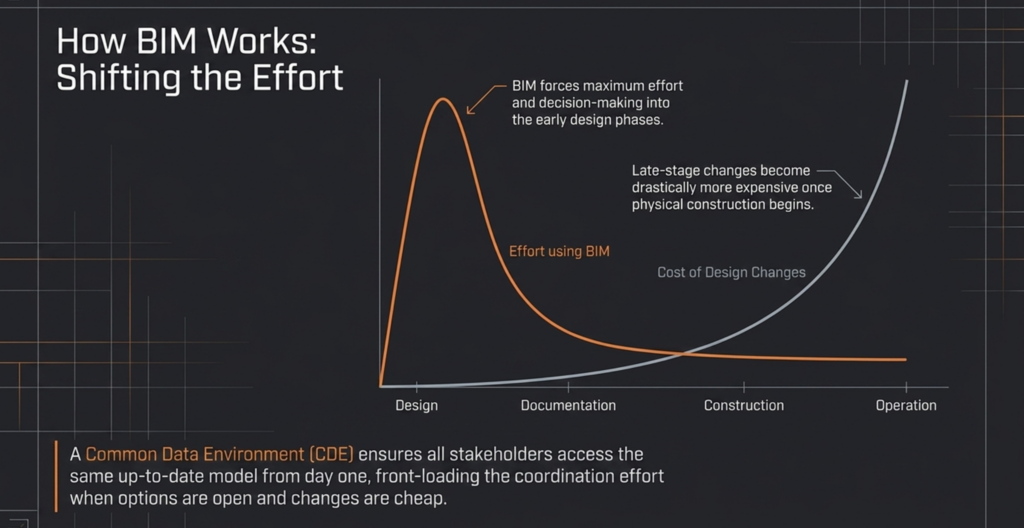
For Australian construction projects, BIM works by keeping design, coordination, cost, and delivery decisions tied to the same evolving record.
This is the reason pre-construction BIM becomes commercially useful once programme, estimating, and approvals start depending on model accuracy rather than drawings alone.
That shift builds through a sequence of uses across the project lifecycle, where each stage either strengthens or weakens the reliability of the next:
- Lifecycle decision integration: BIM shifts from design support to delivery control once engineering, project management, and commercial decisions all reference the same model-backed information.
- Pre-construction validation: The model is used to test design intent and buildability early, so coordination issues appear before tender instead of during procurement.
- Structured authoring during documentation: Discipline teams update models against naming, status, and exchange rules, so revisions remain traceable rather than buried inside disconnected files.
- Federated coordination and clash review: Models are combined for clash detection, but value only holds when issues are assigned, resolved, and cleared before release rather than just identified.
- Programme-linked sequencing (4D): Once sequencing connects to the model, programme decisions depend on model accuracy, so outdated geometry starts affecting construction timing directly.
- Cost-linked quantity control (5D): When quantities are extracted from the model, estimating confidence depends on scope stability, so unresolved options or misclassified elements distort commercial decisions.
- Construction-stage reference control: Site teams rely on the model for package understanding and coordination, so any version drift between model and issued documentation creates delivery risk.
- Handover and asset data continuity: The model only supports operations if information has been governed consistently, otherwise handover becomes a rework exercise instead of a usable asset record.
- Cross-platform information exchange (openBIM): When multiple tools are used, structured data exchange becomes critical, because coordination fails first when information cannot move cleanly between systems.
To learn more, check out our in-depth article on how BIM is used in the construction industry.
Key Roles of BIM in Construction
BIM plays a practical role in digital construction when the model starts affecting how teams coordinate, check, price, review, and release work. These roles matter because each one changes a different part of delivery, and each one only holds value when the information stays governed enough for people to trust it.
Improved Collaboration Across Stakeholders
BIM improves collaboration across stakeholders when teams can work from the same current record instead of reconstructing decisions across separate files, meetings, and message trails.
That matters because collaboration usually breaks first at the approval edge, not at the meeting stage. The architect may publish from the authoring model, a consultant may reply in PDF, the project manager may track actions in a spreadsheet, and comments may continue in Teams or email.
Once that happens, the issue is whether the decision path can still be traced back to a reliable record.
In an Australian SME environment, that distinction matters because delivery rarely sits inside one system for long. BIM helps when it reduces that fragmentation, not when it simply adds another platform on top of it.
Clash Detection and Reduces Rework
BIM supports clash detection and reduced rework when coordination issues are found, assigned, resolved, and cleared before they flow into package release or site work.
Finding clashes is only the first step. Rework reduces only when the team knows who owns the issue, what change has been agreed, and whether the revised model is safe to issue. If those decisions stay unclear, clash detection can create a busy coordination process without actually reducing downstream variation.
If structure, architecture, and services are moving on different publish cycles, this pressure increases quickly. The clash is visible, but the real delivery risk sits in timing, ownership, and release discipline.
Better Cost Estimation and Control
BIM supports better cost estimation and control when quantities are taken from information that reflects approved scope rather than unresolved design movement.
The commercial value does not come from faster quantity extraction on its own. It comes from being able to link quantities to a model state the team is prepared to stand behind. Once unresolved options, poor classification, or outdated objects remain in the live model, estimating speed can improve before estimating confidence does.
That is where cost pressure starts building quietly. Procurement decisions move, pricing assumptions harden, and the package begins to carry more certainty than the model actually supports. When the package, estimate, and model stop aligning, the commercial burden lands later and usually lands harder.
Enhanced Project Visualisation
BIM enhances project visualisation when stakeholders can understand layout, interfaces, staging, and design implications earlier without reopening every authoring assumption manually. That matters because visualisation is useful only when it shortens ambiguity.
A clearer model view helps directors, engineers, project managers, and commercial leads review intent earlier, especially when not everyone is working inside the authoring environment every day.
The benefit is faster understanding of what is being reviewed, what is changing, and where coordination pressure is building. In practice, that makes visual review valuable well before the site starts. It helps teams question decisions earlier, while changes are still easier to absorb.
Faster Project Delivery
BIM supports faster project delivery when review cycles shorten, duplicated checking reduces, and fewer downstream decisions rely on memory or side-channel updates. The speed gain does comes from the model becoming trusted enough that teams stop rebuilding confidence outside the system
So, if weekly coordination still ends with separate markups, manual rechecks, and approval trails spread across email and PDFs, the workflow is still carrying delay even if the firm has BIM tools in place.
Therefore, faster delivery is a control outcome. It appears when information can move through design, coordination, and release without the team repeatedly stopping to confirm what is current and who has approved it.
Common Use Cases Across Project Stages
Below are several use cases of BIM across your project stages:
- Information control and handover: You carry structured data through to completion, so handover reflects what was built instead of requiring reconstruction of missing or inconsistent information.
- Design and conceptualisation: You shape and test your design intent in a model that updates dynamically, so early decisions reflect real spatial and system relationships instead of disconnected drawings.
- Simulation and analysis: You assess performance, safety, and environmental impact early, so adjustments happen while change is still manageable rather than after coordination is locked. This is where BIM for sustainable construction becomes practical.
- Pre-construction coordination and clash detection: You bring disciplines into a single federated view, so conflicts are identified and resolved before they reach procurement or site execution.
- Detailing and fabrication: You turn approved design into buildable components, so fabrication and procurement align with coordinated information rather than assumptions.
- Construction management and execution: You link the model to programme and cost, so schedule changes and site decisions stay tied to the same current record instead of separate tracking systems.
Real Life Implementation of BIM in Construction
BIM applications in the construction industry offer profound advantages. Its applications in construction are vast, helping you visualize better, work smarter, and keep things safe, all while optimizing resources.
Let’s break down several BIM construction objects around the globe.
The Slussen Project: Comprehensive Project Visualization and Design Validation
The Slussen project in Stockholm shows how 3D modeling BIM objects can eliminate the need for traditional 2D drawings. It saved time, improved collaboration across multiple contractors, and used BIM kiosks for on-site access.
Randselva Bridge: Collaboration Across Disciplines
In Norway, the Randselva Bridge was built using a “drawingless” BIM integration approach. By employing IFC models and focusing on end-user needs early in the project, stakeholders could streamline workflows, ensuring consistency and clarity across all construction phases.
Royal Adelaide Hospital Redevelopment: Enhanced Sustainability
3D modeling, coupled with BIM in construction industry practices, enabled detailed prefabrication, reduced on-site time, and provided a central platform for collaboration. A complex project involves numerous stakeholders – architects, engineers, builders, and facility managers. BIM provided a central platform for all parties to collaborate and ensure a clash-free design.
Optimisation of Construction Safety
A case study by Rodrigues F, Baptista JS, and Pinto D. focusing on preventing falls from heights illustrates the role of BIM in safety design. The BIM software and BIM object libraries can simulate construction phases over time (4D), highlighting potential hazards and guiding better safety measures.
Cost Savings and Process Efficiency
Another case study with Plannerly illustrates BIM’s financial advantages, where effective team coordination and real-time data access led to substantial cost savings and project efficiencies. The case highlighted how collaborative online work, especially during the COVID-19 pandemic, saved over four million euros, showcasing BIM’s capacity to optimize resource allocation and reduce wastage.
BIM Software Used Across Construction
In construction, the usage of BIM software matters once different tools start holding different parts of design, coordination, validation, and delivery control.
The table below shows where each BIM software fits and where workflow dependence starts building:
| Software | Use Case | Best Fit |
|---|---|---|
| Revit | BIM authoring and documentation | Architecture, structure, MEP |
| Navisworks Manage | Federated review and clash detection | Coordination and constructability review |
| AEC Collection | Multi-tool BIM and CAD environment | Firms needing Revit, Navisworks, AutoCAD, and adjacent tools |
| Tekla Structures | Structural BIM and constructible detail | Steel, precast, fabrication-linked workflows |
| Archicad | Architectural BIM authoring | Design-led architecture workflows |
| Solibri | Structured BIM validation | QA and governed model review |
How to Implement BIM Without Buying Disorder
You must approach BIM as an information management process to avoid software buying disorder.
Below is a sequence we propose to keep your BIM implementation grounded and prevent the stack from drifting ahead of delivery control:
- Define information requirements before tools: Clarify what decisions you need to support and what information is required to support them. Try to use structured requirements such as OIR, AIR, PIR, and EIR so teams are not producing data without purpose.
- Set the minimum level of information needed: Define the least amount of information required for each decision, so the model carries only what is necessary and does not force you into buying tools to manage excess data.
- Standardise current workflows before scaling: Map how your team currently produces, reviews, and approves information, so new BIM processes extend what already works instead of introducing parallel systems.
- Use open standards to avoid tool lock-in: Try to rely on formats like IFC and BCF so information can move across different platforms, which allows each discipline to use appropriate tools without breaking coordination.
- Establish a Common Data Environment (CDE): Control how information moves through Work in Progress, Shared, Published, and Archive states, so approvals, revisions, and releases stay traceable across the project.
- Check team capability before expanding the stack: Confirm that your delivery teams can work within structured BIM processes, so software adoption does not outpace coordination discipline.
- Use existing frameworks instead of building from scratch: Try applying guidance such as the NATSPEC National BIM Guide and related templates, so your implementation starts from a tested structure rather than an ad-hoc setup.
Future of BIM in Construction
BIM is heading toward tighter information control, more automated checking, and wider use of structured data across design, coordination, delivery, and operations.
The next shift is not more modelling on its own. The shift is that more decisions will depend on whether your information is usable, traceable, and machine-readable enough to move across systems without losing control.
AI will matter where the information structure is already strong. In 2026, we already see it in Autodesk products, like Revit 2027 or AutoCAD 2027.
Governance will become more important than model volume. As validation tools mature, teams will rely more on rule-based checking, controlled information requirements, and automated compliance workflows instead of manual review alone.
Cloud collaboration will keep expanding, but the real value is that models, issues, and approvals can stay closer to one current record across distributed teams.
Open standards will keep gaining weight because mixed software environments are normal. IFC, BCF, and related workflows matter when you need information to move across design, engineering, fabrication, and review environments without forcing every party into the same tool stack.
BIM will also keep moving closer to geospatial context and immersive review, especially where infrastructure, site conditions, and stakeholder understanding depend on seeing the model in a more realistic setting. That changes how teams assess context, not just how they present design.
So, the bigger conceptual shift is that the industry is treating BIM as structured information management across the project and asset lifecycle. Simply because we will tie BIM back to the real question: whether the model can still support reliable decisions once delivery pressure increases?
How Interscale can help
Interscale BIM management services can help when you need BIM to operate as a controlled working environment rather than a loose mix of software, files, and review habits.
That usually means setting up the pieces that let the model support real project decisions day to day. This can include BIM environment planning, role and workflow alignment, model governance, and coordination support across authoring, review, and validation tools.
If your team is still deciding what software access is actually needed, Interscale can also support that stage by helping you align licences, delivery roles, and implementation timing more deliberately.
We offer making your BIM easier to run with consistency. That matters when your teams need the model, the review path, and the project record to stay usable across design, coordination, and delivery without adding more stack complexity than the workflow can hold.
Transform Your Construction Projects with Expert BIM Services
Strategic BIM management and consulting, software licensing, revit modeling, BIM audit, software integration, reporting, and template creation: We help with all your BIM needs.


