Autodesk Construction Cloud is Autodesk’s cloud-based platform designed to connect construction teams, project data, and workflows in a single environment. As projects become more complex and teams increasingly work across multiple locations, many AEC firms are adopting this tool to improve collaboration, coordination, and project visibility.
Instead of relying on disconnected tools for the coordination process, Autodesk Construction Cloud brings these capabilities together within one ecosystem. Tools such as Autodesk Docs, Autodesk BIM Collaborate, and Autodesk Build allow teams to share project data, review models, and manage construction activities in real time.
In this article, we’ll explore what software and tools are included in Autodesk Construction Cloud, explain the purpose of each tool, and show how they support different stages of the construction project lifecycle.
Is Autodesk Construction Cloud the Same as BIM 360?
ACC is the successor to BIM 360. Autodesk has taken the best features from BIM 360, like document management, coordination, and field collaboration. Then, Autodesk expanded them into a more comprehensive and integrated platform.
As of 2025, BIM 360 is being phased out, and new customers are encouraged to adopt ACC instead. ACC includes all the familiar BIM 360 functionality. But it also brings new features and a more integrated user experience.
If you’re planning to move from BIM 360 to ACC, we have a helpful guide to Autodesk Construction Cloud migration to make the transition smoother.
Key Benefits of Autodesk Construction Cloud
As a cloud based construction management software, Autodesk Construction Cloud gives your team one connected environment for every stage of a project. Models, documents, and field reports are unified. This means you can eliminate the hassle of switching between disconnected tools.
The modular structure of ACC ensures you only invest in the features that match your current needs. Your teams can securely scale usage as projects expand without paying for unused capabilities. Access from a browser or mobile means your staff can stay aligned, whether on-site or in the office.
Autodesk Construction Cloud also improves collaboration across architects, engineers, and contractors. Everyone works from a single source of truth, so version confusion and rework are significantly reduced. This integrated environment helps streamline processes from early design through to project handover.
Autodesk Construction Cloud Product List
The primary offerings in the Autodesk Construction Cloud are Autodesk Build, Autodesk Takeoff, Autodesk BIM Collaborate, and Autodesk Docs. Let’s break down what these Autodesk cloud-based construction management tools bring to your Australian AEC projects.
| Tool | Primary Purpose | Key Features | Typical Users | Project Phase |
|---|---|---|---|---|
| Autodesk Build | Field and project management | RFIs, submittals, daily logs, safety checklists, issue tracking | Project managers, site supervisors, contractors | Construction |
| Autodesk Takeoff | Quantity takeoffs and estimating support | 2D & 3D quantity extraction, digital measurement, centralised takeoff data | Estimators, preconstruction teams | Preconstruction |
| Autodesk BIM Collaborate | BIM coordination and design collaboration | Clash detection, issue tracking, model coordination, design review | BIM managers, architects, engineers | Design & Coordination |
| Autodesk Docs | Document management and common data environment | Version control, document sharing, file permissions, audit trails | All project stakeholders | Entire project lifecycle |
| Autodesk Estimate | Cost estimating and bid preparation | Cost databases, standardised estimating workflows, estimate tracking | Estimators, commercial managers | Preconstruction |
| Autodesk Model Management | BIM model organization and review | Model version control, model aggregation, design change tracking | BIM managers, coordination teams | Design & Coordination |
Autodesk Build
Autodesk Build is ACC’s go-to tool for field and project management. It streamlines daily logs, safety checklists, and RFIs—connecting your jobsite to the office in real time. It also helps align field updates with scheduling and budget constraints.
AEC teams use Build to stay aligned on project timelines, quality checks, and safety compliance. It replaces fragmented tools with a single and intuitive dashboard.
Autodesk Takeoff
Autodesk Takeoff simplifies estimating with 2D and 3D quantification tools. Autodesk Takeoff is built for estimators and preconstruction teams. It allows users to perform digital quantity take-offs directly from drawings and BIM models.
This tool helps eliminate manual counts from paper plans by centralising all takeoff data. This means your estimating teams can generate accurate quantities faster and improve bid speed.
Autodesk BIM Collaborate
Autodesk BIM Collaborate (and BIM Collaborate Pro for advanced needs) centres on design collaboration. It also focuses on model coordination within the cloud environment.
Teams can spot clashes, share feedback, and track changes without version confusion. BIM Collaborate Pro adds even more capabilities for those needing advanced co-authoring in Revit.
Autodesk Docs
Autodesk Docs is the common data environment (CDE) for Autodesk Construction Cloud. It’s where all project documents, from drawings and models to photos and reports, live in the cloud.
Docs maintains version control, so everyone knows they’re working off the latest file. It also makes sharing easy, whether internally or with external collaborators.
Autodesk Estimate
Autodesk Estimate is a cost estimating solution designed to help contractors and estimators manage project costs more accurately during preconstruction. It allows teams to create detailed estimates, build cost databases, and standardise estimating workflows across projects.
By organising cost information in a centralised system, estimators can produce consistent estimates and reduce errors caused by fragmented spreadsheets or disconnected tools.
Autodesk Model Management
Autodesk Model Management is a capability within Autodesk Construction Cloud that enables teams to manage and coordinate BIM models in a shared cloud environment. It allows project teams to organize models from different disciplines, track model versions, and review design changes throughout the project lifecycle.
By centralising model data, teams can maintain better control over model updates and ensure that everyone is working with the latest information.
For reference, kindly check the review of Autodesk software list to see how ACC integrates with many Autodesk tools.
How Autodesk Construction Cloud Products Work Together
Autodesk Construction Cloud connects multiple tools that support different stages of a construction project, allowing teams to move from design to construction using a single platform.
The workflow typically starts with Autodesk Docs, which acts as the common data environment where drawings, BIM models, and project documents are stored and shared. This ensures all project stakeholders work from the latest information.
During design coordination, teams use Autodesk BIM Collaborate and Autodesk Model Management to review BIM models, detect clashes, and manage design updates between disciplines.
In the preconstruction stage, estimating teams use Autodesk Takeoff and Autodesk Estimate to extract quantities from drawings and models and develop project cost estimates.
Once construction begins, contractors manage field operations using Autodesk Build to track RFIs, daily logs, safety checklists, and site issues.
By connecting these tools within a single platform, Autodesk Construction Cloud helps teams reduce information silos and collaborate more effectively across the entire project lifecycle.
Autodesk Construction Cloud Integrations
Another major advantage of Autodesk Construction Cloud is its ability to integrate with widely used design and construction software. These integrations allow teams to connect their existing workflows with the cloud platform instead of replacing their core design tools.
Revit Integration
Autodesk Revit integrates closely with Autodesk Construction Cloud, allowing design teams to publish models directly to the cloud environment. With tools like BIM Collaborate Pro, multiple users can work on the same Revit model while keeping version control and coordination workflows intact.
Navisworks Integration
Autodesk Navisworks can connect with Autodesk Construction Cloud to support model aggregation and advanced clash detection. Coordination teams can upload clash results, track issues, and share coordination updates with project stakeholders.
Civil 3D Integration
Infrastructure and civil engineering teams often use Autodesk Civil 3D alongside Autodesk Construction Cloud to share design models and project data with contractors and consultants.
Third-Party Collaboration Tools
Autodesk Construction Cloud also supports integrations with collaboration and business tools such as Microsoft Teams. These integrations help project teams share updates, communicate issues, and connect project information with everyday workflows.
Common Use Cases of Autodesk Construction Cloud
Autodesk Construction Cloud supports multiple workflows across design, preconstruction, and construction. By connecting project data and collaboration tools in one platform, teams can manage complex projects more efficiently.
Common use cases include:
- BIM coordination and clash detection: Teams use Autodesk BIM Collaborate and Autodesk Model Management to combine models from different disciplines, detect clashes, and manage coordination issues during the design phase.
- Document management and project information control: With Autodesk Docs, project teams can store drawings, models, and reports in a centralised cloud environment while maintaining version control and secure access for stakeholders.
- Digital quantity takeoffs and estimating: Estimating teams use Autodesk Takeoff and Autodesk Estimate to measure quantities directly from drawings and BIM models, improving bid accuracy and reducing manual work.
- Construction project and field management: Contractors rely on Autodesk Build to manage RFIs, track issues, monitor daily site activities, and maintain quality and safety documentation.
Autodesk Construction Cloud Pricing
Autodesk Construction Cloud pricing follows a flexible subscription model. You can choose individual modules or bundle them for cost savings. For example, you can opt for a field management bundle (Build + Docs) or a preconstruction package (Takeoff + Docs). These bundles usually offer better value than buying each tool separately.
Can you use ACC for free? Not exactly. There are limited-time free trials, but ongoing use requires a license. For example, a 30-day demo for Autodesk Build. Plus, project admins can invite external users (like subcontractors or clients) to collaborate without requiring them to hold a paid license themselves.
Because pricing for Autodesk Construction Cloud Australia varies by user count, license duration, and regional taxes, many AEC firms need a better offering. Therefore, Interscale licensing services provide local guidance on pricing, compliance, and configuration to simplify this. As an Autodesk authorised partner in Australia, we align subscription choices to your actual project conditions rather than generic packages.
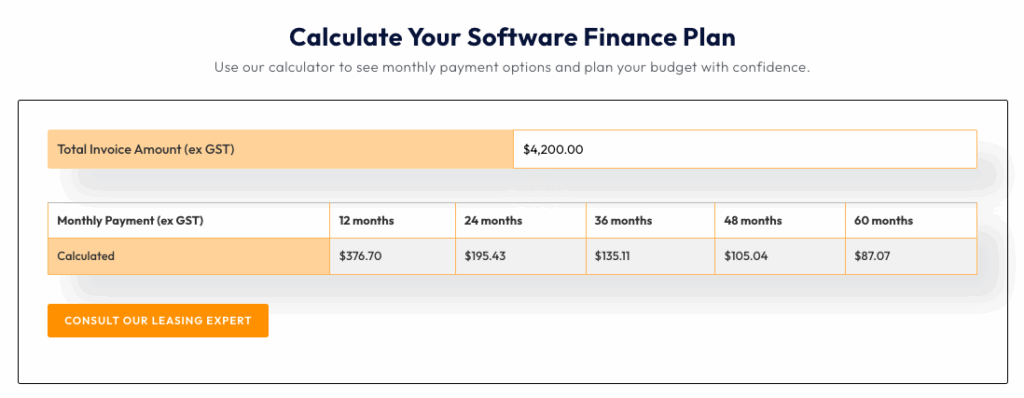
One of the most practical options we provide is Interscale software financing. You can spread payments into predictable monthly instalments instead of committing to a large upfront cost. For instance, if Autodesk Construction Cloud is priced at A$4,200 for a project tender in NSW, you can spread the payment over 12 to 24 months or even longer.
You can also check the estimation before any commitment using the Interscale financing calculator, as shown in the screenshot below.
Your Next Step
Now, it’s time to choose a partner who knows ACC deep down so you can stay focused on your AEC projects without getting bogged down in adoption complexities. And this is why Interscale is your best option.
As an Autodesk partner in Australia, we go beyond licensing. We help you onboard your team, align ACC to your workflow, and make sure it delivers measurable value.
To start the conversation, we offer a free discovery session. We’ll answer your licensing questions, flag any roadblocks, and outline realistic steps to integrate Autodesk Construction Cloud into your setup.
So, let’s talk. Book your free strategy session with an Interscale expert here.
FAQ
What is the Difference Between BIM 360 and Autodesk Construction Cloud?
Is Autodesk Construction Cloud Easy to Learn?
Do You Need a Subscription for Autodesk Construction Cloud?
Related Articles about Autodesk Construction Cloud
- How Autodesk Construction Cloud Supports AEC in Australia
- How to Get Started with Autodesk Construction Cloud
- Autodesk Construction Cloud License and Pricing Guide
- Autodesk Construction Cloud vs Procore: Key Differences for AEC Teams
- BIM 360 vs Autodesk Construction Cloud: Key Differences Explained
- Cloud-Based Construction Software: Why Autodesk Construction Cloud Stands Out
- How to Get Autodesk Construction Cloud Education License