


Key Takeaways
- BricsCAD is the closest like-for-like AutoCAD replacement for Australian AEC teams — native DWG support, familiar LISP commands, and perpetual licence options starting from AUD 555/year, compared to AutoCAD’s subscription-only model at significantly higher cost.
- Fusion 360 (from A$84/month) suits fabrication and product design workflows needing integrated CAD/CAM, but offers only partial DWG compatibility, making it a poor fit for documentation-heavy AEC practices that exchange DWG files daily.
- Free tools like Solid Edge 2D Drafting cover basic documentation and markup needs at no cost, but teams requiring 3D modelling, assemblies, or full project workflows will need to move to paid tiers — so “free” rarely stays free as project complexity grows.
Many are looking for AutoCAD alternatives even though this Autodesk’s CAD software is still considered the leader in the industry.
But what options are out there? And what exactly is the reason people are looking for AutoCAD competitors?
At Interscale, we see that question daily. Some clients need a cheap AutoCAD license to keep many drafters productive and cost-effectively. In comparison, other teams chase free parametric tools or an AutoCAD online alternative that works nicely with remote teams.
Whatever the driver, one truth remains: software choice only shines when the underlying workstations keep up. So, let’s dive into the practical alternatives that might just be the perfect fit for your team.
List of Best CAD Software as an Alternative to AutoCAD
As an AutoCAD software licensing service provider, Interscale usually starts with a practical question: how close does the alternative feel to AutoCAD in daily use? Similarity matters, but it is not enough.
The right fit also depends on what your team draws, how often you exchange DWG files, who needs full CAD capability, and where the software sits in the wider project workflow.
Below, four platforms cover DWG-native drafting, cloud CAM, visual modelling, and scripted design. Scan the snapshots first, then dive deeper into the details that matter to your projects, users, and licensing costs.
BricsCAD: The Practical DWG-Compatible Option
For those hunting for an alternative to AutoCAD, BricsCAD often steals the spotlight. Its native DWG support means you can open and save files without worrying about clunky conversions. In the AutoCAD vs BricsCAD debate, cost is a big win.
At our work in the Australia AEC industry, we saw BricsCAD is suitable when comparing AutoCAD alternatives that feel similar while costing cheaper. BricsCAD offers perpetual licenses or subscriptions, often at a fraction of AutoCAD’s price.
The interface feels familiar, with similar commands and LISP support, easing the switch.
From Lite for 2D drafting to Pro, Mechanical, or BIM versions, it covers a lot of ground. Plus, AI tools like BLOCKIFY speed up repetitive tasks, making BricsCAD a strong contender.
BricsCAD is best for Australia AEC Teams that want familiar DWG-based drafting, lower-cost licensing options, LISP support, and less disruption than moving to a non-DWG-first tool.
DWG compatibility of BricsCAD: Yes. Bricsys positions BricsCAD as a native DWG platform and documents DWG/DXF support.
Pricing of BricsCAD
As of May 2026, for annual single licences, the BricsCAD pricing shown is:
- BricsCAD Lite: AUD 555/year
- BricsCAD Pro: AUD 1,122/year
- BricsCAD Mechanical: AUD 1,628/year
- BricsCAD BIM: AUD 1,694/year
- BricsCAD Ultimate: AUD 1,903/year
Fusion 360: Integrated Design & Manufacturing
Fusion 360, now Fusion, represents Autodesk’s push into integrated, cloud-based design and manufacturing.
Fusion combines CAD, CAM, CAE, and PCB design into a single platform. This makes Fusion 360 ideal for product development, mechanical engineering, and manufacturing workflows.
While not primarily targeted at AEC, Fusion 360 can be useful for designing bespoke components, advanced geometry modeling, or generating CAM data for fabrication.
In the AutoCAD vs Fusion 360 comparison, the key distinction is Fusion’s integrated CAM capabilities versus AutoCAD’s core strength in 2D documentation.
Fusion is best for product design, CAM, mechanical components, prototyping, and fabrication workflows.
DWG compatibility of Fusion: Partial. Fusion can support drawing exchange, although it is not mainly a DWG-first drafting replacement for AutoCAD.
Pricing of Autodesk Fusion
As of May 2026, here is AUtodesk Fusion pricing plans:
- Fusion: A$84/month, paid annually
- Fusion for Manufacturing: A$252/month, paid annually
- Fusion for Design: A$270/month, paid annually
Solid Edge 2D Drafting: Free 2D with a Serious Paid Path
Solid Edge 2D Drafting is useful when your team wants free 2D CAD, but the stronger AutoCAD alternative sits in the wider paid Solid Edge portfolio. Siemens offers Solid Edge 2D Drafting as free 2D CAD software that supports:
- 2D documentation
- Drawing layouts
- Diagramming
- Annotations
- Dimensioning
- Drafting standards such as ISO, ANSI, and BSI.
Solid Edge 2D Drafting also has strong DWG compatibility. It supports importing existing DWG files, with controls for layers, drawing size, line type, fonts, and other drawing settings.
For a small to mid-sized Australian fabrication, engineering, or AEC-adjacent team, it can work for internal drafting, markups, shop details, or controlled 2D documentation where the workflow does not need full AutoCAD capability.
However, the limitation is scope. The Solid Edge 2D Drafting free version is still a 2D drafting tool.
If your team needs 3D CAD, assemblies, simulation, validation, manufacturing outputs, or a broader design environment, the paid Designcenter Solid Edge plans become the more realistic AutoCAD alternative.
Solid Edge 2D Drafting is best for Australia AEC teams that want a free 2D drafting entry point, with a paid upgrade path into professional 3D CAD, simulation, validation, and manufacturing workflows.
Pricing of Solid Edge 2D Drafting
Solid Edge 2D Drafting pricing is free. However, you can see the paid Designcenter Solid Edge plans as of May 2026 in table below.
|
Solid Edge option |
Listed annual price |
Better fit |
|
Designcenter Solid Edge Design and Drafting |
A$1,326.24/year |
2D drafting-first teams that want a paid commercial path beyond the free drafting tool. |
|
Designcenter X Solid Edge Standard |
A$3,152.99/year |
Teams that need professional 3D CAD for everyday design work. |
|
Designcenter X Solid Edge Advanced |
A$3,916.49/year |
Teams that need simulation and more advanced design capability. |
|
Designcenter X Solid Edge Premium |
A$5,613.17/year |
Teams that need broader design, validation, and manufacturing capability. |
SketchUp: Intuitive 3D Design & Visualisation
SketchUp is a strong AutoCAD alternative when the team needs fast 3D modelling, visual communication, and early design exploration rather than DWG-first production drafting.
Trimble offers a free version of SketchUp, which can be useful for learning, simple browser-based modelling, and early concept work. But for Australian AEC teams, the paid plans are usually the more realistic business option.
The SketchUp is best for concept modelling, design visualisation, early massing, interior studies, client presentations, and workflows where 3D communication matters more than detailed DWG production.
In the usage case, the free and paid SketchUp versions can be used. Let’s say a 25-person architecture or interiors team might use SketchUp Free for early exploration.
Then, SketchUp Pro is usually the better business fit once the work needs LayOut documentation, DWG exchange, extensions, shared standards, and repeatable presentation output.
While not a full AutoCAD or Solidworks replacement, SketchUp’s ease and visualisation strengths make it a top AutoCAD alternative.
DWG compatibility of SketchUp: Partial. SketchUp’s DWG import and export capability depends on the plan, with paid plans being more suitable for professional file exchange.
Pricing of SketchUp
As of May 2026, SketchUp has several pricing plans:
- SketchUp Free: Free
- SketchUp Go Annual: A$16.67/month per user, billed annually
- SketchUp Pro Annual: A$51.58/month per user, billed annually
- SketchUp Studio Annual: A$105.92/month per user, billed annually
Free AutoCAD Alternatives
The free CAD drawing software as an AutoCAD alternatives deserve their own section because they solve a different problem from cheaper paid CAD tools: they remove licence cost, not necessarily workflow risk. Let’s see.
FreeCAD
FreeCAD is the strongest free and open source option when the work is parametric modelling rather than AutoCAD-style drafting.
FreeCAD is a parametric, open-source CAD software that lets dimensions drive geometry. Its modular workbenches, like Arch and BIM, let you customise your setup, and Python scripting adds serious flexibility.
But it’s not flawless. The learning curve can be steep, and without native DWG support, file conversions might trip you up. So, is FreeCAD as good as AutoCAD? It depends. For startups or budget-conscious firms willing to invest time, FreeCAD’s power and zero cost make it a gem. Though it’s less plug-and-play for DWG-heavy workflows.
DWG compatibility of FreeCAD: Partial. DWG workflows usually need import, export, or conversion checks.
LibreCAD
If your team needs something like AutoCAD LT without the price tag, LibreCAD is the best answer. This type of CAD software is open source, a no-frills, free-to-use, and focused squarely on 2D drafting.
LibreCAD is lightweight, runs on Windows, macOS, or Linux, and feels somewhat familiar to CAD veterans. While it handles DXF natively, DWG files need conversion, which can be a hassle.
LibreCAD suits students, hobbyists, or pros needing simple 2D drawings without the bells and whistles of 3D or BIM tools.
For a 20-person contractor or consultant, the hidden cost often sits in plotting, file conversion, and rework.
DWG compatibility of LibreCAD: Partial. LibreCAD is stronger around DXF than native DWG.
TinkerCAD
Tinkercad, another Autodesk tool, is a free, web-based 3D modeller that’s dead simple to use. It’s great for students, educators, or beginners dipping their toes into 3D design.
In AEC industries, Tinkercad’s usage is limited. TinkerCAD might occasionally serve for quick conceptual massing studies or basic presentations. So, treat it as a sandbox rather than a core drafting tool.
For example, a Sydney design coordinator might use TinkerCAD to explain a rough form during an early discussion. It should not carry controlled documentation, consultant markups, or issued project drawings.
DWG compatibility of TinkerCAD: No practical native DWG production workflow.
OpenSCAD
OpenSCAD flips the CAD script, literally. This free, open-source CAD tool lets you build 3D models through code. The result is unmatched precision and parametric control. But it’s not for everyone.
OpenSCAD is an ideal alternative to AutoCAD if you’re an engineer or designer who thinks in code.
In AEC, you might script custom parametric parts (like facade elements or complex connectors), generate repetitive structures, or model forms based on exact formulas.
OpenSCAD suits engineers who want exact control while maintaining a free toolchain. OpenSCAD complements shops needing an AutoCAD alternative that is free or cheap for parametric fabrication.
DWG compatibility of OpenSCAD: It is not designed as a native DWG drafting platform.
Is AutoCAD Still the Best Choice for AEC?
The best AutoCAD alternative now hinges on context. AutoCAD’s been the gold standard in AEC for ages, with its polished 2D drafting and tight integration with tools like Revit.
But why are firms exploring AutoCAD alternatives? The big reasons are usually the ongoing cost of mandatory subscriptions and the lack of flexible options.
This makes AutoCAD licence price in Australia look overkill and overpriced when compared to some of the cheap CAD solutions on the market today.
Or try to consider the best suitable software, depending on your priorities:
- Budget: Free tools like FreeCAD or LibreCAD cut costs but demand time investments.
- Compatibility: BricsCAD or Solid Edge ease DWG workflows.
- Specialisation: SketchUp for visuals; Fusion 360 for fabrication.
At Interscale software licensing, we help AEC firms weigh these choices, ensuring their hardware, often leased for cost-efficiency, matches their software. Whether it’s AutoCAD or a compelling alternative, to keep workflows smooth and budgets happy.
Quick Check Before You Replace AutoCAD
Before replacing AutoCAD, check whether the problem sits in the software, the licence mix, or the way the team is using it. Here is a table for quick check as a parameter before you move to AUtoCAD alternative.
|
Question |
What it tells you |
|
Do we exchange DWG files with consultants, contractors, or clients every week? |
Native DWG workflows need stricter testing before any switch, especially when xrefs, title blocks, layers, lineweights, and plotted outputs must stay consistent. |
|
Do all users need full AutoCAD, or only a smaller group? |
Some users may only need AutoCAD LT, Flex, BricsCAD, or another narrower tool, while senior users keep full AutoCAD for automation, 3D, legacy files, or specialist workflows. |
|
Is the issue licence cost, cash flow, or poor seat planning? |
Financing can reduce payment pressure without changing the drafting environment, while licence clean-up may stop the team paying for seats that do not match real usage. |
|
Are templates, xrefs, blocks, fonts, and plotting standards already controlled? |
Migration risk rises when every project team has its own setup, because file conversion problems often appear at issue stage rather than during casual drafting. |
|
Who signs off issued drawings before they leave the business? |
The approval owner should test outputs before production users move, because drawing errors become commercial risk once files go to consultants, builders, or clients. |
|
Does the CAD workflow connect to Revit, BIM coordination, or a CDE? |
A drafting tool may look cheaper in isolation, but the real test is whether it preserves handover points between CAD, BIM, document control, and project delivery. |
If AutoCAD Is Too Expensive, Not Necessarily You Have to Switch
If AutoCAD feels too expensive, the first move is to check whether the real problem is the tool, the licence mix, or the payment structure.
AutoCAD feels expensive because the renewal lands as a large cost while the drafting workflow still depends on native DWG files, established templates, xrefs, plotting standards, consultant requirements, and trained production drafters.
That is why switching tools should not be the automatic answer. If the team already relies on AutoCAD for issued drawings, legacy files, AutoLISP routines, or consultant exchange, the migration cost can sit outside the licence invoice.
The migration cost may show up later as training time, file checking, broken templates, plotting errors, or slower drawing issues. That’s why, the better conversation is more specific:
- Who needs full AutoCAD every day?
- Who only needs 2D drafting?
- Who opens AutoCAD occasionally for review, edits, or legacy files?
So you can buy an AutoCAD license through Interscale software financing. This approach converts a large capital expense into a manageable monthly operating expense (OPEX).
Instead of moving the team away from AutoCAD, financing can spread the cost over a 12 to 24 month payment structure, depending on the agreement.
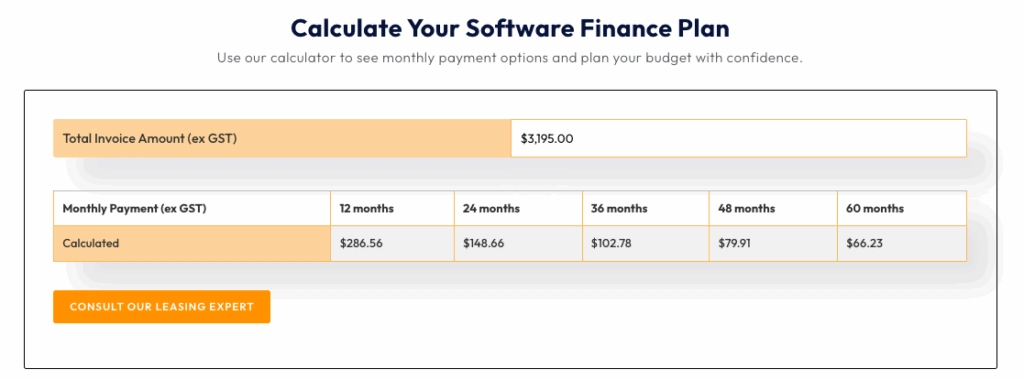
For a 40-person engineering consultancy, that can be a cleaner path than forcing a tool change during active project delivery:
- Senior users may stay on full AutoCAD
- Production drafters may move to AutoCAD LT
- Your business can manage payment timing without disrupting DWG standards.
You can also combine Interscale software financing with AutoCAD LT when the team is focused mainly on 2D production drafting.
AutoCAD LT keeps native DWG workflows for detailed documentation, while removing the cost of full AutoCAD features such as 3D modelling, AutoLISP, and advanced customisation when those features are not required.
The point is to avoid replacing a working CAD environment when the actual issue is payment structure, seat planning, or the wrong mix of full AutoCAD and AutoCAD LT.
Your Next Step
As this exploration shows, the AEC sector benefits from a rich ecosystem of powerful AutoCAD alternatives. The problem now, how you choose the suitable one. Finding the right alternative to AutoCAD is about empowering your team to work smarter, matching the software to your projects, skills, and finances. This is why you need a partner. And we are ready to help you.
As a first offering, try our consultation session with our AEC software specialist here. No sales. We can help you map out the problem, solution, and the strategies.




