
Clear workflows and seamless collaboration drive your construction team’s success. That’s why Bluebeam Revu is essential in the AEC industry, offering powerful PDF markups, measurements, and real-time teamwork.
But understanding Bluebeam licensing, from activation to transferring a Bluebeam license, can be confusing. This guide simplifies it all, helping you manage your Bluebeam Revu license efficiently and keep your projects running smoothly.
What are the Different Types of Plans in Bluebeam?
Bluebeam Revu has three subscription plans: Basics, Core, and Complete. They changed from the older “Standard, CAD, and eXtreme” plans to subscription-based ones. Now, let’s look at the three subscription tiers they offer.
Bluebeam Basics
With Bluebeam Basics, you can create and edit PDFs, measure lengths and areas, and manage simple markups. You also get the power to jump into existing Studio Sessions and collaborate in real time. It’s streamlined, straightforward, and reliable.
Bluebeam Core
Bluebeam Core adds advanced 2D and 3D markup tools, perimeter calculations, and overlay pages. It also enables batch compared to spot design changes fast. Plus, you can run your own Studio Sessions and manage multiple files all at once.
Bluebeam Complete
Craving full-throttle features? Bluebeam Complete is your ultimate toolkit. It takes everything in Core and extends it with volume and angle measurements, Dynamic Fill for easy area takeoffs, and Batch Link automation. You can also slip-sheet plans and apply advanced scripting when you want powerful shortcuts and custom workflows.
BlueBeam pricing table
| Bluebeam Plan | Annual Price | Key Features |
|---|---|---|
| Basics | $260 | – Create and edit PDFs – Essential measurement tools (length, area) – Basic markups and annotations – View and join existing Studio Sessions |
| Core | $330 | – Everything in Basics – Additional 2D and 3D markup tools – Perimeter and advanced measurements – Overlay pages, batch compare – Initiate and manage Studio Sessions |
| Complete | $440 | – Everything in Core – Advanced measurement tools (volume, angle) – Dynamic Fill, Quantity Link – Batch automation (Batch Slip Sheet, Batch Link) – Scripting |
Please note that the Bluebeam Revu price in Australia and other regions may vary slightly from these USD prices. You can contact reseller such as Interscale for more region-specific pricing details.
Bluebeam Academic Program for Students

A free Bluebeam license student program reduces immediate cost barriers. But this plan is currently available for Revu 20. To get a student license, you need to make a request via the Bluebeam Academic Program page.
Please note, this free license can only be obtained if the following conditions are met:
- Students enrolled in credit-bearing courses in high school, college, university or graduate programs for use during the academic year
- Students participating in regional or national competitions
- Instructors teaching credit-bearing classes in high schools, colleges and universities for use during the academic year
- Departments and computer labs serving students
- Instructors and computer labs at skilled trade training centres or Registered Apprenticeship programs using Bluebeam in their courses.
As you weigh your Bluebeam options and tailor your licensing to your project’s needs, it’s also worthwhile to see how other software fits into the AEC landscape. Kindly check “BIM Software List Guide” to discover the BIM solutions that complement your firm’s scale and ambitions.
Is the Bluebeam Perpetual License Still Available?
Bluebeam no longer sells perpetual licenses, but you can still use the old version of Bluebeam Revu.
As you probably know, a lot of current Bluebeam users still remember the old “perpetual license” model. So, just to be clear, this is the current situation:
- New perpetual licenses are no longer sold.
- Bluebeam has fully transitioned to subscription plans (Basics, Core, Complete).
- Existing perpetual licenses (e.g., Revu 20, Revu 2019) can still be used, but new features and major product upgrades are only available in subscription-based Revu 21 and beyond.
If you are unsure whether a subscription plan or an older perpetual license is best for you, reach out to Interscale’s licensing experts for custom recommendations.
How to Buy a Bluebeam License

You have two options when purchasing a Bluebeam license:
Buy Direct from Bluebeam
- Visit the Bluebeam store and choose a plan: Basics, Core, or Complete.
- Finalize the purchase using a new or existing Bluebeam ID (BBID).
- This is a quick option for self-starters but offers limited support if questions arise.
Buy from an Authorized Reseller (Like Interscale)
- Contact Interscale via the contact page and tell us what you need.
- Get expert guidance to select the right Bluebeam Revu subscription for your needs.
- Ensure the best Bluebeam Revu cost for your projects.
- You will receive ongoing support, including subscription renewals, license management, and training programs if necessary.
Tips to Buy a Bluebeam License at an Affordable Price
Many Australian builders hesitate to buy Bluebeam due to the upfront cost, but there’s a smarter way to get started. At Interscale, you can buy Bluebeam using our software financing system. So you can spread the A$737 Complete plan into manageable instalments, like A$66.10 per month over 12 months.
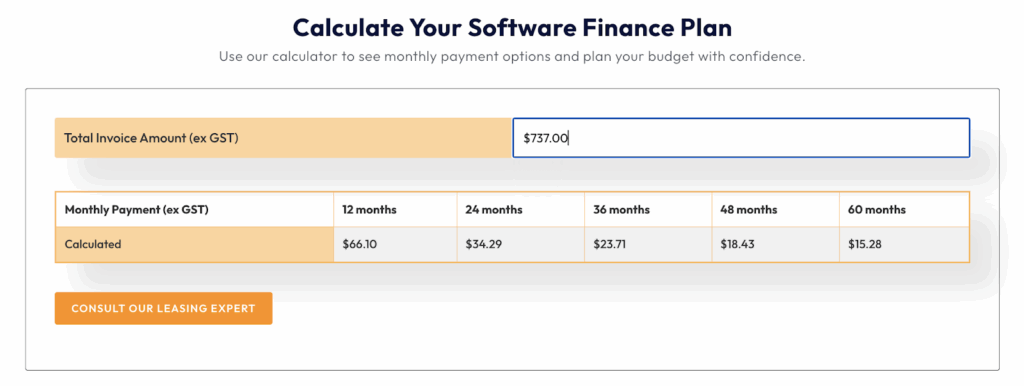
With Interscale software financing, you get premium tools from day one while keeping cash flow steady. There’s no need to downgrade your plan or delay adoption due to cost pressure. And when you buy Bluebeam through Interscale, our local Bluebeam support ensures you’re backed.
How to Check My Bluebeam License?
Need to confirm your Bluebeam license cost details, subscription type, or validity? Yes, it is normal to get a quick snapshot of your license details. So, here’s how.
Within Revu
- Open Bluebeam Revu.
- Go to Revu > About (or Help > About in some versions).
- You’ll see the Subscription Plan (Basics, Core, or Complete) if you’re on Revu 21.
Via the Bluebeam Subscription Management Portal
- Go to the Bluebeam Admin Portal (for subscription-based licenses).
- Sign in with your Bluebeam ID.
- Check the “Subscription” tab to see plan details.
License Certificate
If you have an older perpetual license, locate the License Certificate emailed from [email protected]. It contains the serial number and product key.
How to Transfer a Bluebeam License to a New Device
Whether you’re upgrading hardware or switching workstations, it’s crucial to know how to transfer a Bluebeam license. Here’s a step-by-step guide to follow.
- Open Revu, go to Revu > Unregister (Revu 20 and below).
- Uninstall Revu from the old computer.
- Download and install the same version of Revu you’re licensed for in the new computer.
- For subscription users, simply log in with your Bluebeam ID.
- For older perpetual licenses, enter your serial number and product key during installation.
- For Revu 21 subscription: Once installed, sign in to access features.
- For older Revu versions: Open Revu and select Register (or Help > Register), then input your license details.
For your reference, “Benefits of BIM for AEC Industry,” delves into how BIM technology can further enhance your project efficiency and collaboration.
What to Consider When Choosing a Bluebeam License
Selecting a Bluebeam plan begins with understanding your project scope. It helps to compare the cost of Bluebeam Revu license across all three subscriptions, including annual renewal fees.
If you only need simple markups and measurements, Basics covers the essentials. For more complex 2D and 3D drawings or advanced markups, Core provides that extra muscle. When batch processing, scripting, or advanced quantity takeoffs become critical, Complete stands out as the best option.
Scalability also matters. If you need multiple seats or have plans to expand, explore the Bluebeam Revu price in Australia for region-specific costs. Academic users sometimes qualify for the free Bluebeam license (Revu 20), which is a huge benefit for students and educators who want real-world skills without extra expenses.
Meanwhile, partnering with reseller ensures you get local support, easy deployment, and smooth license management. Usually, reseller team walks you through every detail, from feature comparisons to annual renewals. You can even get a training program if necessary.
So, what is your choice? Again, it all depends on your needs.