

AEC automation tools are software platforms, plugins, scripts, and connected workflows that reduce manual effort across design, documentation, coordination, QA/QC, estimating, scheduling, site capture, reporting, and handover.
AEC automation tools are not always AEC AI tools. Because automation in the AEC industry may be rule-based, such as checking model data, routing issues, generating sheets, or tracking RFIs.
For Australian AEC firms with 7–100 staff, AEC automation tools should focus on which project handoff is creating rework, and which tool can control that handoff without adding more admin?
All because Australian AEC project teams often work across mixed software, contractor-led CDE requirements, consultant model exchanges, tender deadlines, RFIs, transmittals, and handover records.
This article maps 10 practical AEC automation tools by workflow so teams can shortlist options by use case, integration fit, implementation effort, and procurement risk.
How to Choose AEC Automation Tools
To choose AEC automation tools, you check each option against six practical criteria below:
- Workflow fit: Which repeated task or project handoff will the tool improve?
- Integration fit: Does it work with Revit, ACC, BIM 360, Navisworks, Civil 3D, IFC, or BCF in the way your team exchanges information?
- Governance and security: Can it preserve status, revision, responsibility, approval history, permissions, and decision records?
- Deployment model: Is it a plugin, cloud platform, CDE, script, connector, or project-wide workflow system?
- Training effort: Can the team use it without making the BIM lead permanent support?
- Reporting output: Can it support issue ageing, QA trends, RFI turnaround, defects, or Power BI reporting?
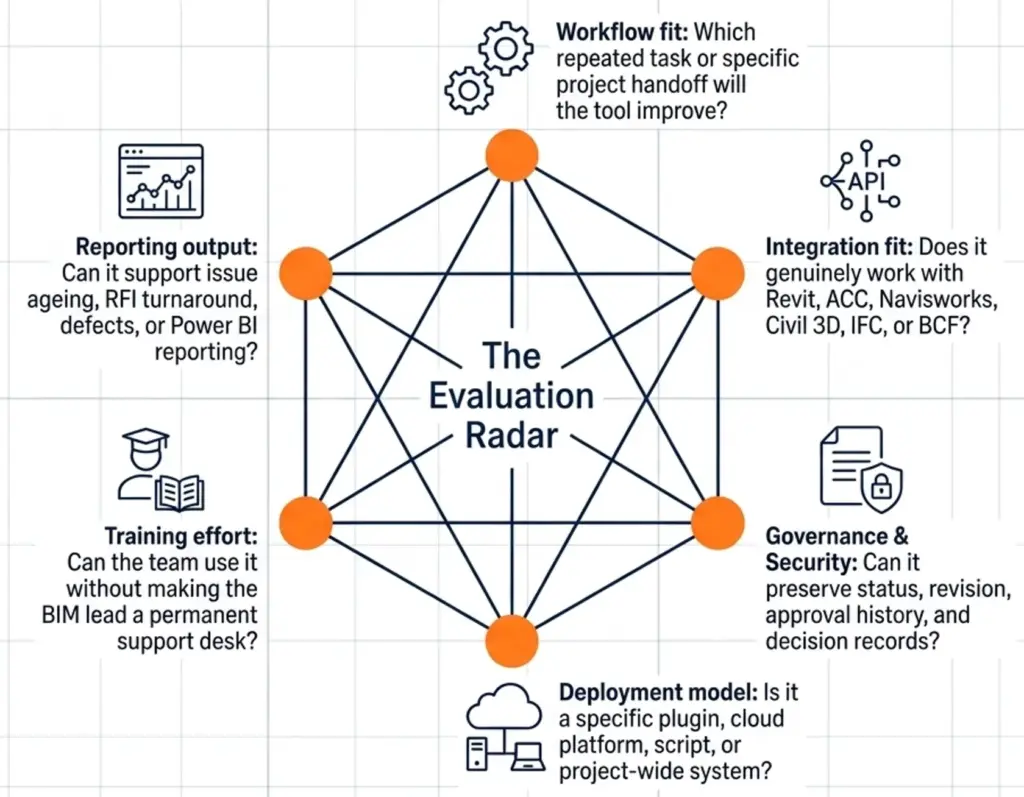
And please note, many tools may look impressive in a demo but still fail the project if they do not improve the point where information usually breaks.
Therefore, the demo should be judged against a live handoff: model exchange, issue closeout, RFI response, document review, or handover record. Because every firm have unique circumstances, like:
- A 20-person architecture studio in Melbourne may need to reduce drawing revision errors before a contractor-led tender.
- A civil consultant working across Civil 3D, IFC, and contractor coordination models may need better interoperability and issue traceability.
- A Sydney builder may care more about RFIs, defects, site photos, submittals, and formal document control.
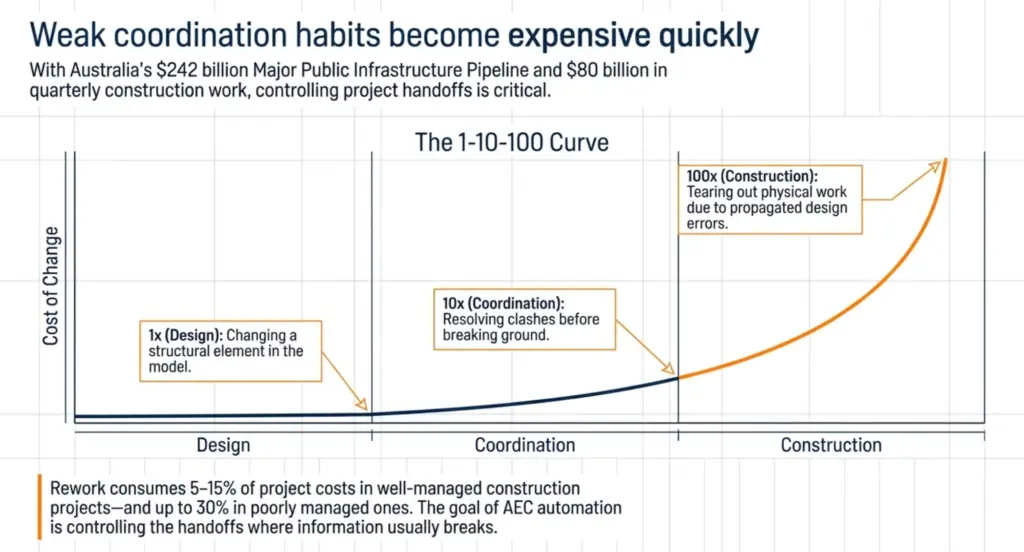
ABS reported total construction work done at about $80.0 billion in the December quarter, while Infrastructure Australia’s 2025 Market Capacity Report put the five-year Major Public Infrastructure Pipeline at $242 billion. In that environment, weak coordination habits become expensive quickly.
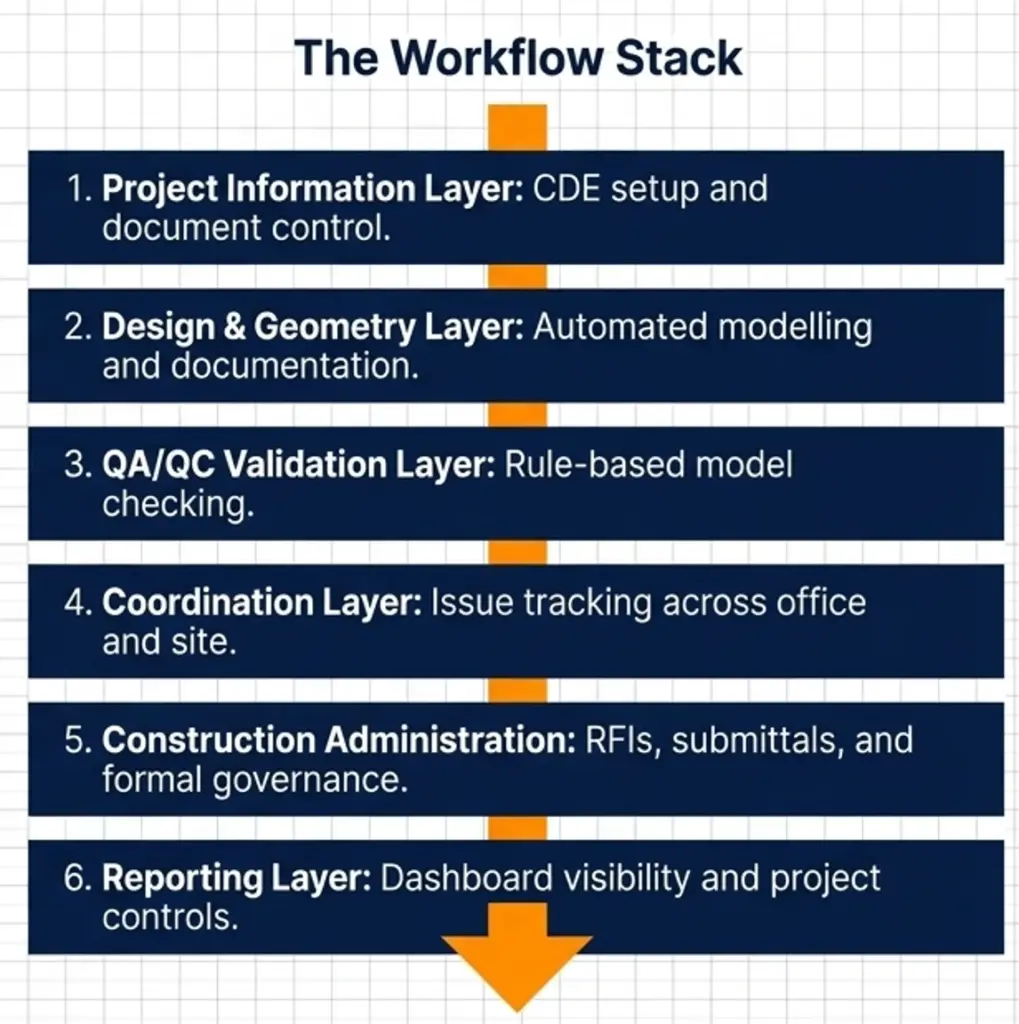
Tools Grouped by Workflow Stage
AEC automation tools below are grouped by the workflow stage where they reduce rework: project information setup, model production, QA/QC, coordination, construction administration, site capture, and reporting.
If those checks expose gaps in templates, connected workflows, or model data handoffs, structured BIM integration and automation support can help connect the tools without turning automation into another disconnected system. Now, let’s break down each tool.
Autodesk Construction Cloud for the Project Information Layer
Autodesk Construction Cloud is strongest when an Australian AEC team needs one controlled environment for documents, models, issues, RFIs, and project records.
- What Autodesk Construction Cloud automates: document control, model coordination, RFIs, submittals, issue tracking, field-office workflows, and reporting.
- Best for: Autodesk-heavy consultants, BIM managers, builders, and project teams working under client or contractor-led CDE requirements.
- Ecosystem fit: Revit, Navisworks, ACC Docs, BIM 360 legacy workflows, and Autodesk project data.
- What to consider: licence scope, consultant access, data export, local support, and whether the head contractor or asset owner already mandates a CDE.
You should also review Autodesk Construction Cloud setup and governance planning before live rollout, especially where templates, permissions, project roles, and review workflows need to be standardised.
Then, once the project information layer is clear, the next source of rework is often inside the authoring model itself.
Dynamo for Revit for Documentation and Model Task Automation
Dynamo for Revit is strongest when a Revit-based team needs to reduce repeated modelling, documentation, and data-cleaning tasks before key project exchanges.
- What Dynamo for Revit automates: parameter updates, view setup, sheet creation, room or area checks, model clean-up, data extraction, and template-driven documentation workflows.
- Best for: architecture, interiors, structural, services, and BIM teams that work heavily in Revit and repeat similar setup or QA tasks across projects.
- Ecosystem fit: Revit templates, shared parameters, schedules, Excel-style data workflows, BIM execution plans, and model QA processes.
- What to consider: script ownership, testing rules, version control, staff capability, and whether the workflow still works when the original Dynamo user is unavailable.
Some automation starts inside documentation models. Other automation starts earlier, where the design logic itself needs to be tested before the model becomes fixed.
Grasshopper for Rhino for Early Design and Geometry Automation
Grasshopper is strongest when design teams need to test geometry, options, façade logic, or rule-based design studies faster than manual modelling allows.
- What Grasshopper automates: parametric geometry, option testing, façade studies, massing logic, computational design routines, and specialist modelling workflows.
- Best for: architects, façade consultants, computational designers, and specialist design teams working through option-heavy early design or complex geometry.
- Ecosystem fit: Rhino modelling workflows, computational design processes, downstream BIM exchange, IFC exports, Revit handoff planning, and fabrication-oriented modelling.
- What to consider: whether the output can be documented, coordinated, exchanged, or fabricated without creating extra clean-up work later.
After models are created or exchanged, the next question is whether the information inside them is complete enough to rely on.
Solibri for BIM QA/QC and Model Checking
Solibri is strongest when project teams need to check BIM information against defined rules before exchange, coordination, tender, or handover.
- What Solibri automates: model checking, data validation, clash-related review, rule-based QA, information take-off, and BIM quality assurance workflows.
- Best for: BIM managers, consultants, contractors, and project teams that need structured model validation rather than visual review alone.
- Ecosystem fit: IFC-heavy workflows, openBIM coordination, model exchange requirements, information requirements, BEPs, and quality gates before issue.
- What to consider: who defines the checking rules, who reviews the results, how issues are assigned, and how closeout is confirmed before the next project milestone.
Finding model issues is only half the workflow. The next problem is making sure those issues are assigned, tracked, and closed.
BIMcollab for BCF-Based Coordination Issue Management
BIMcollab is strongest when mixed-software teams need to manage model-based issues without losing context between authoring tools and coordination meetings.
- What BIMcollab automates: BCF-based issue creation, issue tracking, comments, viewpoints, responsibility assignment, filtering, and coordination follow-up.
- Best for: BIM coordinators, architects, engineers, and consultant teams working across Revit, Navisworks, IFC, and openBIM environments.
- Ecosystem fit: BCF workflows, Revit, Navisworks, IFC coordination, openBIM issue exchange, and model-based coordination processes.
- What to consider: issue status definitions, ownership rules, due dates, closeout discipline, and whether resolved, closed, and accepted status mean the same thing across the project team.
When issue tracking needs to move closer to site activity, the workflow usually expands beyond model comments.
Revizto for Model-Based Issue Tracking Across Office and Site
Revizto is strongest when 2D drawings, 3D models, markups, and coordination issues need to stay connected between office teams and site conversations.
- What Revizto automates: model-based issue tracking, 2D and 3D markups, viewpoint management, coordination comments, issue assignment, and review follow-up.
- Best for: BIM coordinators, multidisciplinary consultants, contractors, and project teams that need model context to remain visible beyond coordination meetings.
- Ecosystem fit: Revit, Navisworks, IFC, model federation workflows, drawing review, issue tracking, and office-site coordination processes.
- What to consider: how Revizto will sit beside ACC, BIMcollab, Navisworks, or the builder’s preferred system, and whether RFIs, defects, design comments, and coordination issues will be separated clearly.
Once coordination issues move into construction delivery, the record usually shifts from model comments to RFIs, submittals, drawings, and site evidence.
Procore for RFIs, Submittals, Drawings, and Site Administration
Procore is strongest when construction-phase teams need better control over RFIs, submittals, drawings, site records, and field-to-office communication.
- What Procore automates: RFI workflows, submittal tracking, drawing management, photo records, document access, field updates, and project administration tasks.
- Best for: builders, project managers, subcontractor-heavy projects, and consultants working inside contractor-led administration.
- Ecosystem fit: construction management workflows, drawing registers, site documentation, subcontractor communication, project financials, and field-office coordination.
- What to consider: onboarding effort, subcontractor access, licence scope, consultant participation, data export, and whether decisions will still be duplicated in email or spreadsheets.
Where the project requires stricter contractual records, document control becomes more important than general collaboration.
Oracle Aconex for Document Control and Formal Correspondence
Oracle Aconex is strongest when a project needs strict control over documents, correspondence, review workflows, and audit records.
- What Oracle Aconex automates: document upload, superseding, transmittals, review workflows, formal mail, correspondence records, and audit trail management.
- Best for: infrastructure projects, asset-owner environments, contractor-led delivery, and consultants working under mandated document-control requirements.
- Ecosystem fit: formal document control, project mail, review workflows, transmittal processes, controlled correspondence, and contractual record management.
- What to consider: training needs, document-controller responsibilities, naming conventions, review turnaround, administration effort, and whether the project genuinely needs that level of governance.
Please remember, not every source of rework begins in a document register. Some begin because the team is working from an incomplete site context.
Matterport for Site Capture and Existing Conditions
Matterport is strongest when teams need visual records of existing conditions, progress, or site context before design, coordination, or closeout decisions are made.
- What Matterport automates: site capture, visual walkthroughs, existing-condition records, progress documentation, remote review, and spatial context sharing.
- Best for: refurbishment, fitout, existing-building projects, site documentation teams, and consultants who need clearer visual context without repeated visits.
- Ecosystem fit: reality capture workflows, visual site records, point-cloud reference processes, design review, and existing-condition coordination.
- What to consider: client permission, privacy requirements, retention periods, accuracy limits, point-cloud workflow, and whether scans form part of the contractual record.
Once project actions are captured across models, documents, issues, and site records, the next challenge is turning that activity into useful management visibility.
Power BI and Project Data Connectors for Reporting Automation
Power BI and project data connectors are strongest when project leaders need live visibility across issues, RFIs, QA trends, defects, and coordination workload.
- What Power BI and data connectors automate: dashboard reporting, issue ageing analysis, RFI turnaround tracking, QA trend visibility, defect reporting, and cross-project performance views.
- Best for: project leaders, BIM managers, operations teams, and Australian SMEs that want fewer manually assembled status reports.
- Ecosystem fit: ACC data extraction, Power BI dashboards, project controls, BIM reporting, issue registers, RFI logs, and operational performance tracking.
- What to consider: data quality, field consistency, naming conventions, status definitions, responsibility rules, and whether the dashboard is showing trusted project behaviour or just attractive charts.
However, reporting automation is only useful when the project data is structured first. Knowing which delivery metrics actually matter is one of the practical levers for improving an AEC firm.
That’s why you can consider Interscale BIM management and digital engineering support to help you set the information requirements, naming rules, model governance, and reporting logic before dashboards become trusted.
Quick Comparison Table: AEC Automation Tools by Use Case
You can use this comparison table to maps each AEC automation tool to the workflow it supports, the technical ecosystem it usually connects with, and the team most likely to benefit.
| Tool | Use case | Integrations / ecosystem fit | Best-fit team |
| Autodesk Construction Cloud | CDE-style project information control, RFIs, issues, submittals, model coordination, reporting | Revit, Navisworks, ACC Docs, ACC Build, BIM 360 legacy workflows, Autodesk Data Connector | Autodesk-heavy consultants, BIM managers, builders, contractor-led project teams |
| Dynamo for Revit | Revit task automation, parameter updates, sheet/view setup, data extraction, model QA support | Revit templates, shared parameters, schedules, Excel-style data workflows, BEP-driven model standards | Architecture, engineering, interiors, and BIM teams working in repeatable Revit environments |
| Grasshopper for Rhino | Parametric design, option testing, façade logic, geometry automation, early-stage design studies | Rhino, computational design workflows, IFC/export planning, Revit handoff, fabrication-oriented modelling | Architects, façade consultants, computational designers, specialist geometry teams |
| Solibri | IFC model checking, rule-based QA/QC, data validation, issue identification before exchange or handover | IFC, openBIM workflows, model exchange requirements, BEPs, information requirements, QA gates | BIM managers, consultants, contractors, quality-focused project teams |
| BIMcollab | BCF-based issue tracking, viewpoints, coordination comments, issue ownership and closeout | BCF, Revit, Navisworks, IFC coordination, openBIM issue exchange | Mixed-software consultant teams and BIM coordinators |
| Revizto | 2D/3D issue tracking, model markups, office-site coordination, coordination closeout | Revit, Navisworks, IFC, federated models, drawing review, issue registers | Contractors, BIM coordinators, multidisciplinary delivery teams |
| Procore | RFIs, submittals, drawings, photos, site records, field-to-office administration | Construction administration workflows, drawing registers, site documentation, subcontractor communication | Builders, PMs, subcontractor-heavy projects, construction-phase teams |
| Oracle Aconex | Formal document control, correspondence, transmittals, review workflows, audit records | Document registers, project mail, workflow reviews, controlled correspondence, contractual records | Infrastructure, asset-owner, authority, and contractor-led projects |
| Matterport | Existing-condition capture, progress records, visual site context, remote review | Reality capture workflows, point-cloud reference, visual records, design review support | Refurbishment, fitout, existing-building, and site documentation teams |
| Power BI + data connectors | Project dashboards, issue ageing, RFI turnaround, QA trends, defect and workload visibility | ACC data extraction, Power BI, issue registers, RFI logs, project controls, BIM reporting | Project leaders, BIM managers, operations teams |
FAQ
What are AEC Automation tools vs AEC AI Tools?
AEC automation tools reduce manual work by following defined rules or workflows, while AEC AI tools use artificial intelligence to interpret project information and support decisions. So, a model checker, sheet setup script, RFI routing workflow, or dashboard connector is usually automation. While an AI tool that summarises RFIs, detects issue patterns, or suggests next steps from project data sits closer to AEC AI.
How do These Tools Integrate with Revit and ACC?
These AEC automation tools may integrate with Revit and ACC through plugins, APIs, connectors, IFC exchange, BCF issue exchange, point-cloud workflows, or reporting connectors. However, do not accept integration with Revit as a complete answer. Ask whether the tool reads native Revit data, exports IFC, syncs issues, connects through ACC, works with Navisworks, supports Civil 3D workflows, or only relies on file uploads.
What is a Realistic ROI Timeframe?
A realistic ROI timeframe AEC automation tools depends on workflow scope, because a narrow script or reporting workflow may show value quickly if it removes repeated work. While a project-wide platform may need one or two project cycles because teams must configure workflows, train users, and build reliable habits.