 Skip to content

In this article, software used for BIM consulting means the platforms used to plan, author, coordinate, check, share, and govern BIM information during a project.
The important word in BIM consultation software is “govern,” because the strongest tools are the ones that help the project team control what information is produced, when it is shared, who can rely on it, and how changes are recorded.
That is where ISO 19650 and NATSPEC become relevant to the software conversation. ISO 19650 and NATSPEC help frame the information-management behaviours the platform must support: naming, status control, revision history, approval paths, exchange records, and responsibility.
Also, in this article, we’ll show you why most software mistakes begin when teams shortlist tools before they define the handoff those tools are meant to control.
What “BIM Consulting Software” Actually Means
In practice, BIM consulting software is the platform a BIM consultant uses to help the project team define, produce, coordinate, check, exchange, and manage project information.
That’s why the phrase BIM consulting software can sound like a neat product category, but it is better understood as a working label.
As we know, BIM consulting involves defining how project information should be created, exchanged, checked, approved, and handed over, which can include:
- BIM Execution Plan (BEP) support
- Model authoring standards
- Coordination workflows
- Model QA/QC, CDE setup
- IFC exchange
- Audit trails, training
- Governance support after the software has been chosen.
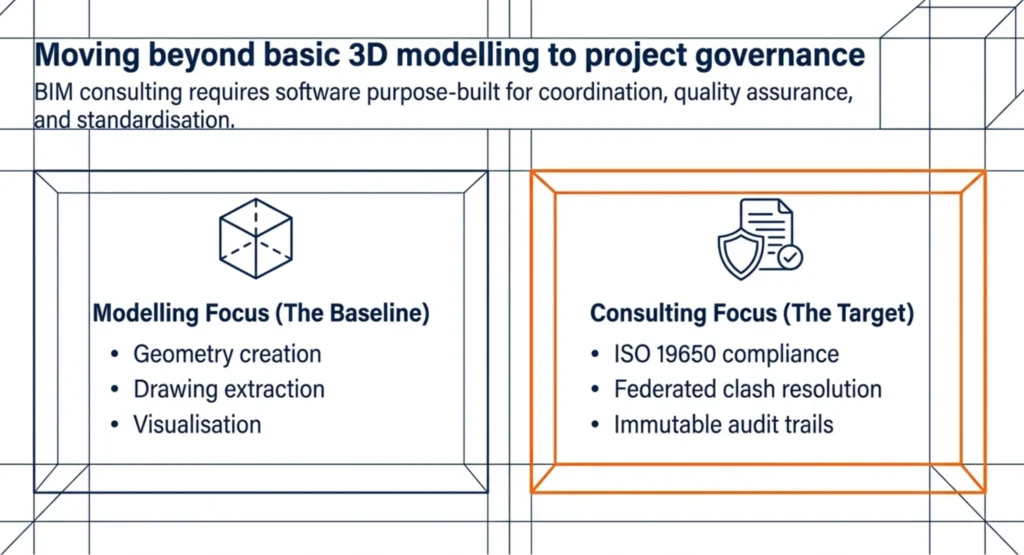
What Generic BIM Software Lists Usually Miss
Generic BIM software lists usually miss the real buying issue that Australian AEC teams face: how the software must withstand the way project information moves between authors, reviewers, contractors, subcontractors, and clients.
Before treating any platform as the right fit, the better test is whether it can support the actual consulting deliverable the project depends on.
- A 3D model is not enough if the information inside it cannot support the next handoff, whether that is consultant exchange, coordination review, approval, or handover.
- Clash detection is only useful when the team can turn each issue into an assigned action, a reviewable decision, and a closed record before the next model drop.
- Collaboration features matter only when they control who can access, issue, revise, approve, and rely on project information.
- IFC export should be tested against the receiving team’s workflow, because “supported” does not always mean the geometry, properties, classifications, and coordinates arrive in a usable form.
- A popular platform can still fail in a 7–100 staff firm if the workflow depends on one BIM lead to fix templates, police naming, chase updates, and explain the process every time.
- A strong feature set is only commercially useful when it supports a defined deliverable, such as a BEP, model QA check, CDE setup, coordination cycle, or handover requirement.
That is why the BIM software shortlist should start with the consulting outcome the project needs to protect, then work backwards to the software layer that can support it.
How BIM Consulting Software Maps to Consulting Deliverables
The most reliable way to shortlist BIM consulting software is to start with the consulting deliverable, because a BEP, a coordination cycle, a model QA check, and a CDE workflow each ask the software to do different work.
In practice, shortlisting BIM consulting software means using the deliverables below as the filter:
- BEP support: Software for creating a BEP helps turn the project’s BIM rules into repeatable controls. The BEP may be written in a document, but the software stack is where those rules are either followed, checked, or quietly worked around..
- Model authoring setup: Prioritise template control, parameter consistency, family management, and reliable model outputs.
- Model coordination: Check for federation, clash review, issue assignment, viewpoints, and closeout tracking.
- Model QA/QC: Look for IFC checks, data completeness testing, classification review, and rule-based validation.
- CDE setup: Test permissions, transmittals, status control, revisions, approvals, and audit trails.
- Handover readiness: Check whether the tool preserves asset data, accepted information, revision history, export records, and openBIM exchange.
- Governance risk: Bring in BIM consulting support when the problem is maintaining standards, ownership, CDE rules, training, and delivery responsibilities after the software is chosen.
11 BIM Consulting Software Platforms Used in Australia
The 11 BIM consulting software platforms below are mapped to the kinds of consulting outcomes Australian AEC teams usually need: authoring, coordination, checking, CDE setup, discipline-specific modelling, and implementation support.
This keeps the shortlist tied to project delivery, because each group supports a different part of the consulting workflow: model setup, clash review, QA/QC, controlled information exchange, or discipline-specific coordination.
Authoring Platforms: Revit, Archicad, Tekla
Revit, Archicad, and Tekla sit in this authoring platforms group because they help project teams produce the model information that later moves into coordination, checking, documentation, and handover workflows. Once that information is shared, IFC BIM viewers let downstream reviewers open it without an authoring licence.
Authoring platforms support the creation of BIM information, including geometry, parameters, classifications, sheets, schedules, and model exports. Let’s break down:
- Revit for architecture, structure, and MEP authoring in Autodesk-led building workflows.
- Archicad for architecture-led BIM authoring, documentation, and open model exchange.
- Tekla for structural and fabrication-aware modelling where constructability and package-level detail matter.
In Australian AEC projects, authoring tools matter most when the consulting deliverable is model authoring setup. That usually means the team needs stronger control over templates, families, shared parameters, naming rules, export settings, and documentation outputs.
Prioritise this authoring platforms group when inconsistent model setup is affecting drawing quality, consultant exchange, schedules, or downstream coordination.
Coordination & Review Tools: Navisworks, Revizto
Navisworks and Revizto sit in the coordination and review tools group because they help your teams review clashes, track issues, manage viewpoints, and keep coordination comments connected to the model context.
As dedicated clash detection software, Navisworks and Revizto support the process of bringing separate discipline models into a shared review environment, which can be broken down into:
- Navisworks for federated model review, clash detection, viewpoints, and coordination reporting.
- Revizto for model-based issue tracking, location-aware comments, design review, and site coordination.
In Australian projects, these tools matter when the consulting deliverable is model coordination, which may include:
- Weekly model drops
- Contractor-led coordination meetings
- Clash review
- Issue assignment
- Design responses
- Closeout tracking.
Prioritise this coordination and review tools group when the project needs a repeatable way to turn model conflicts into accountable coordination actions.
Model Checking & QA Tools: Solibri, BIMcollab
Solibri and BIMcollab sit in this model checking and QA tools group because they help teams inspect model quality, check IFC outputs, review data completeness, and communicate issues across tools.
As model checking and QA tools, both software below support the review of BIM information before it is exchanged, approved, or relied upon:
- Solibri for IFC checking, rule-based validation, data review, and model QA/QC.
- BIMcollab for model-based issue management, checking workflows, and cross-tool coordination.
For Australian AEC teams, this group matters when the consulting deliverable is model QA/QC, which may include checking classifications, properties, data completeness, IFC exchange quality, or rule-based model requirements before formal issue.
Prioritise this model checking and QA tools group when model information needs to be tested before it moves into consultant review, contractor coordination, client approval, or handover.
CDE & Collaboration Platforms: ACC/BIM 360, Trimble Connect
Trimble Connect, BIM 360, and Autodesk Construction Cloud sit in this CDE and collaboration platforms group because they help teams manage model sharing, documents, permissions, revisions, approvals, issues, and project records. These platforms only pay off once teams grasp how BIM is applied in construction.
As CDE and collaboration platforms, ACC, BIM 360 and Trimble Connect support controlled information exchange across project teams:
- Autodesk Construction Cloud/BIM 360 for Autodesk-connected collaboration, model sharing, document control, issues, and project workflows.
- Trimble Connect for cloud-based model sharing, coordination, and collaboration, especially where Trimble or Tekla workflows are involved.
For Australian firms, the CDE and collaboration platforms group matters when the consulting deliverable is the CDE setup.
That CDE setup usually means the AEC project needs clearer control over who can access information, what status each file carries, which revision is current, and how approvals or transmittals are recorded.
Prioritise this CDE and collaboration platforms group when AEC project information needs to move between internal staff, consultants, contractors, subcontractors, and client-side reviewers with clear permissions and revision history.
Discipline-Specific Tools: Civil 3D, Bentley OpenBuildings
Civil 3D and Bentley OpenBuildings sit in this discipline-specific tools group because they help teams manage civil, infrastructure, drainage, external works, and building information in discipline-specific environments.
As discipline-specific tools, both software support BIM workflows that need specialised geometry, data structures, coordinate control, or infrastructure-connected modelling:
- Civil 3D for civil infrastructure design, surfaces, alignments, drainage, corridors, and external works.
- Bentley OpenBuildings for building design workflows in Bentley-led or infrastructure-connected project environments.
For Australian projects, this group matters when the consulting deliverable is discipline-specific model coordination.
In practice, this can involve civil-building coordination, survey alignment, drainage modelling, road design, infrastructure interfaces, or asset information requirements.
Prioritise this discipline-specific model coordination group when the AEC project depends on accurate coordinate exchange, discipline-specific model outputs, or alignment between civil, building, infrastructure, and asset information.
Buying Criteria: ISO 19650, IFC, Data Residency & Audit Trails
The right BIM consulting software should be tested against the project risks it must control: information management (ISO 19650), model exchange (IFC/openBIM), data access, ownership, and evidence.
The criteria below show where the shortlist needs to hold up before the team commits to a platform.
ISO 19650 Compliance & Information Management
As BIM standards in Australia, ISO 19650 is about managing project information through clear naming, status, responsibility, revision, and exchange controls.
For software buying, the practical question is whether the platform can support the way information will be named, shared, reviewed, approved, revised, and archived.

For reference, the illustration above breaks that check into three practical areas:
- Information containers need consistent naming and metadata. The software should support standard naming conventions and metadata tags so files, models, and documents can be identified, sorted, and checked without relying on local habits.
- State management needs clear information transitions. The platform should show how information moves through recognised states such as Work in Progress, Shared, Published, and Archived, because teams need to know what can be coordinated, what can be issued, and what must be retained. Platforms split on this point, as our comparison of document control and information management in ACC and Aconex shows.
- openBIM support needs more than basic export. Native support for IFC4 and BCF matters because open exchange should carry usable model data and issue information without creating separate data silos.
IFC & openBIM Interoperability
IFC matters because AEC project teams rarely work in one software environment. Architecture may sit in Revit or Archicad, structural detailing may sit in Tekla, civil design may sit in Civil 3D, and coordination may happen in a separate review environment.
That is why IFC and openBIM interoperability should be assessed beyond basic file support and go further, as you can see in the table below:
| IFC exchange check | Why it matters |
| Which IFC version and model view are required? | Different receiving teams may need different geometry, data, and coordination outputs. |
| Are classifications and properties mapped correctly? | Poor mapping reduces the usefulness of model data after export. |
| Can exported models be checked before submission? | Export QA reduces rejected, incomplete, or unusable model exchanges. |
| Can issue workflows connect through BCF or similar methods? | Coordination should not depend only on screenshots, emails, or disconnected markups. |
| Has the exchange been tested with the actual receiving party? | Vendor support does not guarantee project-ready interoperability. |
Data Residency, Security & Model Ownership
Data residency, security, and model ownership shape how BIM information is stored, accessed, shared, and controlled. Project models may contain sensitive building information, client assets, contractor methods, commercial assumptions, and intellectual property.
When models become central to delivery, this decision should involve project leadership, IT, and commercial decision-makers. Therefore, the buyer checks in table below cover more than platform features:
| Risk area | What the buyer should check | What can go wrong |
| Data location | Where project information is hosted, stored, backed up, and restored | Sensitive model data may sit in locations that do not match client, insurer, or contract expectations |
| Access control | Whether permissions can be controlled by company, role, package, and project stage | External users may retain access after their work package or engagement ends |
| Model ownership | Who owns native files, exports, comments, issue records, and derived outputs | The firm may lose control of useful project records even after producing or coordinating them |
| Offboarding | What happens when staff, consultants, or subcontractors leave | Departing users may keep access to files, models, comments, or issue records |
| Contract alignment | Whether software terms, project obligations, and client requirements say the same thing | The platform workflow may conflict with agreed responsibilities or handover obligations |
The data residency, security, and model ownership consideration is where software selection overlaps with IT governance.
For example, your firm may start by comparing authoring or coordination platforms, but the decision expands once project information moves through cloud storage, external users, permission groups, and client-controlled environments.
Audit Trails & Version Control
Audit trails and version control matter because BIM decisions can become commercial decisions.
In practice, if your team cannot prove which model was issued, who reviewed it, when a coordination issue was closed, or which drawing revision supported a decision, the software stack is not providing the project with enough evidence. Let’s break down.
| Capability | Why it matters | Weak-control warning sign |
| Version history | Helps teams understand what changed between submissions | Users compare filenames manually or rely on someone’s memory |
| Issue status history | Shows whether coordination actions were closed properly | Closed items are not clearly linked to evidence or model updates |
| Approval records | Supports formal review and information acceptance | Review decisions sit in email, chat, or separate registers |
| Permission logs | Reduces uncertainty around access and responsibility | The team cannot easily confirm who had access at a decision point |
| Export and download records | Helps track what information left the controlled environment | Model exports or drawing downloads cannot be traced later |
Audit trails and version control getting important when small and mid-sized AEC firms move from informal folder structures into CDE workflows because the change involves:
- Where are files stored?
- Who is allowed to issue information?
- What status that information carries?
- How the project proves what happened later?
How to Shortlist BIM Consulting Software for Your Project Type
BIM consulting software should be shortlisted by project type because different Australian projects place pressure on different parts of the BIM workflow.
For example, a commercial tower, a civil infrastructure package, and a government asset may all use BIM, but they do not ask the software to solve the same coordination problem. Our guide to BIM for infrastructure and building projects lays out where those needs split.
Therefore, the starting point should be the fundamental question: What kinds of project information must move safely through design, coordination, approval, and handover?
From there, the shortlist becomes easier to defend.
| Australian project type | Main BIM priority | Software shortlist focus |
| Commercial and vertical builds | Multidisciplinary federation, architectural coordination, MEP clash detection, and drawing-package reliability | Revit, Navisworks, BIMcollab, or similar tools that support model authoring, federation, clash review, and issue tracking |
| Large-scale infrastructure | Geospatial alignment, civil model integration, corridor coordination, heavy file handling, and external stakeholder exchange | Civil 3D, Trimble Connect, Revizto, or similar tools that can manage civil data, large models, and cross-discipline review |
| Government and defence projects | ISO 19650 alignment, data residency, controlled access, audit trails, and rigorous model checking | Solibri Premium, Autodesk Construction Cloud with suitable hosting options, Archicad or openBIM-capable workflows where interoperability and governance are central |
Implementation & Training Considerations in the Australian Market
Implementation and training should be planned before the licence rollout because BIM software only works when the team can use it inside the firm’s local delivery rhythm.
In Australia, rollout planning should include support availability, workflow templates, and phased onboarding instead of treating software purchase as the finish line.

The illustration above shows the rollout as three connected steps. Each step controls a different failure point:
- Local support availability keeps rollout friction from becoming project delay.
- Workflow templates turn software settings into repeatable project behaviour.
- Phased onboarding reduces the risk of a messy rollout.
This is why implementation should be treated as part of the BIM consulting scope, so you leave your team with software access, templates, permissions, and training that match how project information is actually issued, reviewed, and handed over.
How Interscale Can Help
Interscale BIM management service helps Australian AEC firms make BIM decisions that survive live project delivery.
We connect the parts that often get bought or planned separately: Autodesk licensing, software financing, CDE setup, BIM standards, implementation support, and team training. Together that is a full Autodesk software rollout, not a stack of separate purchases.
That means our conversation moves into the controls that decide whether model information can be named, reviewed, accepted, issued, and handed over with authority.
Whenever your firm is ready to tighten BIM delivery, Interscale can help turn your BIM environment into a project record the team can actually trust.
Source:
- ISO. ISO 19650-1:2018 — Organisation and digitisation of information about buildings and civil engineering works, including building information modelling. https://www.iso.org/standard/68078.html
- buildingSMART International. openBIM®. https://www.buildingsmart.org/about/openbim/


