


A late wall change on an Australian school project pushed drawings out of sync. Several consultants scrambled with weekend revisions, and the site team lost confidence in the plans. This is why choosing the right construction design software matters in 2026.
Simply put, risk multiplies quickly when the software does not keep pace with changes. Today, the tool is a foundation for collaboration, compliance, and cash flow. In this guide, we explore what features count, which tools fit best, and how Interscale procurement paths can help you remove friction.
Key Features to Look for in Construction Design Software
When teams evaluate construction design tools, features only matter if they reduce project risk. The five outlined below stand out because they influence drawing accuracy, collaboration, and client confidence. As you review them, consider how each capability would change daily workflows in your projects.
- 2D Drafting & 3D Modeling Capabilities: Strong drafting and modelling tools ensure drawings stay consistent
- BIM Integration & Collaboration: Geometry and metadata remain linked, so schedules, tags, and quantities all update together.
- Cloud Access & Multi-User Collaboration: Shared environments connect offices, consultants, and site staff with version control.
- Rendering & Visualization Tools: Clear visuals help clients make confident decisions before errors enter construction.
- Compatibility with Other Tools: Reliable DWG, IFC, and RVT file exchange ensures smooth collaboration across different software stacks.
- Smart Automation & AI-Assisted Workflows: AI-assisted features support design teams by speeding up modelling tasks, improving clash detection, and highlighting potential coordination issues—helping reduce manual effort and minimise errors before construction begins.
Top Construction Design Software in 2026
Once you know what to look for, comparing options is next. Each construction design app shines in different roles, and clarity here prevents costly mismatches. To guide that, we move from drafting foundations through to visualisation layers.
Autodesk Revit
Autodesk Revit is built around BIM workflows, ensuring drawings, schedules, and 3D models stay consistent. It helps the AEC industry by centralising documentation and coordination in one environment. Revit is best suited for multidisciplinary teams that need stable documentation, parametric modelling, and clear audit trails for client approvals.
Autodesk Revit is best for architects and BIM managers needing robust documentation tools for complex projects requiring BIM compliance. Several Revit key features we need to highlight is:
- Parametric components with bidirectional associativity
- Multi-disciplinary coordination (architectural, structural, MEP)
- Automated scheduling and quantity extraction
- Clash detection and interference checking
- Integration with Autodesk Construction Cloud.
As of Q1 2026, Autodesk Revit subscription pricing in Australia is:
- Monthly subscription: from around A$575 per user, ex-GST
- Annual subscription: A$4,585 per user (paid upfront), ex-GST
- Flex: A$460/100 tokens (minimum).
Autodesk AutoCAD
Autodesk AutoCAD remains the benchmark for precision 2D drafting and sheet production in the Australian AEC industry. Its DWG file format is still the common language across consultants. That’s why AutoCAD is best for contractors, engineers, and consultants who rely on 2D-heavy deliverables.
While AutoCAD now has solid 3D capabilities, its primary strength remains the production of precise, standardised 2D construction drawings. From our perspective, AutoCAD provides steadfast performance for production drawings with a minimal learning curve for new staff. And here are several key features of AutoCAD:
- Robust 2D drafting tools ensure clear, standards-compliant drawings for site and consultant use
- DWG compatibility makes file exchange seamless across architects, engineers, and contractors
- Sheet set manager and plotting tools support large-format printing and professional deliverables.
- Seven specialised toolsets (Architecture, MEP, Mechanical, Plant 3D, Electrical, Map 3D, Raster Design) boost productivity in specific tasks
- Reliable for HVAC, plumbing, electrical layouts, and civil engineering drawings, according to user reviews
- Integration with Autodesk Docs in the AEC Collection supports cloud-based collaboration and document control.
AutoCAD in Australia is available via subscription. Autodesk offers a 15-day free trial. Here is the pricing plan of Autodesk as of Q1 2026:
- Monthly subscription: A$395 per user (ex-GST)
- Annual subscription: A$3,195 per user
- Flex tokens: A$460 per 100 tokens, with AutoCAD consuming seven tokens per day.
SketchUp
SketchUp is widely recognised as a free construction design software with intuitive modelling and speed. Australian architects and residential designers value it for massing studies, quick visualisations, and presentations. When paired with its companion program, LayOut, SketchUp can produce professional construction documentation.
While not a native BIM platform, its extension warehouse allows users to add extra functionality for specific tasks. SketchUp is best for teams that need to test design options rapidly and present them in a way clients understand. Several primary features of SketchUp are:
- Push/pull modeling for easy 3D form creation
- Extensive 3D warehouse component library
- LayOut integration for basic documentation
- Compatibility with various rendering plugins
- Web, desktop, and mobile access options.
As of 2026, SketchUp offers flexible subscription tiers in Australia:
- SketchUp Free: Web-based version with 10 GB cloud storage, suited for simple 3D design
- SketchUp Go: A$16.67/month (billed annually), includes iPad/web modelers and cloud storage
- SketchUp Pro: A$51.58/month (billed annually), includes desktop modeler, LayOut, PreDesign, and full extension access
- SketchUp Studio: A$105.92/month (billed annually), adds advanced rendering and Revit importer for BIM workflows.
Rhino
Rhino is known for its ability to handle complex geometry and freeform modelling that goes beyond traditional CAD. With Grasshopper built in, it offers parametric control and scripted modelling that bridges conceptual exploration with downstream BIM documentation. Rhino is often used for the initial design before the model is moved to a BIM platform for documentation.
Rhino’s flexibility makes it ideal for architectural features, facades, and structural elements requiring mathematical precision. It also often pairs with Revit or Archicad for final documentation. Rhinos are best for construction teams tackling non-standard envelopes, civic projects, or large-scale residential work.
Key features of Rhino as a construction design software in the Australian AEC industry
- NURBS-based freeform modelling creates geometry without limits on complexity or size
- Grasshopper visual scripting for parametric design
- Extensive import/export format support
- Compatibility with rendering and analysis plugins
- Precision modeling tools for manufacturing readiness.
As of Q1 2026, Rhino’s pricing is perpetual and straightforward compared to subscription-heavy tools:
- Commercial licence: US$995 (~A$1,540) one-time purchase, perpetual with service releases included
- Student/teacher licence: US$195 (~A$300) one-time purchase, also perpetual
- Evaluation licence: Free for 90 days with full commercial features
- Licences can float across teams via Zoo or Cloud Zoo, useful for Australian practices with multiple designers
Archicad
Graphisoft Archicad positions itself as architect-led BIM, designed to align design intent and documentation. Its publishing pipelines generate consistent drawing sets, which matter when Australian councils or clients request multiple revisions. Best for mid-sized studios, Archicad appeals to firms balancing creative exploration with compliance needs.
Archicad’s reliable IFC (Industry Foundation Classes) exchange supports open BIM standards. Its logical structure and focus on design output make it a strong alternative to Revit. Several Archicad key features are:
- Integrated BIM workflow from concept to documentation
- Teamwork Server supports simultaneous collaboration, even across distributed offices
- Integrated MEP modelling covers HVAC, electrical, and plumbing inside the same platform
- Libraries of architectural objects speed up documentation, especially for repeated housing elements
- Connection with rendering software like Lumion makes presentation workflows smoother.
As of 2026, Archicad’s Australian pricing is subscription-based, ex-GST:
- Archicad Collaborate: from A$351 per seat per month (A$4,210 annually)
- Archicad Full Version: from A$413 per seat per month (A$4,955 annually)
- Archicad Studio: from A$602 per seat per month, includes advanced design and BIMcloud SaaS
- BIMcloud SaaS add-on: from A$152 per month
Vectorworks Architect
Many Australian firms use Vectorworks Architect to sketch ideas quickly and deliver consistent schedules and sheets. The platform’s flexibility makes it ideal for practices moving from traditional 2D drafting into integrated 3D and BIM-light processes. This makes it a versatile choice for studios that want to maintain a high degree of design freedom.
Vectorworks Architect presents a complete solution for small to mid-sized firms without the procedural rigidity of other BIM platforms. Its graphical style and customisation options appeal to design-led practices. Here are several key features of Vectorworks Architect you need to consider:
- Integrated 2D/3D/BIM workflow
- Parasolid modeling engine for flexible geometry
- Renderworks built-in rendering capabilities
- Site design and landscape tools
- Good interoperability with other file formats.
As of 2026, Vectorworks Architect offers two subscription tiers. A monthly subscription costs around A$257.88, which is best for occasional users. An annual subscription costs around A$2,320 per year, which suits frequent use and comes with cost savings.
MicroStation
MicroStation is purpose-built for infrastructure design, giving Australian engineers a platform that handles precision drafting, geospatial context, and compliance-ready outputs. Its strength lies in managing complex projects with rigorous standards requirements. Best for consultants in civil, transport, and utilities, MicroStation supports teams managing staged infrastructure projects.
The software supports a wide range of file formats and works well with other Bentley Systems products for specialised engineering tasks. Its data management capabilities are beneficial for a construction designer working on major public works. Here several key features of MicroStation:
- Native DGN environment with strong support for legacy files like DWG and DXF
- Geospatial integration connects designs to real-world coordinates, including ArcGIS and GPS data
- 2D and 3D drafting tools create accurate, standards-compliant drawings for infrastructure delivery
- Automation tools accelerate sheet production and reduce repetitive drafting tasks
- Robust AccuSnap and AccuDraw features improve precision and speed for large civil models
- High interoperability ensures models and data flow between disciplines without conversion
- Visualization tools enable lifelike renderings for stakeholder engagement and approvals.
As of 2026, MicroStation’s pricing is subscription-based:
- 12-month subscription/Virtuoso subscription: around A$3.713,13 per year with two keys and bundles a 12-month licence with training credits
- Perpetual licences: available with SELECT support, but pricing provided on request
Navisworks
As Autodesk contractor design software, Navisworks is built to unify models, schedules, and costs into one review environment. Australian contractors often describe it as the meeting point where design clashes are exposed before they hit site. Teams coordinating hospitals, transport hubs, or staged infrastructure rely on it to keep review cycles disciplined and decisions visible.
Best for contractors, project managers, and client-side reviewers. It suits teams handling large multi-trade projects where coordination and sequencing can easily break down without a single federated model. In practice, it reduces disputes because issues are seen and resolved before they become claims.
Key features of Navisworks:
- Model aggregation from multiple file formats
- Clash detection and interference management
- 4D construction simulation and sequencing
- Quantification and material takeoff
- Integration with Autodesk Construction Cloud.
Autodesk Navisworks is offered in two editions: Simulate and Manage. Simulate provides model aggregation, quantification, and 4D simulation, while Manage adds full clash detection for coordination meetings. Here is the pricing of Navisworks Manage and Simulate as of January 2026:
- Navisworks Manage
- Annual: A$4,325 per user
- Monthly: A$540 per user
- Flex: A$460 per 100 tokens.
- Navisworks Simulate
- Annual: A$2,700 per user
- Monthly: A$220 per user
- Flex: A$460 per 100 tokens.
Chief Architect
Chief Architect Premier is designed for residential and light commercial projects. Its automated building tools create walls, roofs, framing, and schedules with minimal manual input. In Australia, many small to mid-sized studios appreciate how quickly the software turns concepts into permit-ready drawings while still producing client-friendly 3D visuals.
Chief Architect Premier is best for residential designers, builders, and renovators needing efficient design-to-consent workflows. It suits studios focused on kitchens, bathrooms, interiors, or full home projects that rely on prebuilt assemblies and strong visual presentations. Key features of Chief Architect we need to highlight are:
- Automated building tools generate walls, roofs, stairs, and framing according to standard practices
- Extensive libraries provide cabinets, fixtures, and manufacturer-specific objects for accurate detailing
- Realistic and artistic rendering options, including photo-real ray tracing and 360° tours
- Built-in CAD engine supports DWG/DXF/PDF import for precision detailing and overlays
- Instant material lists and schedules simplify cost estimation and cut preparation
- Terrain and landscaping tools with 4,000+ plant symbols support site planning and exterior design
- Integrated interior design workflows let users move seamlessly between 2D drafting and 3D perspectives.
Chief Architect Premier is available only by subscription. As of September 2026, the Chief Architect’s monthly billing is AU$350 (approx.) and annual billing averages AU$255 per month. Each plan includes software upgrades, premium catalogue downloads, and priority technical support.
Enscape
Chaos Enscape stands out because it turns design intent into a live visual experience. Architects and designers in Australia often use it during client meetings, where a walkthrough can replace hours of explanation. The workflow is simple: model, click start, and instantly move through a space with your client watching.
Best for studios that want to secure approvals quickly without waiting for lengthy render times. Firms balancing residential, commercial, or institutional projects find value in its instant clarity. Here several key features of Enscape as a construction design software in the Australian AEC industry:
- Real-time rendering within BIM software
- Virtual and augmented reality support
- One-click documentation images and videos
- Material and asset library customisation
- Collaborative annotation and markups.
Enscape offers a free 30-day trial, followed by subscription options. As of January 2026, the Chaos Enscape pricing plan is:
- Solo plan: approx. A$78 per month, billed annually, for single users
- Premium plan: approx. A$89 per month, billed annually, for single users
- ArchDesign Collection: approx. A$131 per month, billed annually, for single users
The Best Construction Design Software at a Glance
This table quickly compares the best construction design software to make shortlisting easier. It summarises each platform’s main strength and the type of user it’s best suited for. You can use this to see how the software capabilities align with your typical project types and team structure.
| Software | Core Feature | Best For | 2D/3D | BIM/Coordination | Cloud/Collab | Rendering | Interoperability |
|---|---|---|---|---|---|---|---|
| Autodesk Revit | Governed BIM and stable documentation | Architects, BIM leads | Yes/Yes | Strong | Good | Via add-ons | RVT, IFC, DWG |
| Autodesk AutoCAD | Precise 2D and plotting discipline | Contractors, 2D-heavy teams | Yes/Limited | Add-on workflows | Good | External | DWG, PDF |
| SketchUp | Fast concept modelling and client clarity | Residential, early design | Limited/Yes | Add-on workflows | Good | Integrated options | SKP, DWG, IFC |
| Rhino | Complex geometry with parametric control | Advanced design teams | Limited/Yes | Bridges to BIM | Good | External | 3DM, DWG, IFC |
| Archicad | Architect-centric BIM and publishing | Architectural studios | Yes/Yes | Strong | Good | Integrated options | IFC, DWG, PDF |
| Vectorworks Architect | Design-led with integrated documentation | Small to mid studios | Yes/Yes | Moderate | Good | Integrated options | DWG, IFC, PDF |
| Microstation | Infrastructure precision and policy fit | Transport and civil | Yes/Limited | Add-on workflows | Good | External | DGN, DWG, IFC |
| Navisworks | Aggregation, clash, and review structure | Contractors, coordinators | No/No | Strong review | Good | N/A | NWD, NWF, DWG |
| Chief Architect | Residential speed with strong libraries | Home designers | Yes/Yes | Light BIM | Good | Integrated options | DWG, PDF |
| Enscape | Real-time visuals for decisions | Design teams | N/A/Visual | N/A | Good | Strong | Links to authoring |
Confused Which Design Software Fits Your Firm?
Every team has different project needs and budgets. Interscale helps you choose, license, and finance the right construction software with confidence.
Recommended Software Stacks (Real-World Combos) for 2026
In 2026, Australia’s small- to mid-sized businesses rely on recommended software below, which works in combination, with clear stacks that hold up under weekly revisions and real delivery pressure.
Of course, your useful rule of thumb is revision velocity. If your team reissues drawing sets more than once a week during delivery peaks, stack discipline matters more than tool count.
For Residential Focus (Custom Homes, Volume Builders, Renovations):
- Core Design & Documentation: Chief Architect Premier. Its automated tools and dedicated libraries speed up consent drawings for repetitive housing elements.
- Concept Design & Client Visualisation: SketchUp Pro with Enscape. Perfect for rapid massing studies and producing client-winning, real-time walkthroughs.
- Collaboration & File Sharing: A straightforward cloud storage and issue-tracking platform. This keeps revisions in sync with your draftsperson and external certifiers.
For a custom home builder managing multiple residential projects simultaneously, this kind of stack combining precise documentation with client-ready visualisation, keeps design intent, client approvals, and site delivery in sync throughout the build.
For Commercial & Mixed-Use (Mid-Rise, Fit-Outs, Institutional):
- Core BIM & Documentation: Autodesk Revit or Archicad. These provide the disciplined, data-rich environment needed for services coordination and compliance documentation.
- Model Coordination & Clash Detection: Navisworks Manage. Essential for federating models from architects, engineers, and services contractors before work starts on site.
- Specialist Modelling & Facades: Rhino with Grasshopper. Used for complex geometric elements, parametric screens, or unique architectural features that feed into the main BIM model.
For Civil & Infrastructure (Land Development, Transport, Utilities):
- Core Design & Drafting: MicroStation. Its native strength in geospatial data, precision, and handling large-scale projects is foundational.
- Detailed Engineering Design: AutoCAD Civil 3D (typically accessed via the AEC Collection). Used for detailed corridor modelling, earthworks, and utility design.
- Project Data Management: A robust Common Data Environment (CDE). This is non-negotiable for managing files, versions, and approvals across long project timelines and multiple external stakeholders.
The Integration Challenge
A stack only earns its keep when the tools share data cleanly across the workflow. Now, this is the part most teams overlook: assuming formats like IFC will carry everything perfectly from concept through to site delivery. In practice, material definitions, custom parameters, and even annotations can get lost in translation.
This is where a structured onboarding plan with a dedicated construction software consultant becomes genuinely useful. The consultant will help you force teams to map the data exchanges they actually rely on between chosen platforms.
If you want a broader operational lens on making these stacks work across devices, access, and document control, Interscale construction IT solutions is a practical next step. From the Interscale perspective, practices that plan the integration layer early tend to see fewer coordination resets and less software-driven rework later in the project cycle.
Tips for Buying Construction Design Software
One fundamental tip is always mapping the software to your project types and cash flow. Some firms combine tools for complementary strengths, while others double down on one stack. The key is aligning your operational reality to the strengths visible here.
That’s why software procurement is not just about the upfront cost. Leasing helps smooth cash flow, especially during seasonal delivery peaks. Financing also aligns with laptop refresh cycles, making upgrades less disruptive.
At purchase, consider an Interscale software license for structured agreements and Interscale software financing for predictable monthly planning. Let’s say you want to buy Revit on a monthly payment. With Interscale software financing, you can get A$411.23 with an extra local service.
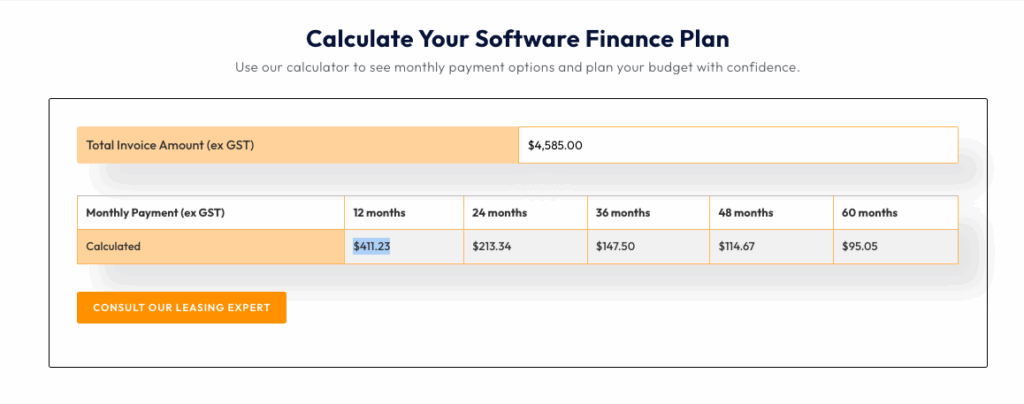
One of our clients, a Sydney contractor, avoided a costly halt by spreading software payments through financing. They scaled seats as the team grew without risking cash reserves. The project maintained delivery pace with no sudden financial shock.
Beyond cost, service levels determine productivity. Always check SLA terms, support hours, and onboarding quality. A poor support plan can undo savings if downtime compounds across projects.
Get Your Design Software—No Heavy Upfront Cost
Buy or lease Autodesk, SketchUp, Rhino, and more with Interscale’s software financing. Simple monthly payments, full license ownership.
The Future of Construction Design Software
The future of design software seems to be focused on intelligent assistance rather than full automation. We are seeing AI begin to handle repetitive tasks like sheet setup, component tagging, and data entry. This can free up designers to focus on more complex problem-solving and creative work where their skills are most valuable.
A BIM coordinator, for example, might use an AI-assisted tool to generate a standard set of drawings from a model. Their time would then be spent refining the critical details and annotations to meet Australian compliance standards. In this relationship, the human remains the expert who is accountable for quality control and professional sign-off.
FAQ
What Software is Best for Building Design?
Can SketchUp do Construction Drawings?
Can AI Create Construction Drawings?
Editorial notes: This article has been updated with a new recommended software stack for 2026 to stay aligned with current construction trends in Australia. It also helps small to mid-sized teams (15–100 staff) understand software combinations by project type. We also added new information regarding the importance of AI as one of the things to consider when choosing software design.




