


For many years, Australian teams relied on the AutoCAD multiuser license to share access among staff. That model has now ended, and Australian businesses must adjust to the named user system and optional Flex tokens. This shift raises questions about compliance, daily management, and budget control.
Let’s say your manager found two drafters were using a single login to keep costs down. This practice created compliance issues and made it hard to track usage for audits. They fixed this by creating a clear assignment policy based on real user data.
This article covers the new license types available for your team’s AutoCAD users. We will also detail efficient user assignment and flexible options for changing workloads. So, let’s break it down now.
Why is AutoCAD Multi-user License no Longer Available?
The traditional multi-user license for AutoCAD is no longer sold or renewed, as Autodesk has fully transitioned to a named-user subscription model. This change is part of a broader shift across the software industry toward subscription-based licensing and reflects Autodesk’s move to modernise both its business structure and how customers access its products.
By moving to a single-user model, Autodesk can deliver a more secure, cloud-connected experience while ensuring that each user is properly licensed. The shift also made sense in the wake of the COVID-19 pandemic, when remote and flexible work became the norm, making individual, cloud-linked accounts more practical than shared network licenses.
For any business with an AutoCAD license here in Australia, this transition actually simplifies compliance. Audits are more straightforward because each user is tied to their own subscription, reducing the risk of non-compliant use from shared accounts.
This means, when reviewing the AutoCAD license price in Australia, your teams should also consider compliance, user assignment, and audit risk rather than comparing subscription cost alone.
Available AutoCAD License Types
Autodesk now operates on a subscription model, primarily through named user subscriptions. Each subscription is assigned to one named individual, who can install and activate the software on up to three devices but may only use it on one device at a time. This model suits full-time employees and heavy users who need daily access to AutoCAD.
If your staff use AutoCAD occasionally, Autodesk Flex provides a pay-as-you-go system. This uses tokens, which are deducted only on the days AutoCAD is opened. It is often suitable for contractors, part-time drafters, or project managers who need access a few days each month.
Current subscription options in Australia (ex-GST) as of May 2026:
- Annual subscription: A$259 per month, billed annually (A$3,100 for 1 user per year).
- Monthly subscription: A$385 per month, suited to teams with shorter engagements.
- Flex tokens: A$445 for 100 tokens, with AutoCAD consuming 7 tokens per day per user.
These plans all exclude GST and provide flexibility for different team setups. If you are unsure which model best suits your project or team size, our Interscale team can walk you through the options. We help Australian AEC firms balance subscriptions so your AutoCAD access stays aligned with the way you work.
The Benefits of AutoCAD Named User Subscriptions
- Direct accountability: Each subscription is tied to a person, supporting ISO 19650 workflows.
- Simpler audits: User-level logs satisfy client and government compliance checks in Australia.
- Project flexibility: Assign and revoke access as subcontractors join or leave jobs.
- Seamless onboarding: Invite contractors by email and grant access within minutes.
- No seat clashes: Predictable access prevents downtime from pooled-license conflicts.
- Device clarity: One user can install AutoCAD on multiple computers, but never concurrently.
- Cost efficiency: Mix subscriptions and Flex to suit permanent and occasional project roles.
- Granular reporting: Monitor seat utilisation to right-size between AutoCAD and AutoCAD LT.
- Administrative control: Split admin roles so assignments continue even when one lead is off-site.
- Security at exit: Remove access instantly when staff or contractors finish, protecting data integrity.
Challenges for Teams
- Subcontractor churn: Frequent rotations force constant seat reassignment, raising admin workload.
- ISO 19650 alignment: User accounts must map to CDE roles or workflows break compliance.
- Joint ventures: Separate ABNs and tenants complicate license sharing across partnered projects.
- SSO provisioning: Poor SCIM role mapping can leave ex-staff with lingering AutoCAD access.
- Remote sites: Patchy internet interrupts login checks, disrupting work on construction sites.
- Device concurrency: Users risk lockouts if logged into office and site machines at once.
- Flex forecasting: Estimating token use during tenders is difficult, often wasting credits.
- Role sizing: Assigning AutoCAD instead of AutoCAD LT inflates costs for 2D roles.
- Ex-GST cycles: Annual renewals can clash with budget approvals tied to project claims.
- Slow offboarding: Delayed deactivation exposes project files and wastes valuable seats.
- Audit pressure: Incomplete per-user logs trigger questions in client or government reviews.
- Standards control: BYOD staff need managed CTB, fonts, and LISP or QA checks fail.
Alternatives for Teams Needing Flexibility
The best alternative for flexible AutoCAD licensing is a controlled mix of access models based on how each person uses the software.
For most 15–100 person Australian AEC teams, that means combining named user subscriptions, Autodesk Flex, AutoCAD LT, and financing based on real usage. Let’s break down below.
Start With Real AutoCAD Usage, Not Job Titles
Real AutoCAD usage gives a better licensing signal than job titles alone. A project manager, draftsperson, BIM coordinator, and documentation officer may all touch DWG files, yet their access needs can be very different.
So please, you need to Group users by three practical questions:
- How often do they open AutoCAD?
- Do they need full AutoCAD, or only 2D drafting tools?
- Is their access permanent, seasonal, or project-based?
This step often reveals quick savings. For example, a 35-person Adelaide engineering firm may have ten people listed as AutoCAD users, while only five need full AutoCAD every week.
When Does Flex Actually Save Money?
Flex usually saves money when AutoCAD use is occasional, measured, and easy to control. Consider using this AutoCAD annual rule:
- If a user opens AutoCAD for 85 days or more per year, a named user subscription is usually more economical;
- If they open AutoCAD for fewer than 50 days per year, Flex is usually the better fit.
Autodesk’s Flex Rate Sheet lists AutoCAD at 7 tokens per user per day. For comparison, as of May 2026, 100 Flex tokens cost A$445, while one annual AutoCAD subscription costs A$3,100 ex-GST.
At 7 tokens per day, 100 tokens cover about 14 AutoCAD-use days, so the decision needs actual usage data.
For admin teams, the decision usually falls into three practical bands as you can see in the table below.
| AutoCAD usage per user | Better starting point | Practical decision |
| Fewer than 50 days per year | Flex | Best for occasional access |
| 50–84 days per year | Compare both | Usage rhythm can change the result |
| 85+ days per year | Named user subscription | Usually cleaner and cheaper |
The 85-day point is a planning threshold, not an Autodesk licensing rule. It helps admins spot when token-based access starts behaving like a permanent seat, especially when drafters open AutoCAD most weeks.
Let’s say, your consultancy firm adding a second office may have project managers who open AutoCAD only for design reviews, mark-ups, and tender checks. Flex can work well for that pattern.
On the other hand, a 45-person drafting team with senior drafters who open AutoCAD most weeks usually needs named-user seats for predictable access.
For a deeper licensing check, Interscale can help you compare Flex against named user subscriptions through its AutoCAD licensing support.
Flex Token Rules That Admins Should Not Miss
Flex tokens need active admin control because they expire 12 months from purchase. Autodesk’s usage guidance excludes expired tokens from available balances, so unused tokens should not be treated as rollover credit.
Plan Flex like expiring project capacity. Tokens do not roll over, and used token orders should not be treated as refundable budget if the work pattern changes.
Your team may buy tokens for a short documentation push, then see the project move by several months. At that point, the issue is not only the token rate. The remaining balance also needs to be used before the 12-month window closes.
Use Autodesk Account to Control Access and Token Spend
Autodesk Account gives admins a practical control point for assignments, product access, and Flex reporting.
Administrators can assign subscriptions, grant Flex access, remove users, and review usage data from the account portal.
For Flex users, keep access narrow. Assign Flex only to approved users, limit which products they can access, then set an internal usage threshold for each occasional user, such as expected AutoCAD use-days per month or maximum token spend by project role.
For Flex monitoring, your admin can open the Autodesk Account and go to Reporting > Token Usage. Then, you can use that report to check:
- Usage by user: who is consuming tokens
- Usage by product: which Autodesk tools are drawing from the token pool
- Token balance: how much capacity remains
- Forecast details: when the team may run out based on recent use
Review these monthly, then compare actual token use with your internal threshold. Remove Flex access from users who no longer need it.
Use AutoCAD LT
AutoCAD LT suits users whose work stays inside 2D drafting, documentation, mark-ups, plotting, and drawing updates.
AutoCAD LT can fit documentation officers, drawing reviewers, or team members preparing standard details. But please remember, this works best when roles are mapped properly, such as:
- A documentation officer preparing compliance drawings may only need LT
- Structural or MEP detailers may still need full AutoCAD for more advanced workflows.
This means, you need to treat LT as a role-fit decision. Because we believe AutoCAD LT belongs where the work is 2D, repeatable, and documentation-focused.
Buy an AutoCAD License With Financing Solutions
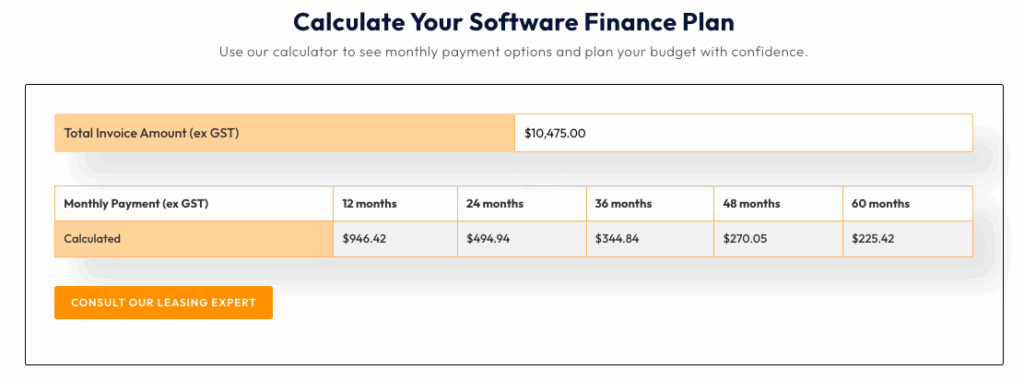
When buying an AutoCAD license upfront feels difficult, Interscale software financing provides a practical alternative.
Instead of managing a large one-time expense, the cost can be spread across predictable payments. This approach is beneficial when scaling quickly after winning new work.
Imagine your firm has just secured a contract and must immediately bring on five new drafters.
With the Interscale software financing calculator, you can activate yearly subscriptions right away and keep delivery on schedule. You can run the calculation directly on our website, as shown in the screenshot below.
Also, consider how in Australia, most software quotes are ex-GST, so factor that into the approval process from the start.
At Interscale AutoCAD software licensing service, we can help structure AutoCAD subscriptions, Flex access, LT usage, and financing around the way your team actually works.
Conclusion
The end of the AutoCAD multi user license has changed how teams approach access. Conducting a lightweight usage audit provides the evidence needed for better decisions. If you need guidance, consider discussing your AutoCAD setup with an Interscale as an Australian Autodesk partner.


