 Skip to content

In many Autodesk AutoCAD vs. AutoCAD LT discussions, a risk decision is actually hiding inside your markup workflow. The moment you’re chasing approvals or cleaning up overlapping versions under a tender clock, that difference stops being abstract. It starts costing hours, revisions, or credibility.
Too many teams overbuy what they never automate, or underinvest and pay for it in rework. Our team at Interscale saw how the real pressure is about knowing which version won’t let you down when coordination, budget, and delivery all collapse into the same deadline. This guide helps you choose based on the reality of the AEC industries in Australia.
What is AutoCAD?
AutoCAD is a comprehensive design and drafting software for 2D and 3D work. It is used across architecture, engineering, and construction for detailed documentation. Its toolsets support a wide range of specialised industry workflows.
Full AutoCAD is best for teams needing 3D modelling and advanced customisation. It handles complex models, automates sophisticated tasks, and integrates with other software. This makes it ideal for multi-discipline projects requiring detailed coordination.
What is AutoCAD LT?
AutoCAD LT is a lite version of AutoCAD, a precision 2D drafting and documentation software. It provides all the core tools needed for creating accurate technical drawings. It’s a powerful choice when the focus is purely on 2D output.
This LT version is best for roles centred on high-volume 2D deliverables. It is excellent for drafters producing floor plans, elevations, and schematics. Teams value its efficiency for standardised documentation workflows.
For Australia licence pricing of Autodesk AutoCAD and AutoCAD LT, you can refer to Interscale Autodesk AutoCAD licensing support.
Detailed Comparison of AutoCAD vs AutoCAD LT
2D vs 3D Capabilities
The main difference between AutoCAD and AutoCAD LT is 3D functionality. Full AutoCAD creates and edits 3D models with solids, surfaces, and meshes. AutoCAD LT is strictly limited to 2D drawing and documentation.
Choosing AutoCAD LT makes sense when drawings remain in flat-space coordination. However, AutoCAD becomes essential when the extra dimension prevents arguments from becoming errors. 3D capabilities accelerate decision-making when context is crucial.
Customisation and Automation
AutoCAD supports a wide range of automation options using AutoLISP, .NET, and third-party plugins. AutoCAD LT now includes limited AutoLISP support on Windows, enabling users to automate routine 2D edits. While it doesn’t offer the full customisation available in the AutoCAD complete version, the AutoCAD LT covers many repetitive drafting tasks.
For small teams working with standard layouts or markups, this AutoCAD LT capability can be enough. Where automation spans multiple files or involves data from other systems, full AutoCAD remains the better option. It allows greater control over batch processes and supports more complex scripting functions.
Industry-Specific Toolsets
AutoCAD’s specialised toolsets are one of the clearest reasons to choose the full version over AutoCAD LT. Full AutoCAD includes seven toolsets, while AutoCAD LT does not include these toolsets at all. For AEC teams, this gap can matter more than the basic 2D versus 3D comparison. Whichever version your team adopts, online AutoCAD training for beginners builds the core skills that carry across both.
The Architecture and MEP toolsets are usually the most relevant for AEC teams comparing AutoCAD and AutoCAD LT.
| AutoCAD toolset | Why it matters in AEC workflows |
| Architecture | Helps with architectural documentation, including walls, doors, windows, sections, and building layouts. |
| MEP | Supports building services documentation, including ducts, piping, electrical layouts, and mechanical coordination. |
| Electrical | Helps teams document electrical controls, circuits, panels, and related schematics. |
| Mechanical | Supports mechanical drafting workflows, parts documentation, and manufacturing-style drawing standards. |
| Map 3D | Helps teams work with mapping, infrastructure, and GIS-linked drawing data. |
| Plant 3D | Supports plant design workflows, including piping, equipment layouts, and process documentation. |
| Raster Design | Helps clean up, convert, and work with scanned drawings or raster-based legacy files. |
Autodesk’s published productivity studies in 2020 and 2022 report productivity gains of over 61% for the Architecture toolset and up to 85% for selected MEP toolset tasks, depending on the tested workflow.
That’s why, let’s say you have a 30-person building services consultancy. This means, you can use AutoCAD LT for markups, 2D drafting, and standard drawing updates.
Full AutoCAD becomes easier to justify when the same team needs MEP objects, repeatable documentation standards, or faster coordination between services drawings. At that point, the license is covering fewer manual steps in the drawing workflow.
Collaboration Tools
AutoCAD and AutoCAD LT offer cloud-based collaboration features, including Trace, Shared Views, and Autodesk Docs. These tools help stakeholders outside the CAD environment to provide feedback without changing the original file.
For teams that need to access and edit DWG files without installing desktop software, AutoCAD Web provides a browser-based alternative for everyday drafting and markup.
This approach works equally well for LT users. For example, a senior engineer, reviewing plans from the site, adds comments to a pump room layout using an iPad. The drafter receives the markup instantly, without the need to send another PDF or track edits through email.
Licensing Cost
AutoCAD LT has a lower subscription cost compared to full AutoCAD. For firms with defined scopes and routine documentation, this helps reduce licensing expenses without affecting output quality. Let’s check the table comparison below. Let’s check the table pricing of AutoCAD and AutoCAD LT below.
| License Type | AutoCAD(as of May 2026) | AutoCAD LT(as of May 2026) |
| Monthly | A$385 per month | A$100 per month |
| Annually | A$3,100 per year | A$810 per year |
| 3-Years | A$9,305 per 3 year | A$2,425 per 3 year |
| Autodesk Flex (minimum) | A$445/100 tokens | – |
For a deeper breakdown of billing terms, renewal planning, and local cost context, read our guide to AutoCAD licence price in Australia before finalising your licence mix.
System Requirements
AutoCAD LT performs well on standard business laptops and desktops. Conversely, full AutoCAD requires more memory, graphics power, and storage. This is why AutoCAD LT is easier to deploy across teams with varying devices.
Your AEC teams should review the minimum system requirements before assigning licences to avoid slow performance, and check the recommended specs for AutoCAD before buying new laptops for full AutoCAD users. If a device struggles with Revit or other GPU-intensive software, AutoCAD will likely require an upgrade.
Industry Use Cases
AutoCAD LT is great for:
- Subcontractors creating shop drawings
- Engineers documenting plans
- Firms delivering high-volume 2D packages.
AutoCAD LT fits tasks where visual clarity and drafting precision are the main requirements. For these roles, advanced modelling features may not be necessary.
AutoCAD suits professionals managing multi-discipline coordination, detailed 3D layouts, or complex template sets. Design consultants and BIM leads often choose AutoCAD for its modelling and scripting tools. Teams working with MEP, infrastructure, or fabrication workflows benefit from this added capability. For firms testing whether a free tool could cover the basics, our AutoCAD vs FreeCAD write-up weighs that option.
In one example, a Melbourne-based HVAC company reassigned two drafters to full AutoCAD to support 3D layout reviews. The change helped them resolve design clashes earlier and reduced delays in the approval process.
Which One Should You Choose?
The cleanest way to choose is to stop comparing products and start mapping roles as we can see in table comparison below.
| Choose AutoCAD LT if… | Choose AutoCAD if… |
| Your team works mainly in 2D drafting and documentation. | Your team needs 3D modelling or spatial coordination. |
| Users create floor plans, markups, annotations, layouts, and standard DWG sheets. | Users need Architecture, MEP, Electrical, Mechanical, Map 3D, Plant 3D, or Raster Design toolsets. |
| Budget control matters and advanced automation is not required. | Your workflow relies on AutoLISP, APIs, add-on apps, or batch processes. |
| Reviewers need to open, check, and comment on DWG files. | Designers need to coordinate across architecture, engineering, services, infrastructure, or fabrication inputs. |
| The work does not involve creating or editing 3D models. | The role depends on full 3D tools and broader customisation. |
AutoCAD LT fits users who mainly produce or review 2D documentation. Full AutoCAD is for users who need 3D, toolsets, automation, or cross-disciplinary coordination.
A Brisbane engineering office with six documentation users and two coordination leads may not need full AutoCAD for every seat, which the split may look like this:
- AutoCAD LT: documentation users who handle 2D drafting, markups, and standard DWG sheets
- Full AutoCAD: coordination leads who handle 3D checks, specialised toolsets, or automation
That split is often more practical than assigning the same licence to every user.
Unsure Which Version Fits Your Team?
Book a free consultation now, we help you choose the right license and provide financing solutions for licenses that suit your team’s needs.
Where to Buy the AutoCAD Full Version or the AutoCAD LT in Australia?
The best way to buy an AutoCAD license in Australia is through a local partner, like Interscale, who understands how project workflows and licensing decisions are connected. All because you need a clear path to activation, invoicing, and user assignment that fits how your team operates. That’s where most friction happens if you’re buying directly without context.
What makes a difference is support that continues after the transaction. Teams often require assistance with role-based licensing, network deployment, or reconciling usage prior to renewal, especially when moving onto named-user AutoCAD seats after the multi-user model ended. We’ve seen how this upfront alignment avoids downtime and helps firms scale licences without second-guessing.
Our team collaborates with Australian AEC companies that lack the time for trial-and-error setups. Whether you’re buying full AutoCAD or AutoCAD LT, we can tailor the terms to match your actual usage.
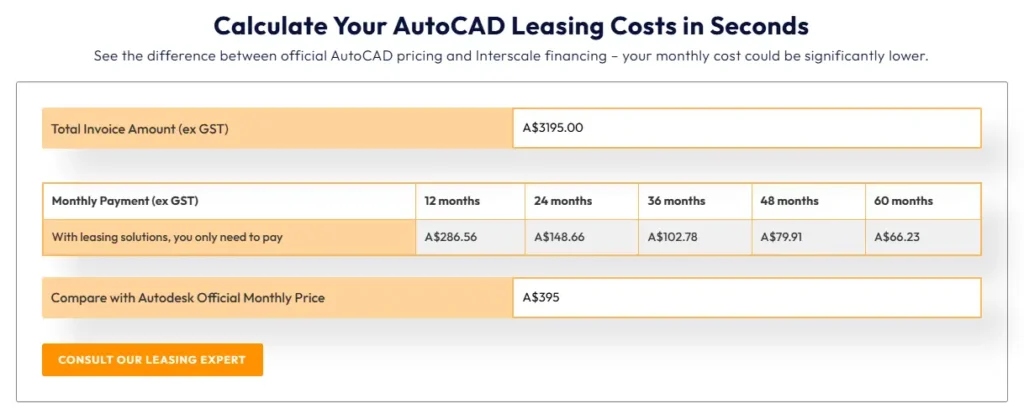
Interscale also offers financing solutions for AutoCAD software licenses. Besides avoiding the initial cost, this solution guarantees a lower monthly price than Autodesk’s official pricing.
For comparison, the monthly price for a full AutoCAD license is A$395. Our financing solutions allow you to pay just A$286.56 per month for an annual license.
Buy AutoCAD License with Financing Solutions
Get an AutoCAD license for your team with no large upfront cost, more affordable than Autodesk’s official price.
Making the Right Choice
Choosing between AutoCAD and AutoCAD LT depends on the specific needs of your project. A clear understanding of the 2D versus 3D boundary is the most crucial factor. This ensures you invest in the right level of capability.
A smart mix of licences protects both your project schedule and your budget. This is why the specialists at Interscale can guide you through your AutoCAD vs AutoCAD LT options. They make sure your software procurement is smooth and effective.


