 Skip to content

AutoCAD LT is enough when a user’s work stays within 2D DWG drafting. Meanwhile, a full AutoCAD license is the better fit when the role also needs 3D modelling, specialised toolsets, or advanced extensions.
That distinction matters more than the A$800 annual AutoCAD LT price, although it is A$2,270 lower than full AutoCAD’s annual price.
Before you buy, compare the subscription price with the actual tasks each user owns.
This article moves from current pricing and licence terms to what LT 2027 can handle, where its limits begin and how the gap affects each role’s cost. It ends with a clear selection test for LT, full AutoCAD or a mixed licence plan.
AutoCAD LT Pricing Guide
AutoCAD LT costs A$100 a month or A$800 a year in Australia, while full AutoCAD costs A$380 a month or A$3,070 a year. Autodesk also offers three-year terms, which are paid annually.
| Subscription term | AutoCAD LT | Full AutoCAD | LT Price Difference |
|---|---|---|---|
| Monthly | A$100 per month | A$380 per month | A$280 less per month |
| One year | A$800 per year | A$3,070 per year | A$2,270 less per year |
| Three years | A$2,400 total | A$9,215 total | A$6,815 less over the term |
The table highlights the price gap between AutoCAD vs AutoCAD LT as of September 2026. The subscription term simply determines how you pay that cost.
They exclude GST, freight and handling, may change without notice, and show the three-year option as three annual payments.
All new AutoCAD LT licences are subscription-based. You can choose a monthly, one-year or three-year term, although the annual option is usually better value for a user who needs LT throughout the year.
Because each subscription is assigned to a named user, Autodesk license management could help you track who needs LT, not how many office devices you own.
Each user can access the current release and three previous versions, and can install the software on different computers, provided they use only one at a time.
What Can You Do with AutoCAD LT?
With AutoCAD LT, you can handle professional 2D DWG drafting, documentation, and review across desktop, web, and mobile.
It is a practical fit when a role’s output is a coordinated 2D drawing set, because the following tools cover the drawing, reference, automation, and review work behind it:
- Create and revise 2D drawings: Draw precise geometry, organise layers, and annotate sheets with dimensions, leaders and tables.
- Build coordinated drawing sets: Use layouts, reusable blocks, Xrefs and batch plotting to prepare 2D documentation.
- Bring in common references: Compare DWGs and Xrefs, or attach and import PDF content when you need to work from existing information.
- Automate repeat work: Run AutoLISP routines and customise commands, menus, ribbons and tool palettes for repeatable 2D tasks.
- Review from other devices: Create, edit, annotate and share drawings through the included web and mobile access.
Those capabilities form LT’s core 2D workflow.
AutoCAD LT 2027 builds on that workflow with Geometry Cleanup, improved Connected References and Connected Support Files, while Smart Blocks can find and convert repeated geometry.
Autodesk Assistant is also available as a technology preview. These updates can make 2D production easier, although they do not add full AutoCAD’s 3D or specialised capabilities.
What Can’t You Do with AutoCAD LT?
With AutoCAD LT, you won’t be able to work with 3D models, specialised toolsets, advanced extensions, or integrated project data.
It remains a 2D drafting product, so these limits matter when a user must work beyond drawing documentation:
- Native 3D modelling: LT can produce 2D isometric drawings, but it cannot create AutoCAD’s solid, surface, or mesh models.
- Specialised toolsets: LT does not include any of full AutoCAD’s seven discipline-specific toolsets.
- The full extension stack: LT supports AutoLISP and limited customisation, but it leaves out ObjectARX, managed .NET libraries and the Visual LISP IDE. It also does not include macros or Autodesk App Store access.
- Advanced project data: Autodesk lists point-cloud editing and integrated coordinated BIM model workflows for full AutoCAD, not LT.
That boundary can stay hidden in simple 2D work, although it becomes material when a consultant file, plug-in or automation requirement enters the project.
Before assigning LT to a role, check the extensions, reference files and deliverables that the user must handle.
AutoCAD LT Cost vs Your Actual CAD Requirements
AutoCAD LT saves money only when it covers every recurring CAD requirement assigned to a user.
The following table separates routine 2D work from the capabilities that require the full product.
| Actual drafting requirements | AutoCAD LT | Full AutoCAD | What It Means for Cost |
|---|---|---|---|
| Create, edit and annotate 2D DWGs | ✓ | ✓ | Choose LT when this defines the role. |
| Use blocks, Xrefs, layouts and PDF references | ✓ | ✓ | LT covers the normal 2D documentation workflow. |
| Run standard AutoLISP routines | ✓ | ✓ | AutoLISP alone does not justify a full licence. |
| Review and edit through web or mobile | ✓ | ✓ | Either edition supports this requirement. |
| Create or modify native 3D geometry | ✕ | ✓ | Choose full AutoCAD for the user who owns this work. |
| Use an included Architecture, MEP or other specialised toolset | ✕ | ✓ | Choose full AutoCAD for the relevant discipline. |
| Use ObjectARX or managed .NET development, the Visual LISP IDE, or App Store extensions | ✕ | ✓ | Confirm the extension’s requirements, then choose full AutoCAD if needed. |
| Edit point clouds or integrate coordinated BIM models | ✕ | ✓ | Choose full AutoCAD when this is part of the deliverable. |
Kindly note that a cross does not automatically mean every user needs full AutoCAD.
So, LT can still fit when another named user formally owns that task. However, where the hand-off is frequent or informal, the lower licence price can return as extra coordination time.
Once you have mapped those requirements to named users, request AutoCAD licensing options to price the right mix of LT, full AutoCAD and AEC Collection licences.
Is AutoCAD LT Worth It for Your AEC Firm?
AutoCAD LT is worth it for roles limited to recurring 2D delivery, while full AutoCAD suits roles whose advanced tasks are part of their regular responsibility.
The tricky part is that job titles can hide very different work, make the decision from each user’s actual deliverables.
Consider to choose AutoCAD LT when all of these conditions apply:
- The user creates, revises and issues 2D DWG drawings.
- Their workflow uses standard 2D documentation tools such as layers, blocks and Xrefs.
- Required automation can run through the AutoLISP capability available in LT.
- They do not own 3D modelling, specialised toolset, point-cloud or advanced extension tasks.
When all four conditions hold, LT is the appropriate lower-cost license.
If the gap is using its 2D tools consistently rather than accessing a capability LT lacks, a structured AutoCAD training can address the skills issue without an unnecessary licence upgrade.
Typical fits include documenters, site reviewers and consultants producing straightforward 2D details.
Then, choose full AutoCAD when any of these requirements recur:
- The user creates, edits or visualises native 3D geometry.
- Their discipline depends on Architecture, MEP or another included specialised toolset.
- Their workflow requires a plug-in, API or routine that LT cannot run.
- They integrate point clouds or coordinated BIM models into CAD production.
These requirements often sit with CAD managers, advanced designers and discipline specialists who own those functions.
If those users also rely on Revit and other Autodesk applications, compare the Autodesk AEC collection package before buying standalone subscriptions.
For Australian AEC firms, this leads to a mixed plan: You can use LT for defined 2D roles and keep full AutoCAD with the people who own advanced work.
Interscale Helps You Choose the Right One
When a tender or newly awarded project calls for 2D drafting, 3D coordination or BIM deliverables, a capability gap can surface after the team has already been assigned.
Reviewing the role mix before renewal or project start gives your firm a clearer basis for budget approval and licence allocation.
Interscale’s software licensing and consulting review separates recurring requirements from occasional preferences.
As an Autodesk reseller in Australia, Interscale can then provide a role-based licence recommendation and quote.
Once the licence mix is clear, use our software license calculator to model payment options against the ex-GST invoice amount.
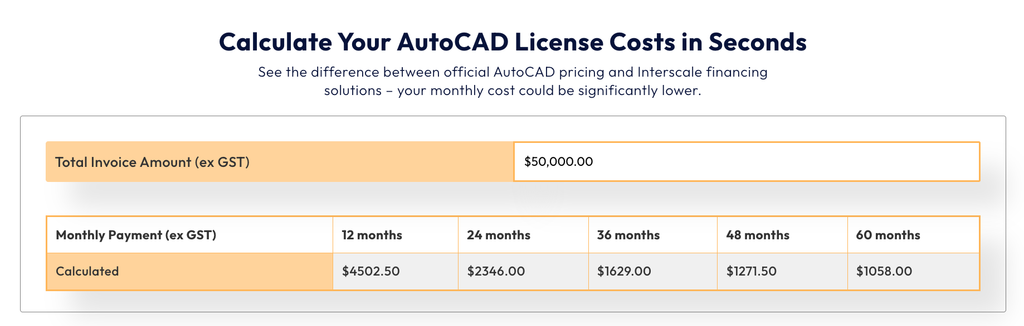
This calculator helps you plan the budget for the selected configuration, while the review confirms which licences belong in it.
Prefer a role‑by‑role review before looking at the pricing of AutoCAD, the AEC Collection, or AutoCAD LT? Book a free discussion with our team.


