 Skip to content

A security operations centre (SOC) gives your business an organised way to monitor threats and respond when preventive controls are bypassed.
However, the term can describe an internal team, an outsourced service or a hybrid function.
For Australian AEC decision-makers, the question is whether your existing antivirus and firewall controls are supported by ongoing detection, investigation and response.
The answer helps determine whether an internal, managed or hybrid SOC model is the better fit.
What is a Security Operations Center (SOC)?
A security operations centre is a centralised function that monitors, detects, investigates and responds to cyber threats across an organisation’s technology environment.
The centre may be a physical room, a distributed team or an outsourced service, and its operating hours depend on the coverage model. For many Australian firms the outsourced route means folding SOC coverage into the right managed IT service provider.
As comparison, the cyber security fundamentals cover the broader controls and practices used to protect systems and information.
A SOC is the operating function that turns security activity into investigation and response.
That is why it is often confused with related terms, even though each describes a different part of the security environment. However, the related terms are not interchangeable:
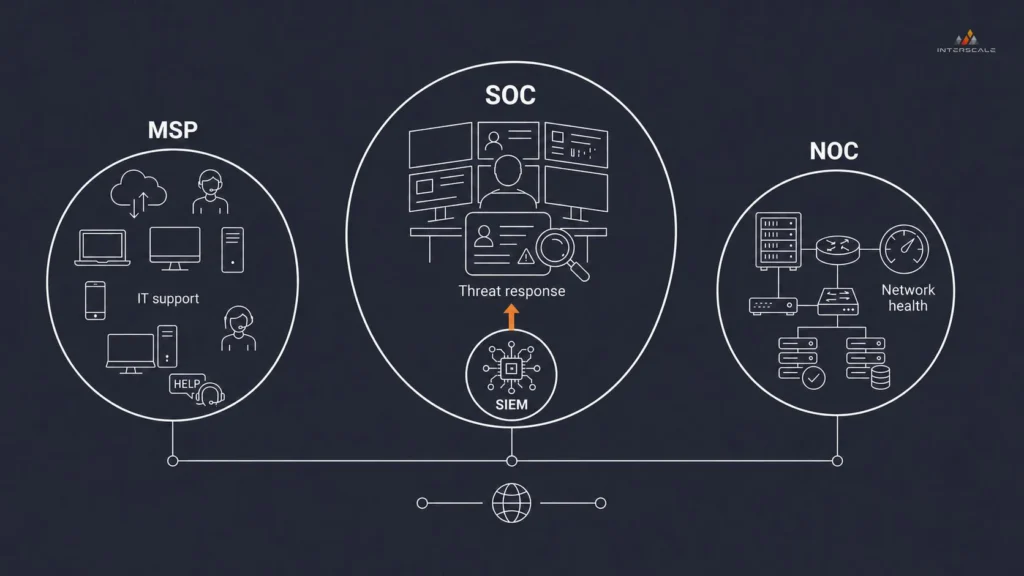
- A SIEM (Security Information and Event Management) is a software platform used to collect and correlate security data
- An MSP manages broader technology operations
- A managed SOC has a defined security monitoring, investigation and response scope.
A SOC is the security operating function. SIEM supports it as a tool, while NOC and MSP functions remain distinct.
What Does a SOC do? Core Functions
A SOC collects security signals, triages suspicious activity, investigates credible events and coordinates incident response.
Alongside that work, it searches for missed threats, refines detections and records outcomes. The workflow begins with the data the SOC can see.

A SOC turns separate identity, endpoint, email and cloud events into a case before it contains the threat or escalates a decision.
Monitoring and Data Collection
Monitoring and data collection give a SOC the telemetry needed to identify potentially malicious activity across the agreed environment.
Log collectors or platform connectors send selected events from identity services, endpoints, email, firewalls, servers and cloud platforms into a central location. As AI tools spread across project teams, AI usage monitoring belongs in that scope too, because standard logs rarely show prompts or uploads.
The data needs consistent timestamps, user or device identifiers, source and destination details, and enough retention to connect activity across systems during an investigation.
Threat Detection and Triage
Advanced threat detection and triage use correlation rules, behavioural analysis and threat intelligence to identify patterns that may indicate malicious activity.
A SIEM, EDR or XDR platform can raise an alert when events match a detection rule, such as an unusual sign-in combined with suspicious endpoint activity.
Triage adds the business and technical context needed to rank the alert, close a false positive or escalate it for deeper investigation.
Investigation and Scoping
Investigation and scoping help determine whether an alert represents a genuine incident and clarify its technical and business impact.
Analysts review the alert timeline, related logs, affected identities, hosts, network connections, and any signs of privilege escalation or lateral movement.
They then identify which assets are affected, the likely entry point, how far the activity has spread, and any systems or projects that may need protection.
Incident Response and Containment
Incident response and containment aim to limit the spread and impact of a confirmed security incident through approved actions.
Depending on the agreed level of authority, analysts may isolate a device, suspend an account, revoke active sessions, block an IP address or preserve evidence for follow‑up. In cloud environments, that same discipline runs through AWS incident response with defined ownership and escalation paths.
The response playbook should set out which actions the SOC can take immediately, when approval is required, and who is responsible for eradication, recovery and communication.
Threat Hunting, Tuning and Reporting
Threat hunting, tuning and reporting help improve the SOC’s ability to detect recurring and previously unseen activity over time.
Threat hunters form hypotheses, run telemetry searches and apply relevant intelligence to look for indicators that may not have generated an alert.
Detection rules, exclusions and response playbooks are then refined, while reporting documents investigations, response actions, recurring risks and any gaps in coverage.
Please remember, the SOC does not automatically own every corrective action. It may contain a threat and pass patching, system restoration or user support to internal IT, an MSP or another provider.
A managed SOC agreement should state where monitoring ends and remediation begins.

A defined handoff keeps investigation and authorised containment with the SOC, while approval, communication and recovery have named owners.
Who Works in a SOC? Team Roles and Structure
A SOC is usually led by a security operations manager and staffed by analysts, engineers and incident responders, with threat hunters added where the operating model requires them.
Larger centres often divide analyst work into tiers, while smaller or managed teams may combine several roles.
| SOC role | Core responsibility |
| SOC manager or security operations lead | Sets priorities, coverage, escalation paths, service levels and reporting expectations. |
| Level 1 analyst | Reviews alerts, gathers initial context, closes false positives and escalates credible events. |
| Level 2 or Level 3 analyst | Performs deeper investigation, scopes affected assets and recommends or coordinates containment. |
| Detection or SIEM engineer | Connects data sources, builds detection rules, tunes alerts and maintains automation playbooks. |
| Incident responder | Leads containment, eradication and recovery coordination for confirmed incidents. |
| Threat hunter or intelligence analyst | Searches proactively for suspicious behaviour and turns relevant intelligence into improved detections. |
Across these roles, you need to remember that job titles matter less than named ownership.
Even with an outsourced SOC, your business still needs an internal point of contact who understands project priorities.
That person approves disruptive actions and coordinates legal, client and operational decisions.
The Tools and Technology Behind a SOC
The tools and technology behind a SOC typically include SIEM or log management, EDR or XDR, SOAR, threat intelligence and case‑management tools.
These tools exist to collect security data, investigate suspicious activity and coordinate authorised response actions.
Each layer contributes something different, so your platform mix should reflect the environment being monitored and the actions analysts are allowed to take. Here’s a quick breakdown.
| Technology layer | What it contributes | What your team should define |
| SIEM or log management | Centralises security logs and correlates related events to identify activity that needs attention. | Included log sources, ingestion limits, retention periods and detection rules. |
| EDR or XDR | Detects suspicious endpoint or cross-system activity, provides investigation detail and may enable containment actions. | Covered workstations, servers, identities and cloud services. |
| SOAR | Enriches alerts and runs approved response steps through playbooks and workflow automation. | Which actions can run automatically and which require analyst or business approval. |
| Threat intelligence and detection content | Adds context about malicious infrastructure, behaviours and techniques that may be relevant to an alert. | Who validates relevance, updates detection logic and removes outdated content. |
| Case management and reporting | Records evidence, decisions, escalations, response actions and service performance. | Ticket access, report frequency, escalation paths and evidence-retention requirements. |
For an AEC firm, identity and endpoint telemetry are usually the starting point because compromised accounts and workstations can affect many business and project systems.
Email, network access and cloud platforms can add context where they support a defined detection or investigation use case.
Project systems should be included only when their logs provide useful security visibility and the firm can act on the resulting alerts.
SOC vs NOC: What’s the Difference?
A SOC protects systems and information from malicious activity, while a network operations centre (NOC) maintains network availability and performance.
Both monitor technology, but their objectives, signals and actions differ. We can look at each area in turn.
| Comparison | SOC | NOC |
| Primary objective | Detect, investigate and respond to cyber threats. | Keep networks and infrastructure available and performing. |
| Typical signals | Security alerts, identity events, endpoint activity, logs and threat intelligence. | Availability, latency, capacity, device health and connectivity. |
| Typical action | Validate a threat, isolate an asset, disable access or activate incident response. | Restore a connection, replace a failed device or resolve performance degradation. |
| Operating result | Security events are assessed and incidents are contained or escalated. | Services remain stable or are restored within operational targets. |
In practice, your teams can share telemetry and escalation paths:
- A NOC may notice unusual traffic, while a SOC determines whether it represents an attack.
- An MSP may provide a help desk or NOC function, but that does not create a SOC unless security detection, investigation and response are explicitly included.
SOC Models: In-house, Outsourced (Managed), and Hybrid
SOC models assign security operations to an internal team, a managed provider or a combination of both.
The choice determines who provides the people and tools, who delivers continuous monitoring and who makes response decisions.
Each option has its own benefits. For example, managed cyber security services can bundle SOC functions with other security activities, so the service name alone does not establish what is included.
The following table compares the coverage and responsibility model.
| SOC model | How it works | Strongest fit | Main trade-off |
| In-house SOC | The organisation employs the team and operates the platforms, processes and coverage. | Businesses with sufficient scale, specialist staff and a strong need for direct control. | High staffing, tooling, training and after-hours coverage burden. |
| Outsourced or managed SOC | A provider monitors agreed systems and performs contracted investigation, escalation and response tasks. | Businesses that need specialist or 24/7 capability without building the full function internally. | Less direct control and a greater need for precise scope, integrations and escalation rules. |
| Hybrid SOC | Internal staff retain selected decisions or daytime work while a provider supplies specialist functions or extended coverage. | Businesses that have security ownership but need more depth, capacity or after-hours support. | Handoffs can fail unless responsibilities and shared workflows are explicit. |
So please, before choosing an outsourced or hybrid model, your team should define:
- Which assets, identities, cloud services and log sources are monitored;
- Whether coverage is business‑hours, after‑hours or 24/7;
- How alerts are prioritised and the response times for each severity;
- Whether the provider can contain threats or only notify your team;
- Which incident response, forensics and recovery activities are included; and
- Who owns tuning, remediation, reporting, data retention and service exit.
Because your decision is ultimately about operating capability rather than the SOC label.
For example, an outsourced service can reduce the internal staffing load, but your organisation remains responsible for business decisions, provider oversight and the controls outside the contract.
That decision becomes much easier once you can see which monitoring and response responsibilities are currently uncovered.
But, not sure where your security gaps are?
You can start by building a clear picture of your current posture across endpoints, cloud services and project systems. A managed IT provider for small businesses can run that baseline for you when an in-house SOC is not realistic. And that’s how we can help you.
Our expert team can assess telemetry coverage, alert‑triage ownership and containment authority across your environment before you choose a SOC model.
See Cybersecurity Services
What Australian Businesses Need to Know About SOC
For Australian businesses, a SOC should add ongoing detection, investigation and response to cybersecurity controls such as the Essential Eight.
It can also create incident and monitoring evidence for client reviews or tenders, but that evidence still needs to match the specific requirement being assessed.
What to Define Before Choosing a SOC Model
Before choosing an in-house, managed or hybrid SOC model, we suggest defining four operating areas that determine whether the capability can work within your environment.
| Operating area | What we suggest defining | Why it matters for AEC firms |
| Control alignment | Identify which preventive controls the SOC monitors and which events may indicate that those controls have been bypassed. | SOC monitoring can support your security posture, but it does not prove Essential Eight alignment by itself. |
| Monitoring coverage | Prioritise relevant telemetry from identities, endpoints, email, networks and cloud platforms. | Include project systems only when their logs support a defined detection or investigation need. |
| Response authority | Agree which actions analysts can take immediately, which require approval and who remains available outside business hours. | Isolating a workstation or disabling an account may interrupt live project delivery. |
| Assurance evidence | Define how long logs, investigation notes, response actions and service reports must be retained. | Evidence should map directly to client, tender or assessment requirements. |
If these responsibilities do not have reliable internal ownership, especially outside business hours, we suggest considering a managed or hybrid SOC to close the identified monitoring and response gaps.
When a Managed SOC Is the Better Fit?
A managed SOC is the better fit when your business needs continuous monitoring and response but cannot sustain specialist staffing, security tooling and operating coverage in‑house.
An in‑house model suits firms with dedicated capacity, while a hybrid model suits teams that retain internal ownership but need selected after‑hours or investigation support.
When alert review and containment responsibilities are split or unclear, suspicious activity can remain unresolved while teams decide who should act.
For an AEC firm, that delay can pull IT staff away from active projects and make incident decisions harder under pressure.
You can get 24/7 security monitoring without building a SOC in‑house through a structured managed cybersecurity service from Interscale.
As an IT services provider for AEC, Interscale delivers managed security monitoring and response built for Australian environments — so your team stays focused on projects, not alerts.
Explore Managed Security Services from Interscale.


