 Skip to content

BYOD allows staff and consultants to use their own phones or laptops for work. For AEC firms, that can make it easier to access email and project platforms from the office, site or home.
The challenge is keeping project data secure when those devices sit outside your standard IT setup. So, what should your firm put in place before allowing BYOD?
Let’s break down the fundamentals, policy, risks and security practices that matter.
What Is BYOD (and How It Works)
BYOD, or bring your own device, is an organisational approach that permits people to use personally owned devices for authorised work using enterprise mobility management.
These devices connect to organisational networks, data and resources, so BYOD is an access model rather than a hardware preference.
In an AEC firm, BYOD can cover several levels of access:
- A personal phone might receive email and multifactor authentication prompts.
- A tablet might open site documents or record defects.
BYOD laptops might run collaboration, estimating or authoring tools and store working files locally. Each level creates a different risk, so one approval rule should not cover every device and task.
At the operating-model level, enterprise mobility management coordinates identities and applications. It also sets the information rules and device controls behind access.
A user signs in, the platform checks the applicable conditions and only approved applications or sessions receive business data.
The safest design starts with the resource being accessed; Email may be allowed through a protected app on an unenrolled phone, while a live BIM model may require a fully managed laptop or virtual desktop.
The Benefits of a BYOD Approach
A controlled BYOD approach can improve mobility, user choice and onboarding speed, particularly for distributed teams and short-term consultants. The practical gains usually fall into four areas:
- Faster access for mobile work: Staff can review email, mark-ups or approvals while moving between the office, site and home.
- Quicker consultant onboarding: A consultant may gain limited access to approved applications without waiting for a fully configured device, provided the project and client permit that model.
- User familiarity: People already understand their own device settings and accessibility features.
- More targeted device spending:The firm can reserve high-spec company hardware for BIM authoring, rendering or sensitive projects while allowing lower-risk mobile tasks on approved personal devices.
These benefits appear when the firm limits access by role and data type, rather than allowing any device to reach every project system.
But, please note that BYOD does not automatically reduce total IT cost. Lower device spending may be offset by management licences, support, monitoring and reimbursement. Personal hardware also varies, which can increase diagnosis time.
BYOD Security Risks and Challenges
The main BYOD risk is losing consistent control over personal devices that can access project systems and data.
For your AEC firms, that can affect where project files are stored, how securely devices are configured, what IT can manage on personal hardware and how access is removed after loss or departure.
Uncontrolled Copies of Project Data
Local downloads, screenshots, email attachments and sync tools can create copies outside the project’s approved common data environment.
A drawing sent to a personal email account may also bypass revision control and leave the firm unable to prove which version was used.
Your policy should therefore define where each data class may be viewed, edited, downloaded or shared.
Sensitive client material may need browser-only access, protected applications or a virtual desktop that keeps the working file inside the controlled environment.
Inconsistent Device Security
Effective endpoint security reduces the gap between a permitted device and a trustworthy one.
Unsupported systems, shared accounts and local administrator rights can expand the attack surface. Unsafe browser extensions and missing security tools add further risk.
For reference, ASD advises organisations that corporately managed devices are more secure than unmanaged personal devices. We also suggest you make a BYOD policy where personal devices are allowed.
That supports a clear decision rule: if IT cannot measure or enforce the required condition, the device should not receive that level of access.
Blurred Ownership and Privacy
BYOD blurs ownership and privacy because the firm must control business data on a device that belongs to the user.
Staff should know what IT can and cannot see. They also need to know what data is collected and whether selective or full wipe is possible.
Weak Offboarding and Incident Response
The main offboarding and incident-response risk is that project access or business data can remain active after a person leaves or a device is lost or compromised.
When a person leaves, loses a device or changes roles, disabling the main account may not remove every copy or session.
Your process needs a named owner, a rapid reporting route and evidence that access and business data were removed.
What a BYOD Policy Should Include
A BYOD policy should define who may use personal devices, what they may access, the controls they must accept and what happens during an incident or departure.
It should be short enough for staff and consultants to use, then supported by technical standards that IT can test.
Before you approve a single personal device, check whether your BYOD policy answers every decision in this table.
| Policy area | What to define for an AEC firm |
| Scope and eligibility | Approved employees, consultants and roles; permitted device types; client contracts, project security plans or confidentiality requirements that restrict BYOD |
| Device and access tiers | Separate rules for phones, tablets and laptops; protected email access versus downloading tender documents, project files or federated models |
| Acceptable access | Approved apps and services; data that may be viewed, edited or downloaded; restrictions on personal email, storage, messaging and generative AI tools |
| Minimum device condition | Supported operating system, patch level, screen lock, encryption, security software, no shared accounts and rules for administrator access |
| Identity and access | Individual accounts, multifactor authentication, conditional access, least privilege and periodic access reviews |
| Monitoring, privacy and acknowledgement | Information IT can collect, actions IT can take, selective or full-wipe conditions, privacy boundaries and signed acknowledgement before access |
| Costs and support | Who pays for hardware, mobile data and required software; whether IT supports the whole device or approved work apps only |
| Incident and exit process | Reporting channels and timeframes, access suspension, selective wipe, evidence preservation and offboarding checks |
The policy records these decisions, while your technical controls must enforce them.
BYOD Security Best Practices
BYOD security best practices form a lifecycle that covers planning, access control, data protection, security baselines and incident response.
Together, these stages give your firm a repeatable framework for managing personal devices from approval through removal. The lifecycle begins by deciding which roles and data are suitable for BYOD.
Start with Roles and Data
Always start by deciding which roles and data are suitable for BYOD before choosing the technology.
Separate low-risk communication from personal information and commercial documents. Credentials, building security details and valuable design intellectual property may require tighter access.
These distinctions keep exceptions narrow and make approvals easier to defend. For example:
- A subcontractor may only need one project workspace for eight weeks.
- A director may need email and approvals on mobile.
- A BIM coordinator working across live models may require a company-issued or fully managed workstation.
Enforce Identity and Access Conditions
Require individual accounts, multifactor authentication and least privilege for every BYOD user.
Conditional access can then block or limit a sign-in when the device, app, user risk or location fails the firm’s rules.
However, please do not use a trusted user as a substitute for a trusted session.
Credentials can be stolen, and a legitimate account on an unsafe device can still expose sensitive data. Review access at project milestones and remove dormant guest or consultant accounts.
Separate and Encrypt Work Data
Separate work data from personal apps and storage, then encrypt it in transit and at rest.
You should apply data encryption in transit and at rest. Block transfers to personal storage where supported, then set rules for printing, screenshots and offline access.
Backups also need a boundary. Personal backup services should not receive project files simply because the device owner uses them for photos or documents.
Business recovery should rely on the firm’s controlled repositories and retention settings.
Apply a Measurable Security Baseline
Use your Essential Eight compliance work to define a measurable security baseline for supported Windows laptops and the systems they access.
Relevant controls include patching, application control, macro settings and user application hardening.
They also cover restricted administrator privileges, multifactor authentication and protected backups.
However, the Essential Eight was designed for internet-connected IT networks rather than enterprise mobility, so it does not approve a BYOD design by itself.
Document personal devices that sit inside the assessment scope, any exceptions and the compensating controls.
As an IT services for AEC, we also recommend a risk-based implementation with exceptions minimised, approved and reviewed.
Because, ideal mobility-specific guidance should cover device encryption and work-personal separation. It should also address remote removal, secure lock screens and approved applications.
Prepare for Loss, Compromise and Exit
Prepare for lost or compromised devices and user departures by assigning who suspends access, assesses exposed data and communicates with clients.
It should also state what evidence must be retained to support your incident response plan. Test selective wipe and account revocation before relying on them.
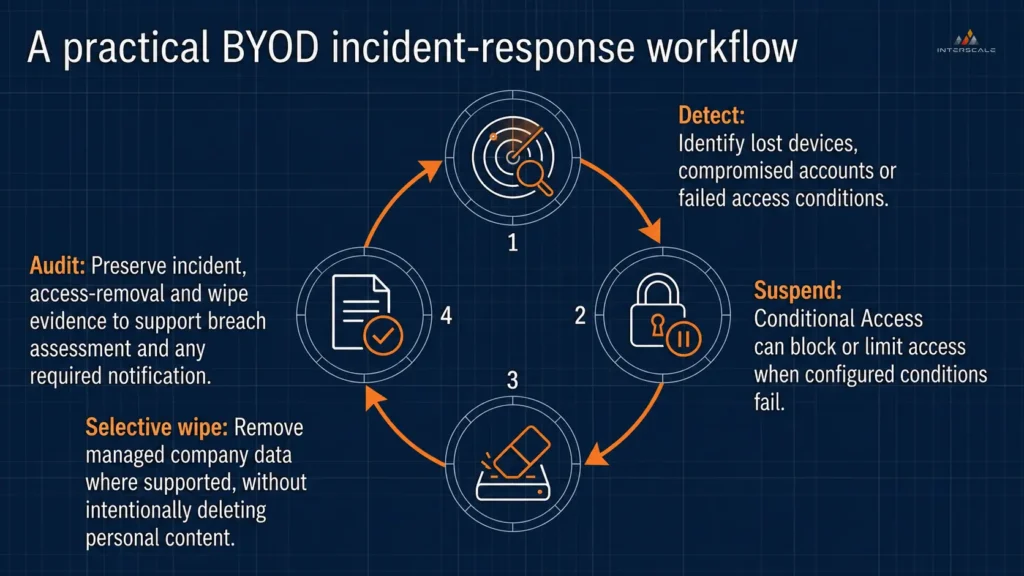
A defined response path helps your team detect a failed condition, suspend access, remove managed work data and retain evidence.
If ongoing monitoring or response exceeds your internal capacity, consider using a structured managed security that can provide a defined operating option.
Confirm its scope against your device fleet, project systems and response responsibilities rather than assuming every personal endpoint is covered.
Managing BYOD with MDM and Enterprise Mobility Management
You can use mobile device management for device-level control and enterprise mobility management to coordinate devices, applications, identities and data across your wider BYOD program.
That’s why you should choose the least intrusive management layer that still protects the access and project data involved.
| Management layer | Best fit | Main control |
| MDM | A device needs broader access to project systems or sensitive data | Device settings, compliance checks and remote actions |
| Application management | A user only needs approved email, file or collaboration apps | Business data inside supported apps without managing the full device |
| EMM | Staff, consultants and mixed device types need consistent governance | Identity, applications, devices, data and policy |
Also, we suggest applying these layers through three practical checks:
- Match control to access: Limited app access may only require application controls, while broader access to project systems may justify full device enrolment.
- Set privacy boundaries: Tell device owners what IT can view, which settings it can enforce and what business access or data it can remove.
- Pilot the complete workflow: If your firm uses Microsoft Intune MDM, test enrolment, access denial, user support, incident handling and offboarding before wider rollout.
BYOD, the Privacy Act and Australian Compliance
If the Privacy Act 1988 applies to your AEC firm, personal information accessed through BYOD remains subject to the same privacy duties as information accessed through company-owned devices.
We suggest treating every approved personal device as part of your privacy, access-control and breach-response processes.
Four compliance checks keep that responsibility manageable:
| Compliance check | What it means for BYOD | What you should focus |
| Privacy Act coverage | The Act generally covers organisations with annual turnover above A$3 million and some smaller organisations or activities. | Confirm whether your firm and the information it handles fall within scope. |
| APP 11 protection | Covered firms must take reasonable steps to protect personal information from loss, misuse and unauthorised access or disclosure. | Control access, protect work data and prevent uncontrolled copies on personal devices. |
| Device-owner privacy | BYOD controls may collect device information or allow IT to monitor and remove business access. | Explain what IT can see or remove, limit administrator access and retain only necessary device data. |
| Breach response | Covered firms may need to assess and report an eligible breach involving serious harm. | Prepare a response for lost or compromised devices, including the 30-day assessment period where applicable. |

For firms covered by the Privacy Act, a lost or compromised personal device may trigger APP 11 protection and NDB assessment duties when personal information is exposed.
Privacy Act coverage should not be your only check. Client contracts, confidentiality terms and state or territory requirements may still affect how project and personal information is handled.
Ideally, you can mapping those obligations before setting your access, storage and offboarding rules.
Put Your BYOD Policy into Practice with Interscale
As you might expect, writing a BYOD policy is only the first step. The harder part is applying its rules consistently across personal devices, project applications and consultant access.
When enrollment, security and offboarding are handled separately, staff may find workarounds while IT loses visibility over project data.
Your policy can look complete while remaining difficult to enforce.
That is where Interscale can help you turn policy decisions into a workable BYOD model.
With our structured enterprise mobility management for AEC firms, you can apply consistent device, application and access controls while retaining the flexibility your team needs.
If ongoing support, monitoring and access management add pressure to your internal team, Interscale managed IT services can help maintain those controls after rollout.
Or, simply book a free discussion with the Interscale team to map your BYOD policy to the controls and support your firm needs.


