Autodesk Forma is Autodesk’s cloud direction for connecting early design, BIM coordination, project data, and construction workflows across the AEC lifecycle.
For Australian architecture, engineering, and construction teams, the question is where it belongs in the software stack, especially when a firm already works with Revit, Civil 3D, AutoCAD, Autodesk Docs, BIM Collaborate Pro, or the AEC Collection.
That question matters because early design decisions rarely stay early for long. A massing option can shape planning discussions, consultant inputs, BIM setup, tender assumptions, and handover expectations. If those decisions sit outside the controlled project workflow, the team may gain speed at the start and lose clarity later.
Forma is best understood as a cloud layer around design and delivery workflows, and we’re gonna break it down in this article.
What is Autodesk Forma?
Autodesk Forma is Autodesk’s AECO industry cloud for connecting design, construction, and project data workflows across the built environment lifecycle.
For Australian AEC teams, the simplest way to understand Forma is to separate the platform from the products inside it:
- Forma is now the broader cloud direction.
- Forma Site Design is one product within that direction.
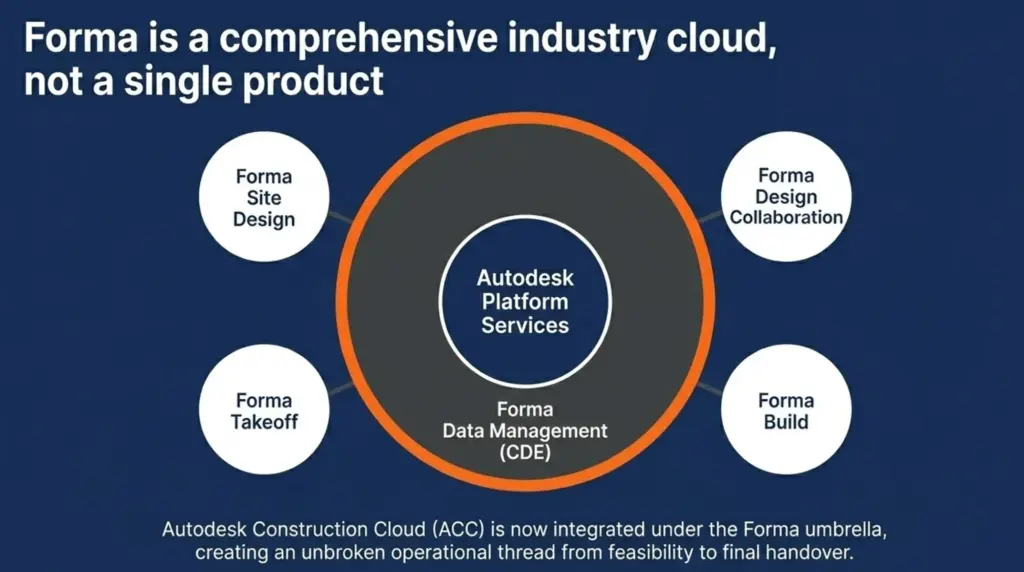
- Autodesk Construction Cloud has also joined Forma, with familiar ACC products continuing under new Forma names.
Autodesk Forma Now Means Three Things
In 2026, the word “Forma” can refer to different parts of Autodesk’s AEC cloud environment, so it helps to separate the meaning before judging whether the tool fits your firm.
| Forma meaning | What it means | Why it matters |
| Autodesk Forma | The broader AECO industry cloud | This is the platform direction across design, construction, and project data |
| Forma Site Design | The early-stage site and design tool | This supports feasibility, massing, area studies, and early analysis |
| ACC under Forma | Autodesk Construction Cloud rebranded under Forma | Existing ACC-style workflows continue under new Forma product names |
This is why a conversation about Forma can become confusing. One person may be talking about early design. Another may be talking about document control, model collaboration, RFIs, submittals, or construction records.
Is Forma Replacing Autodesk Construction Cloud?
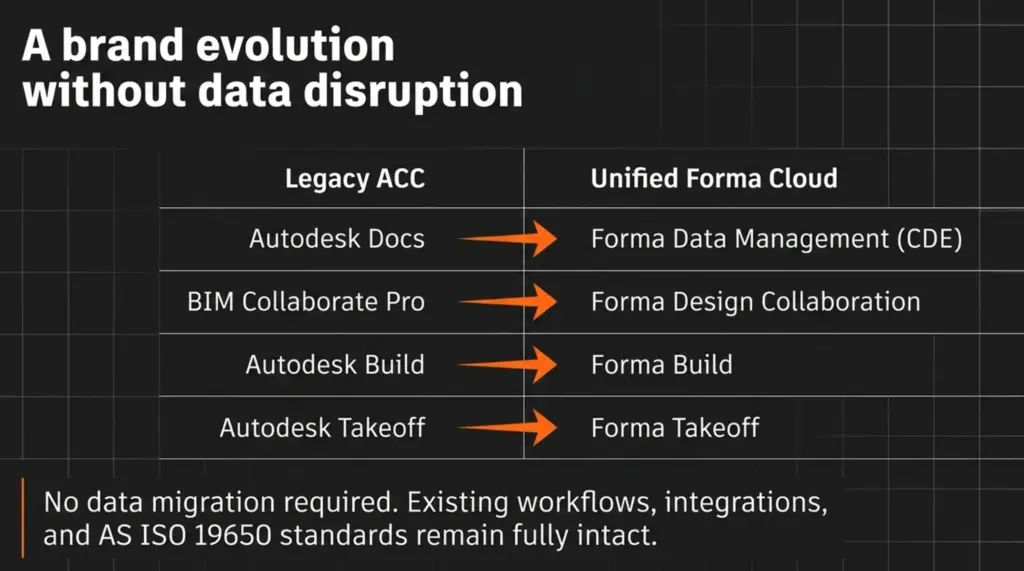
Autodesk Construction Cloud has joined Autodesk Forma, so ACC is now part of the Forma industry cloud direction. But please remember that does not mean Australian firms should treat Forma as a sudden migration away from ACC.
The safer reading is that Autodesk has moved the ACC brand and product family under Forma, while the core delivery workflows continue under updated names.
| Previous ACC name | Current Forma direction |
| Autodesk Docs | Forma Data Management |
| BIM Collaborate Pro | Forma Design Collaboration |
| Autodesk Build | Forma Build |
| Autodesk Takeoff | Forma Takeoff |
For existing ACC users, the focus is not whether all workflows must be rebuilt. The better question is whether document control, model coordination, issues, reviews, RFIs, submittals, and project records are still being managed clearly under the updated Forma structure.
What Does Forma Do in Early Design?
Forma Site Design helps project teams test early site and building options before the model becomes a detailed BIM authoring task.
A design team may use it to test massing, area yield, orientation, site context, and early environmental signals. That can help a director, architect, or design lead compare options before committing too much Revit modelling time.
The boundary still matters. A massing study in Forma is not the same thing as a coordinated BIM model. Once the preferred option moves forward, the team still needs Revit setup, model standards, coordinates, documentation rules, and consultant coordination.
What Does Autodesk Forma Include?
Autodesk Forma includes early design, building design, data management, design collaboration, construction management, and takeoff capabilities under one cloud platform direction.
The important point is not that every firm needs every Forma capability. The practical question is which part of Forma supports the workflow your team is trying to improve.
The Main Parts of Autodesk Forma
Forma is easier to understand when the capabilities are grouped by project function, rather than read as one long software list. Let’s break down the main parts of Autodesk Forma in the table below.
| Forma capability | Main role | Where it usually fits |
| Forma Site Design | Early site planning and option testing | Feasibility, massing, area studies, early analysis |
| Forma Building Design | Early building design exploration | Concept and schematic design before detailed BIM |
| Forma Data Management | Common data environment and document control | Files, reviews, issues, transmittals, and project records |
| Forma Design Collaboration | Model sharing and BIM coordination | Multi-discipline coordination and model exchange |
| Forma Build | Construction management workflows | RFIs, submittals, issues, field records, and site delivery |
| Forma Takeoff | Quantity takeoff support | Estimating, tender checks, and model-based quantity review |
As you see, the Forma should not be judged as one single tool. Because, for example, a design lead may care about Site Design, while a BIM manager may care about Design Collaboration, and a contractor may care more about Build or Takeoff.
Where Forma Starts for Design Teams?
Forma Site Design is usually the most immediate starting point for architects and early-stage design teams.
It helps teams test site options, building mass, orientation, area yield, and early performance signals before a detailed Revit model is built. That can be useful when a project is still moving through feasibility, client review, or planning discussion.
However, the output still needs discipline. Once an option moves forward, the team should check coordinates, levels, model origin, naming, and what information should be rebuilt or carried into Revit.
Where Forma Becomes a Project Information Tool?
Forma becomes more than an early design tool when project information needs to be controlled across more people and stages.
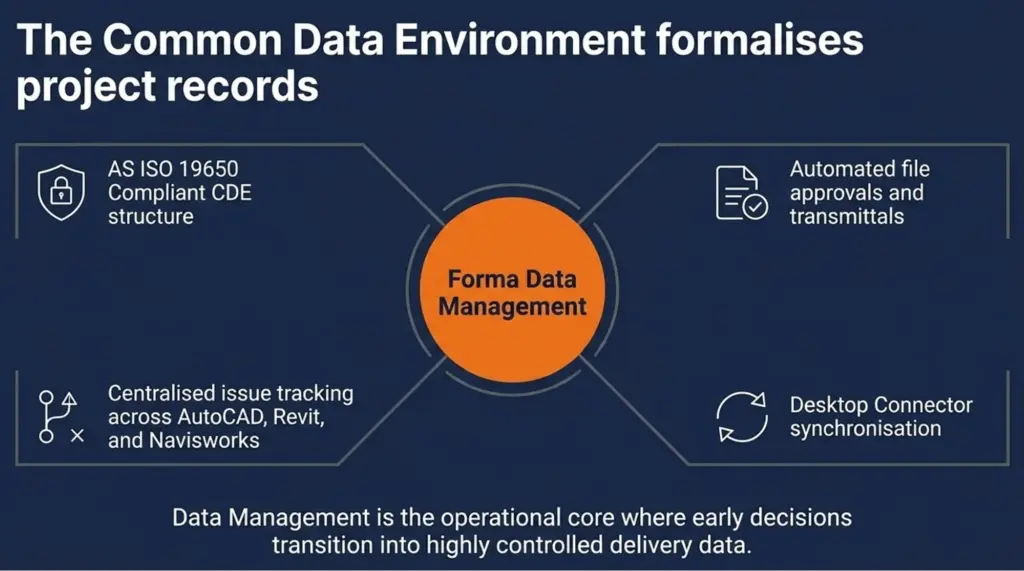
Forma Data Management supports the common data environment side of the workflow. That is where files, issues, reviews, permissions, transmittals, and project records need structure.
For Australian teams working across consultants, contractors, and asset owners, this is where early decisions start becoming part of the formal project record.
What Should Australian Firms Check First When Using Forma?
Australian AEC firms should check Forma access against their current Autodesk licence mix before treating it as a new software purchase. Access alone is not the same as readiness, though. These are the checks worth making before Forma becomes part of the project workflow:
- Which project roles actually need Forma access?
- Whether the team is using it for feasibility, BIM handoff, CDE control, or construction workflows?
- How outputs move into Revit or other Autodesk tools?
- Whether local site data is reliable enough for the project location?
- Who owns setup, permissions, naming, and review states?
- Whether training or workflow support is needed before wider use?
For many firms, the Autodesk AEC Collection is the first place to check because Forma tools may already sit alongside Revit, AutoCAD, Civil 3D, InfraWorks, and Navisworks Manage.
For example, a Melbourne architecture practice preparing a mixed-use planning package may use Forma Site Design to test bulk, orientation, early area yield, and assumptions for council-facing drawings.
Once the preferred option is selected, the firm still needs Revit setup, consultant coordination, internal review records, and controlled documentation.
How Does Autodesk Forma Support the Project Lifecycle?
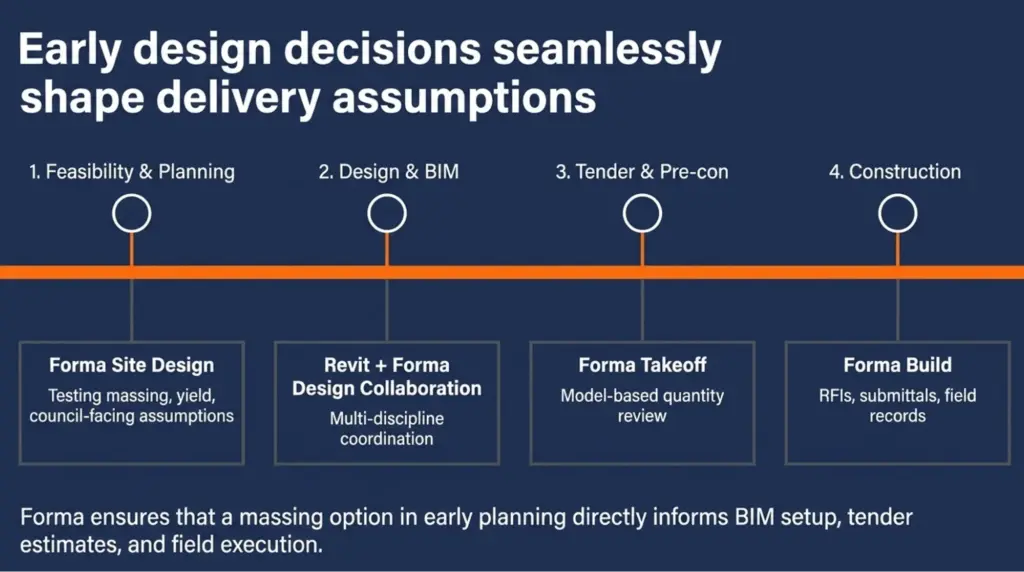
Autodesk Forma supports the project lifecycle by helping early design information move into BIM, collaboration, construction, and project data workflows with less disconnection.
The value starts before documentation. At the feasibility stage, a team may need to test site potential, building mass, orientation, area yield, and early performance signals before committing to a detailed Revit model.
Forma helps at that point when the team needs faster option testing without losing sight of what must happen next.
Where Forma Fits Across the Lifecycle
Forma is most useful when each project stage has a clear purpose, output, and control point. Let’s break down.
| Project stage | How Forma may help | What the team should control |
| Feasibility | Test site options and early design direction | Assumptions, site data, planning context |
| Concept design | Compare massing, area, and performance signals | Option names, review notes, decision records |
| Schematic design | Move selected options towards Revit | Coordinates, levels, model origin, handoff rules |
| Design coordination | Share models and manage issues | CDE structure, permissions, model exchange cadence |
| Tender preparation | Control documentation and project records | Published files, revision status, approval trails |
| Construction | Manage delivery workflows and site records | RFIs, submittals, issues, field communication |
| Handover | Preserve structured project information | Asset information requirements and record quality |
This table shows the main point. Forma is valuable because it helps teams create earlier design options. Then, Forma becomes more useful when those options move forward with enough structure to support later modelling, review, tender, construction, and handover decisions.
What This Looks Like in Australian Project Workflows
Forma fits best when it supports a real handoff that already exists in Australian AEC delivery, such as:
- A civil consultant may test early site context before moving detailed design into Civil 3D.
- An architecture studio may use Forma Site Design to test bulk, yield, and orientation before preparing council-facing drawings.
- A contractor or D&C team may care less about massing and more about whether Build, Takeoff, RFIs, submittals, and project records are controlled later.
Those are different workflows, so the Forma setup should not be identical for every firm. Therefore, to avoid treating Forma as a generic add-on, please identify:
- Is Forma being used before Revit modelling starts?
- Is it supporting consultant review or internal option testing?
- Will the output influence tender or construction decisions?
- Does the project need a controlled CDE record?
- Will the asset owner expect structured handover information later?
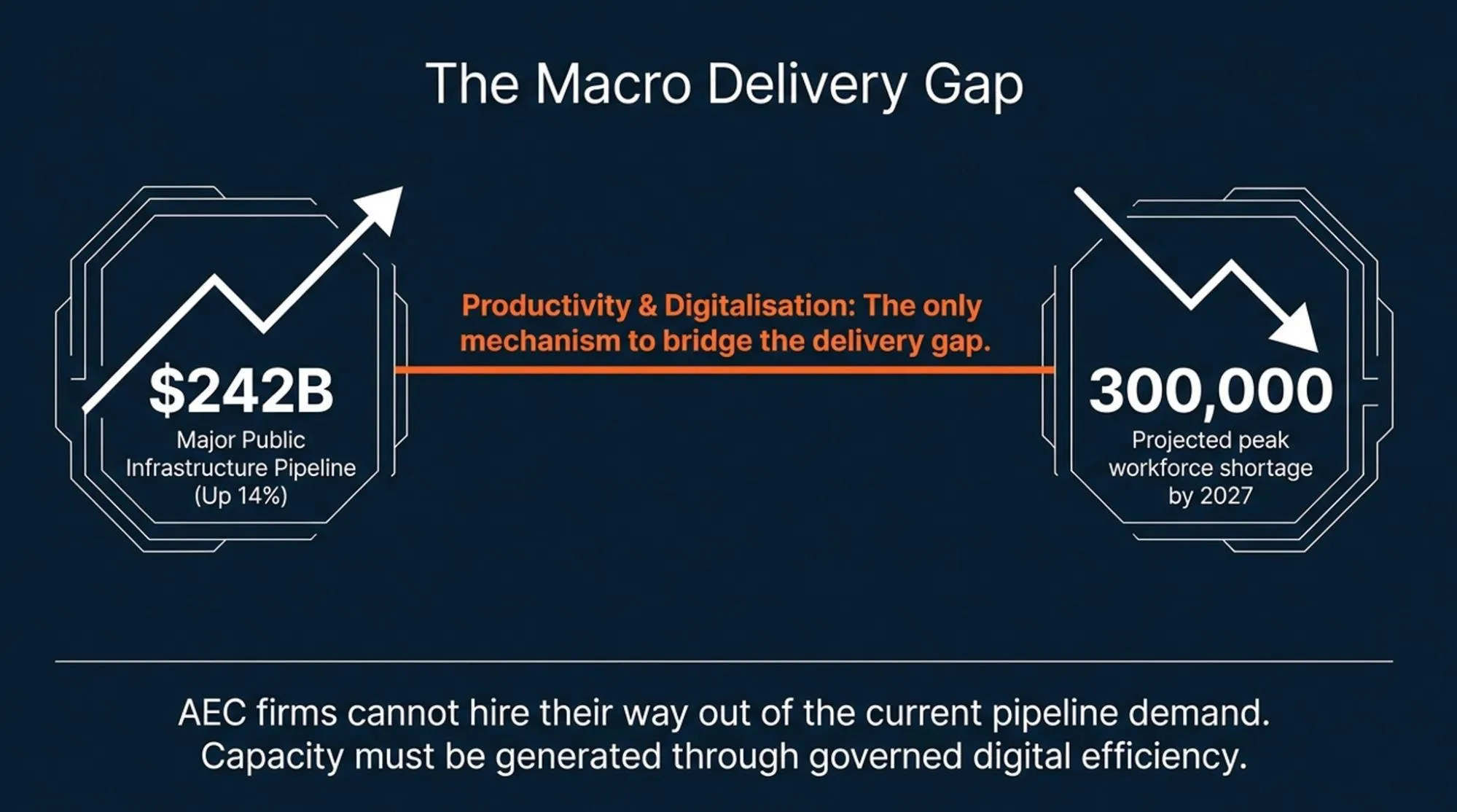
Because Australia’s project environment gives this discipline more weight. Infrastructure Australia reported that the five-year Major Public Infrastructure Pipeline reached A$242 billion in its 2025 Market Capacity Report.
And as you know, larger pipelines put more pressure on consultants, contractors, and asset owners to manage information consistently across many handoffs.
Autodesk Forma and Autodesk Construction Cloud: What’s the Connection?
Autodesk Construction Cloud has joined Autodesk Forma, so the old ACC conversation now sits inside the wider Forma platform decision, which means Australian AEC firms should avoid treating Forma as only an early-design tool.
The same name now touches site studies, document control, model collaboration, construction workflows, takeoff, and project records.
The table below can help clarify which workflow your firm is trying to control, and which part of Forma is most relevant to that decision.
| If the problem is… | Look at… |
| Early site and massing decisions | Forma Site Design |
| Revit handoff and model coordination | Forma Design Collaboration |
| Document control and review records | Forma Data Management |
| RFIs, submittals, issues, and site workflows | Forma Build |
| Quantity checks and estimating workflows | Forma Takeoff |
This is where the connection becomes practical:
- A design manager may see Forma as an early option-testing tool.
- A BIM manager may see it as a model coordination and CDE question.
- A contractor may care more about Build, Takeoff, RFIs, and submittals.
Treat those as separate workflow questions before treating Forma as a single platform purchase.
Interscale’s Autodesk Construction Cloud guide is a useful reference if your team needs the delivery-side setup explained through permissions, document management, BIM collaboration, and construction workflows.
How to Get Access to Autodesk Forma in Australia
Australian AEC firms can access Autodesk Forma through eligible Autodesk subscriptions, including the Autodesk AEC Collection.
Therefore, you should check whether Forma is already available through your firm’s current Autodesk licence mix, then decide who actually needs access. That check should stay practical:
- Does your firm already have AEC Collection seats?
- Which roles need Forma access: design, BIM, project administration, or construction?
- Will Forma be used for early design, Revit handoff, CDE control, or delivery workflows?
- Does the team need support with setup, permissions, naming, or rollout?
Or, if your team is unsure whether Forma is already included, how it fits with Revit and Autodesk cloud tools, or which users should be assigned, Interscale can help review the setup.
Interscale’s Autodesk AEC collection licensing & consulting service supports Australia AEC firms with the AEC Collection licensing, renewal, configuration, and local guidance.
Is Autodesk Forma Right for Your Firm?
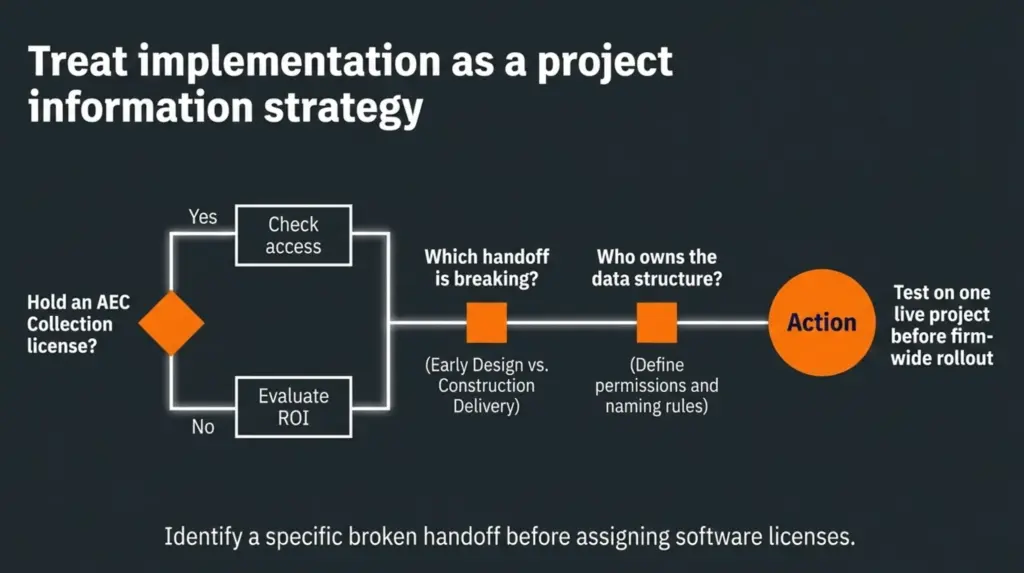
Autodesk Forma is right for your firm if it improves a real handoff. By this point, the decision should be clear. Forma has the strongest fit when your team needs early design ideas to move into Revit, CDE control, construction workflows, or project records with less friction.
If none of those problems exist, Forma may not need to be a priority yet. Your firm may get more value from improving Revit standards, CDE structure, model exchange rules, or licence allocation first.
The strongest next step is not a full rollout. Test one real project. Choose one site, one design question, one handoff path, and one project record requirement. Then check whether Forma makes that workflow clearer.
If your team wants a clearer breakdown before making that decision, you can book a free discussion with an Interscale expert to review whether Forma fits your firm’s workflow, licence mix, and project delivery setup.
FAQ
Do Australian AEC Firms Need Autodesk Forma if They Already Use Revit?
Is Autodesk Forma Included in the Autodesk AEC Collection?
Should a Firm Set Up Autodesk Forma by Itself or Speak with a Specialist?
What Should We Check Before Rolling Out Autodesk Forms Across the Firm?
Sources
- Autodesk Platform Services. Get to know the new Autodesk Forma Industry Cloud. Accessed 25 June 2026. https://aps.autodesk.com/blog/get-know-new-autodesk-forma-industry-cloud
- Autodesk News. Autodesk Construction Cloud to join Autodesk Forma on March 24. Accessed 25 June 2026. https://adsknews.autodesk.com/en/news/autodesk-construction-cloud-to-join-forma/
- Autodesk. Forma Site Design | Forma Site Design Login | Software Price & Buy. Accessed 25 June 2026. https://www.autodesk.com/products/forma/overview
- Autodesk Help. Data Management Help | About Forma Data Management. Accessed 25 June 2026. https://help.autodesk.com/view/DOCS/ENU/?guid=About_Autodesk_Docs
- Australian Bureau of Statistics. Construction Work Done, Australia, Preliminary, March 2026. Accessed 25 June 2026. https://www.abs.gov.au/statistics/industry/building-and-construction/construction-work-done-australia-preliminary/latest-release
- Autodesk. Architecture, Engineering and Construction (AEC) Collection 2027. Accessed 25 June 2026. https://www.autodesk.com/collections/architecture-engineering-construction/overview