 Skip to content

AutoCAD 2027 is Autodesk’s 25 March 2026 release of its core CAD platform.
For Australian AEC firms the issue is whether this release reduces rework in live DWG production, tightens review control, and makes shared drawing environments less fragile when teams are split across office, site, and external consultant workflows.
This article covers the AutoCAD 2027 release date, pricing, system requirements, the core new features, and the practical differences between AutoCAD 2027 and 2026 for firms making a mid-to-late funnel buying decision.
AutoCAD 2027 Release Date
AutoCAD 2027 was released on 25 March 2026. Autodesk published both the official release notes and the launch announcement on that date.
The current AutoCAD Australia price is A$390 per month or A$3,135 per year. Autodesk also states that current subscribers can install and use the three previous versions, which matters if your directors, CAD leads, and production staff cannot all move to a new release at the same time.
The AutoCAD 2027 system requirements are not extreme, but they still matter during rollout planning. Autodesk lists 8 GB RAM as basic and 16 GB recommended, with Windows 11 support and 64-bit Intel or Apple silicon on Mac, so hardware readiness should be checked before the update gets folded into a live project environment. If a device refresh is due, compare the best budget laptops for AutoCAD that clear these specs.
Quick Overview of AutoCAD 2027 New Features
The fastest summary of AutoCAD 2027 new features: Autodesk has focused on AI-guided drafting, geometry repair, parallel editing, cloud-managed DWG control, and better 3D viewing.
That mix matters because it targets the parts of drafting work that usually break after design intent is already set.
- Autodesk Assistant tech preview for AI-guided drafting support and standards checking.
- Geometry Cleanup for gaps, overshoots, undershoots, and angle issues.
- Checkout for object-level parallel editing in shared DWG files.
- Connected References that repair moved or renamed Xrefs.
- Connected Support Files for palettes and CUI customisation in shared projects.
- AutoCAD Web improvements for issues, plotting, and sheet set workflows.
- Graphics updates for smoother 3D display and better visual fidelity.
AI-Powered Features in AutoCAD 2027
The AI features in AutoCAD 2027 are narrow, useful, and mostly aimed at drafting control. Autodesk is applying AI to guidance, validation, and repetitive correction, which is a better fit for production teams. Autodesk has signalled a similarly guided approach for what Revit 2027 is likely to bring for AI , rather than autonomous design.
Autodesk Assistant for Smart Drafting
Autodesk Assistant in AutoCAD 2027 is an in-product support layer that can also help check drawings against a reference standard. Autodesk says users can upload a reference file and use conversational prompts to validate whether the drawing aligns with organisational CAD standards.
In Australian practice, standards drift usually starts with small local changes inside a busy office: a non-standard layer, a different support file, a shifted block rule, or a plotting setup that lives on one machine only.
By the time that reaches a project lead or associate for issue review, the cost is no longer drafting time alone. It becomes delayed approval, another markup cycle, and sometimes a tense conversation about which file is actually current.
AI-Based Drawing Validation
AI-based validation matters because it moves standards checking earlier in the workflow. When review happens only at the end, the CAD lead absorbs the cleanup cost. When the drawing is checked earlier, the author carries more of the correction while the file is still cheaper to fix. For teams still weighing cost against capability, the AutoCAD vs FreeCAD trade-off shows what a free tool asks in return.
For firms running Microsoft 365, Teams, PDFs, and consultant markups in parallel, that shift reduces the number of review decisions that depend on inbox history or verbal clarification rather than the drawing record itself.
Automated Design Recommendations
AutoCAD 2027 does not appear to introduce broad AI-generated design recommendations in the concept-design sense.
The release is better understood as targeted assistance: prompt-driven standards guidance through Assistant and fix suggestions through Geometry Cleanup, which places the value of these AutoCAD AI features in compliance and correction rather than automated design authorship.
Automated Geometry Cleanup Tools
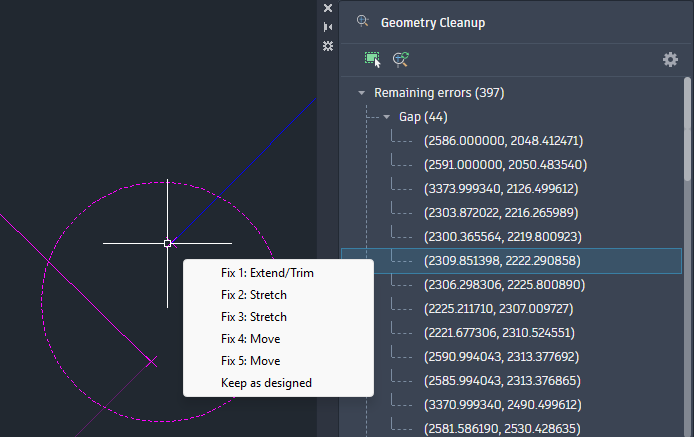
Geometry Cleanup is one of the clearest workflow gains in AutoCAD 2027 because it addresses the exact drawing defects that usually slow production later. Autodesk says it detects common geometry faults and suggests targeted fixes.

Error Detection in Drawings
AutoCAD 2027 can detect gaps, overshoots, undershoots, and misaligned angles. Those faults look minor in isolation, but they tend to break hatches, joins, offsets, dimensions, and downstream reliability first.
Auto-Fix Suggestions for Faster Editing
Auto-fix suggestions improve editing speed because they shorten the search phase, not only the repair phase.
That is where AutoCAD automation becomes commercially useful. A drafter who spends less time locating geometry faults spends more time resolving intent, which is a better use of production hours.
Cloud Collaboration and Connected Workflows
AutoCAD 2027 pushes DWG production further into a managed cloud environment and connected workflow through Forma Data Management Essentials.
Autodesk says that standalone AutoCAD subscriptions now include Forma Data Management Essentials, with version visibility, issue tracking, file sharing, and folder-level permissions.
Let’s say, your main Brisbane office, a site team, and an external consultant are all touching the same drawing package in different ways. Once uncontrolled copies start circulating, the first thing that breaks is responsibility. Nobody is fully sure which issue set is current, who approved it, or whether the marked-up PDF and DWG still belong to the same release state.
Integration with Autodesk Forma
AutoCAD 2027 now links drafting more directly with Autodesk Forma through Forma Data Management Essentials and Forma Board integration on the web. That improves continuity between early review, shared context, and detailed drafting.

Centralized DWG File Management
Centralised DWG management in 2027 is about controlled access, version visibility, and fewer unmanaged file branches. That is a stronger fit for Australian SMB AEC firms than the old habit of relying on email attachments, ad hoc folders, or someone’s desktop as the practical source of truth.
Real-Time Markups and Issue Tracking
Real-time markups and issue tracking now sit closer to the drawing itself through Forma issues integration in AutoCAD on the web. Autodesk says users can view, create, and resolve issues directly within drawings, which matters because markup reliability falls quickly when comments are split across PDFs, email chains, Teams messages, and separate site notes.
Checkout Feature for Multi-User Editing
Checkout is the most commercially important AutoCAD 2027 feature for growing drawing teams because it changes how shared DWG editing is controlled.
Instead of locking the full drawing, contributors can check out only selected geometry, edit in a trace environment, and submit changes for merge by the user with read-write authority.
Parallel Editing Without File Locking
Parallel editing without full file locking reduces one of the oldest DWG bottlenecks. In a 25 to 60 person practice, full-file locking often creates a poor choice between waiting, making a duplicate, or working outside the live record. Waiting costs programme time. Duplication costs certainty.
Version Control and Conflict Management
Conflict management is better in 2027 because review stays with the release owner while contributors can still move work forward. That is a better control model for firms where one person still carries final issue authority even though several people contribute upstream.
| Key Feature | AutoCAD 2026 | AutoCAD 2027 |
|---|---|---|
| Shared DWG collaboration | Multi-user markup and connected support files improved review and file context | Checkout adds object-level parallel editing and controlled merge workflows |
| Standards support | Assistant existed, but 2027 adds reference-file-based standards validation in the Assistant tech preview | Stronger drafting control earlier in the authoring stage |
| File environment | Connected support files and markup workflows were improving in 2026 | 2027 deepens Forma-based control with Connected References, Checkout, and broader shared project behaviour |
| Buyer implication | Better review and coordination | Better control when several contributors are touching the same live DWG |


Connected References and Support Files
We all need Connected References and support files in AutoCAD 2027 because many DWG failures begin around the file, not inside the file. A drawing can be technically correct and still issue badly if Xrefs, plot styles, palettes, or support files are inconsistent between staff.
Improved Xref Management
AutoCAD 2027 improves Xref recovery by detecting moved or renamed references and suggesting repairs directly from the Xref palette. That reduces time spent path-chasing and lowers the risk of issuing from an incomplete reference state.
Shared Support Files Across Teams
Shared support files now extend to tool palettes and partial CUI customisation files in Forma-managed projects.
For firms with staff spread across Sydney, Melbourne, regional offices, or hybrid work patterns, this is a control feature that helps standards travel with the project instead of staying tied to a particular workstation.
Performance and Graphics Enhancements
AutoCAD 2027 improves performance through faster layout switching and more stable 3D graphics behaviour. Autodesk says the Graphics System Framework now provides a more stable and efficient experience, with better support for large coordinates, materials, shadows, textures, and realistic display modes.
Faster File Loading and Processing
Faster processing matters because small delays compound across review cycles. Autodesk specifically calls out improved layout tab switching performance, which is not flashy but is useful in sheet-heavy production work.
Enhanced 3D Graphics System
The enhanced 3D graphics system improves viewing and navigation quality, not just appearance. That is useful when AutoCAD is being used for mixed 2D documentation with 3D review rather than as a full BIM authoring platform.
Improved Visual Quality for Models
Visual quality is improved for large coordinates, occluded edges, materials, lights, textures, shadows, sky, and backgrounds. That matters when a drawing review meeting depends on what people can reliably see on screen before the issue set goes out.
AutoCAD Web Feature Enhancements
We believe AutoCAD Web in 2027 is moving closer to a controlled production because Autodesk’s update adds issue workflows, plotting improvements, and stronger sheet set support.
Cloud-Based Plotting
Cloud-based plotting makes it easier to save, rename, preview, and store plot outputs directly in the cloud. That matters when a PDF is part of a formal review or sign-off chain rather than a local export.
Sheet Set Management Improvements
Sheet set improvements matter because sheet errors usually surface late, when the correction window is already expensive. Autodesk says sheet management in the web workflow now benefits from Connected Support Files and more production-ready reliability.
Browser-Based Editing Capabilities
Browser-based editing in 2027 is better understood as part of a managed project environment. Autodesk has also removed the older Open From Web & Mobile and Save To Web & Mobile features in favour of Forma Data Management, which signals a clearer platform direction than 2026.
Industry Toolset Improvements in AutoCAD 2027
Autodesk’s toolset release notes show that Architecture, Mechanical, and Electrical all inherit the shared 2027, including AutoCAD, gains around Geometry Cleanup, Assistant, Checkout, Connected References, and connected support files.
However, each toolset also has different evaluation priorities. So yes, the specialised toolsets in AutoCAD 2027 matter more when you look at discipline-specific control points.
Architecture Toolset Updates
The Architecture toolset update matters most where model-linked documentation, IFC handling, and property data need to stay stable through issue and consultant exchange.
Autodesk highlights structural member coordinates, IFC enhancements, and graphics responsiveness, so architecture teams should test not only drafting speed but whether object data and exported coordination information stay cleaner under live delivery pressure.
Mechanical Toolset Enhancements
The Mechanical toolset update matters most where standards content, symbols, and library reliability affect production speed.
Autodesk highlights ANSI and ISO symbol revisions plus new content library parts, which means evaluation should focus on whether standards-based detailing and legacy drawing reuse are more reliable than in 2026, not only whether the base AutoCAD collaboration layer is better.
Electrical Toolset Improvements
The Electrical toolset update matters most where controlled edits and file consistency protect schematic accuracy across several contributors.
Autodesk’s 2027 toolset highlights still include Connected References, Checkout, Geometry Cleanup, Assistant, and connected support files, so the right buyer test is whether those controls reduce drawing ambiguity when electrical markups, revisions, and issue cycles move between designers, checkers, and approvers.
Conclusion: Why AutoCAD 2027 Features Matter for Your Business
AutoCAD 2027 matters for your business because it improves DWG control where delivery usually breaks: standards drift, shared editing conflicts, and unstable reference files. Earlier validation, safer multi-user editing, and cleaner geometry reduce rework and tighten issue reliability across office, site, and consultant workflows.
This 2027 update is a workflow-control upgrade that affects approvals, release timing, and drawing consistency across your active projects.
That is where Interscale software financing fits. When your decision depends on rollout timing, project cash flow, and environment stability rather than list price alone, our financing becomes part of delivery planning.
And if you’re looking to go further, Interscale also helps AEC teams implement and optimise their AutoCAD workflows—ensuring your setup is efficient, scalable, and ready for what’s next. Or if you’re preparing for the 2027 version upgrade, we also support your transition to ensure a smooth and controlled rollout.
Schedule a free consultation with our team to see how this can fit into your rollout plan.


