 Skip to content

Patch management helps an AEC firm keep workstations, servers and applications current without leaving security updates to individual users.
The challenge is not simply installing every available update. Your process must identify what needs patching, decide how quickly to act, test changes against project-critical software and confirm that deployment succeeded.
This guide explains how that process works, how it maps to Australia’s Essential Eight and when patching should remain in-house or move to a managed provider.
What Is Patch Management?
Patch management is the structured process used to identify, assess, deploy and verify updates across applications, operating systems, drivers, firmware and other technology assets.
A patch may close a security vulnerability, correct a software fault, improve functionality or update the low-level software controlling a device.
Patch management places those updates inside a repeatable operational process instead of relying on users to notice notifications and install updates themselves. On cloud platforms, AWS patch management adds schedules, approvals and rollback confirmation so nothing is left assumed.
For an AEC firm, the scope of patch management can include:
- Windows workstations and servers
- Internet-facing servers and network devices
- Microsoft 365 applications and web browsers
- Revit, AutoCAD and other Autodesk products
- Bluebeam Revu and PDF applications
- BIM, rendering and document-management plugins
- Graphics, printer and peripheral drivers
- Firewalls, switches and equipment firmware
A Windows update report therefore represents only part of the patching environment.
Types of Patches
The four main patch types address different operational needs; security, bug-fix, feature, and firmware. Let’s break down in table below:
| Patch type | Primary purpose | Typical AEC example | Main consideration |
| Security patch | Closes a known vulnerability or adds a vendor mitigation | A browser, PDF application or operating system security update | Prioritise using exploit activity, severity and system exposure |
| Bug-fix patch | Corrects defects affecting reliability or expected behaviour | A Revit update that resolves a crash or export fault | Test the workflow affected by the defect |
| Feature patch | Adds or changes product functionality | A software update that changes an interface or workflow | Review release notes and assess user or compatibility impact |
| Firmware patch | Updates software embedded in hardware | A firewall, graphics dock or network-device firmware update | Confirm hardware support, restart requirements and rollback options |
The urgency of each patch management type should be based on the vulnerability, affected asset and business exposure rather than the patch label alone.
Also, please note that security and feature changes are not always distributed separately.
We suggest you review vendor release notes because some vendors bundle security fixes with functionality changes that may affect existing business processes.
Why Patch Management Matters
Patch management matters because unpatched systems contribute to the broader cyber risks facing construction firms by leaving known weaknesses exposed across project-critical devices and applications.
In AEC firms, updates are often delayed because workstations are needed for rendering, model coordination and documentation. That creates four practical risks:
- Known vulnerabilities remain open, giving attackers more time to exploit them.
- Project work can be disrupted if compromised systems block access to models, drawings or shared files.
- AEC applications may be missed when patching covers Windows but not Revit, AutoCAD, Bluebeam or plugins.
- Patch status becomes unreliable when updates depend on individual users, manual checks or one administrator.
We suggest treating patching as an ongoing operational responsibility rather than a monthly update task.
Because every supported device and application should have a defined owner, update priority and verification method.
The Patch Management Process, Step by Step
A reliable patch management process follows three connected stages: understand what is in the environment, decide which updates need priority, and confirm that each patch is safely deployed.
The process starts with a current asset inventory, then moves through patch assessment and prioritisation before testing, deployment, verification and reporting.
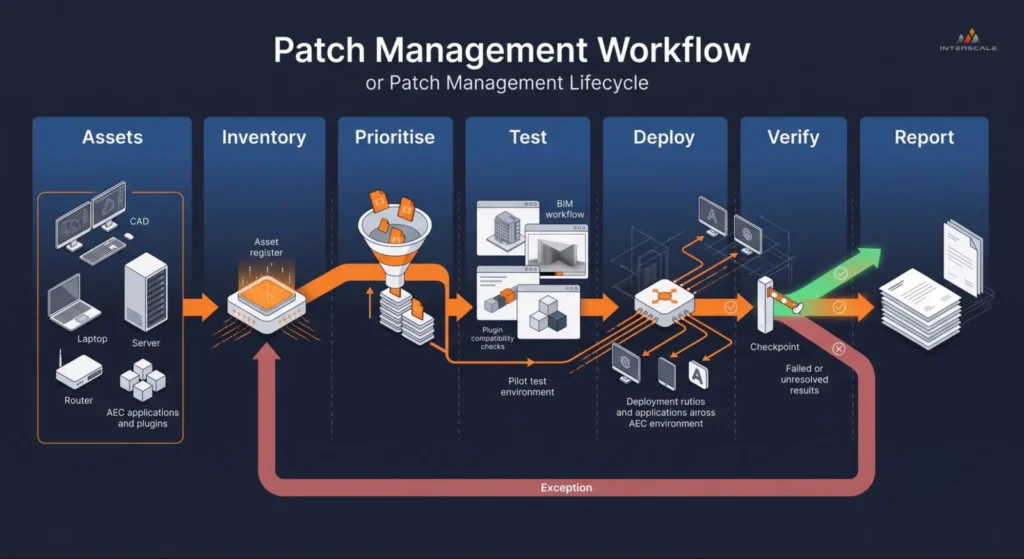
Patch management moves from asset visibility and prioritisation through AEC workflow testing, controlled deployment and verification, with failed updates returned for reassessment.
Asset Inventory: You Cannot Patch What You Cannot See
Patch management starts with an inventory of devices, operating systems, applications, versions, drivers and firmware. That’s why an asset record needs more than a workstation name.
An asset inventory should capture enough detail to identify what the asset does, who uses it, whether it’s internet‑facing and how important it is to project delivery. In an AEC environment, your inventory should capture details such as:
- Assigned user and business role
- Office, site or remote location
- Operating system and support status
- Installed Autodesk and Bluebeam versions
- Revit, AutoCAD and document-workflow plugins
- Graphics card, drivers and specialist peripherals
- Exposure to the internet or external collaborators
- Project-critical applications and dependencies
- Available deployment or update method
- Asset owner and patching responsibility
Under the Essential Eight Maturity Model, an automated asset-discovery method should run at least fortnightly to support later vulnerability scanning.
Unsupported applications and operating systems must also be removed or replaced according to the applicable maturity requirements.
And consider; an inventory that is updated only during annual procurement reviews is not sufficient for an operational patch cycle.
Identify, Assess and Prioritise
Once you’ve identified available patches, the next step is to decide how quickly each one needs prioritisation. Effective prioritisation in patch management considers factors such as:
- Whether a working exploit exists
- Vendor severity rating, especially critical advisories
- Internet‑facing status of the affected system
- Type of application or operating system involved
- Sensitivity of project data the asset handles
- Business impact of downtime
- Availability of temporary vendor mitigations
- Your target Essential Eight maturity level
These criteria help ensure that low‑risk feature updates don’t displace urgent patches for browsers, online services or internet‑facing servers.
A vulnerability scanner can support this stage by identifying known vulnerabilities and missing updates across the environment.
A broader vulnerability assessment can then validate exposure, rank findings and provide remediation actions where internal scanning is incomplete.
Prioritisation still needs to end with a clear owner and deadline. For example, a dashboard full of critical findings doesn’t reduce risk until someone is responsible for resolving them.
Test, Deploy, Verify and Report
Test patches against critical AEC workflows, deploy them through controlled stages, verify successful installation and report any remaining gaps.
We believe the AEC firms do not need a large dedicated test environment.
We suggest using the following deployment rings to test updates with a small group before expanding the rollout:
- Pilot ring: IT staff, BIM managers and selected power users
- Early production ring: A small group representing common roles
- General production ring: Remaining supported devices
- Exception group: Systems temporarily held back with an approved reason
Testing should focus on project-critical workflows, such as opening current Revit models, loading plugins, exporting PDFs, accessing shared data and checking graphics performance.
A rollback option should also be available where an update could disrupt production.
Once testing is complete, define the installation window, user communications, restart deadline and response to failed deployments.
Verification should then confirm that the patch was successfully installed, not simply sent to the device.
Check for offline devices, failed installations, pending restarts and systems that still report a vulnerable version. Then, the final report should summarise:
- Assets covered and successfully patched
- Failed or outstanding updates
- Critical vulnerabilities still open
- Approved exceptions and their owners
This closes the process by turning patch deployment into a verified and accountable security control.
Patch Management and the Essential Eight
Australia’s Essential Eight compliance adds specific discovery and remediation timeframes that are often missing from general patch management guidance.
For AEC firms, patching must cover both applications and operating systems, with deadlines based on exposure, software type and maturity level, an operational baseline now expected across the AEC industry in Australia.
The main timeframes can be summarised as follows:
| Asset or software category | How often to check | When to patch |
| Online services and internet-facing infrastructure | At least daily | Critical or actively exploited vulnerabilities within 48 hours; other vulnerabilities within two weeks |
| Browsers, email clients, PDF software, office applications and security tools | At least weekly | Within two weeks; at Maturity Level 3, critical or exploited vulnerabilities within 48 hours |
| Other applications, including Revit, AutoCAD and specialist plugins | At least fortnightly at Maturity Levels 2 and 3 | Within one month |
| Workstations and non-internet-facing servers | At least fortnightly | Within one month; at Maturity Level 3, critical or exploited vulnerabilities within 48 hours |
| Drivers and firmware | At least fortnightly at Maturity Level 3 | Critical or exploited vulnerabilities within 48 hours; other vulnerabilities within one month |

Essential Eight patching priorities vary by system exposure, software category and maturity level, with internet-facing and actively exploited vulnerabilities requiring the fastest response.
For AEC firms, this creates three practical requirements:
- Monthly Windows patching is not enough: Internet-facing systems and commonly targeted applications may require action within 48 hours or two weeks.
- Specialist applications need separate coverage: Revit, AutoCAD, Bluebeam and plugins may not appear in the same update process as the operating system.
- Patching must support the wider maturity target: Strong patch compliance does not compensate for gaps in the other Essential Eight controls.
You can translate these requirements into three internal rules:
- Maintain an emergency 48-hour patch path.
- Review specialist applications at least fortnightly.
- Close routine workstation updates within one month.
Patch Management vs Vulnerability Management
Patch management deploys updates, while vulnerability management identifies and manages the wider set of weaknesses affecting an organisation.
A breakdown in the table below shows the key differences between patch management and vulnerability management.
| Area | Patch management | Vulnerability management |
| Primary purpose | Apply vendor updates and mitigations | Find, assess, prioritise and track vulnerabilities |
| Main inputs | Vendor releases, patch catalogues and deployment policies | Vulnerability scans, threat intelligence, configurations and asset context |
| Typical actions | Test, deploy, restart, verify and report | Scan, validate, rank, assign, remediate and reassess |
| Problems addressed | Missing application, OS, driver and firmware updates | Missing patches, unsupported software, exposed services and other weaknesses |
| Completion measure | Required patch installed and verified | Vulnerability reduced, accepted, transferred or otherwise treated |
| Operational relationship | One method of remediation | The broader risk-management cycle |

Vulnerability management discovers and prioritises weaknesses before routing them to the appropriate treatment. Patch management handles vulnerabilities with an eligible update, while reassessment confirms whether the exposure was removed.
In simple cases, here’s how both work together;
- A vulnerability scanner may identify that a workstation runs an exposed software version.
- Patch management then deploys and verifies the vendor update needed to remove that exposure.
However, not every vulnerability is fixed with a patch. Some require a configuration change, access restriction, software removal, endpoint security, or temporary vendor mitigation.
For example, patch management removes known software weaknesses, while endpoint security helps detect and contain malicious activity that reaches a device.
This is why patching should connect to an ongoing vulnerability assessment and remediation process.
Patch Management Best Practices
We believe, patch management best practice follows a defined workflow that covers each supported device, application, deadline and responsible owner, as follows:
- Define the scope: Record which workstations, servers, operating systems, AEC applications, plugins, drivers and firmware are included in the patching policy.
- Set patch deadlines: Assign remediation timeframes based on system exposure, vulnerability severity and the firm’s target Essential Eight maturity level.
- Separate routine and emergency updates: Use a standard rollout for normal patches and a faster approval path for critical or actively exploited vulnerabilities.
- Test against AEC workflows: Check updates with representative users before wider deployment, focusing on Revit models, plugins, PDF exports, shared data and graphics performance.
- Control deployment and restarts: Set installation windows, user notifications and restart deadlines so patches are not repeatedly postponed during project delivery.
- Verify the result: Confirm that updates were installed successfully and identify failed deployments, offline devices, pending restarts or remaining vulnerable versions.
- Manage exceptions: Document every delayed patch with its reason, temporary control, responsible owner and review date.
- Review coverage regularly: Check that unsupported software, new applications and specialist tools have not fallen outside the patching process.
In-House vs Outsourced Patch Management
In-house patch management keeps control with your internal team, while outsourcing transfers day-to-day patch ownership to a managed provider. Patch cadence then becomes one more line on the scorecard for the best managed IT service provider.
The better option depends less on whether your team can maintain coverage, response times and verification across the full AEC environment, as we can see in table below:
| Decision factor | In-house may fit when | Outsourcing may fit when |
| Internal capacity | A dedicated IT owner can manage patching consistently | Patching is delayed by support work, leave or project deadlines |
| Application coverage | Existing processes cover Windows, servers, AEC applications and plugins | Reports cover the operating system but miss specialist software |
| Response time | The team can act quickly on critical vulnerabilities | Urgent updates wait for the next routine maintenance window |
| Testing | BIM and IT staff can test updates against active workflows | Updates are deployed without representative AEC testing |
| Verification | Failed updates, offline devices and pending restarts are followed up | Deployment reports do not confirm whether vulnerabilities were removed |
| Compliance evidence | The team can document patch status and exceptions | Essential Eight reporting is manual or inconsistent |

In-house, managed and hybrid patching can cover the same AEC environment, but responsibility for assessment, deployment, verification, reporting and application-sensitive approval changes between each model.
We suggest keeping patching in-house only when ownership, backup coverage and reporting are clearly defined.
Outsourcing becomes more suitable when the process depends on one person or repeatedly falls behind project delivery.
For another consideration, we propose a hybrid model because it can also work well for AEC firms.
A managed provider can handle routine deployment, verification and reporting, while internal BIM or IT leaders approve changes that may affect Revit, AutoCAD, Bluebeam or project-critical plugins.
When Managed Patch Ownership Becomes Practical
Managed patch ownership becomes practical when your firm:
- Cannot consistently identify missing updates
- Deploy them within the required timeframe
- Verify that every affected system is protected.
We suggest starting by confirming where the gaps are. Our structured vulnerability assessment service can help you identify missing patches, unsupported software and exposed systems that need priority.
Once those gaps are understood, Interscale’s managed IT services can maintain the ongoing patch workflow across supported workstations, servers and applications.
This includes coordinating deployments, following up failures and reporting unresolved exceptions.
And whenever you work towards stronger Essential Eight alignment, Interscale’s managed security services can connect patching with broader vulnerability monitoring and security oversight.
Book a free discussion with an Interscale expert to identify your current patch gaps and define which responsibilities should remain internal or move to a managed service.


